Study notes from Julia
Welcome. I am Julia Pottinger, and I have spent over a decade in QA. I started as an intern in 2015, while I was still in university, and before that I had wanted to be a teacher, so this lesson is both of those things at once. Before you touch a single tool, learn the map. QA is not “click around after the build and log whatever looks off.” It is following how software moves from an idea to a release, noticing where risk sneaks in, and handing your team evidence early, while changing direction is still cheap. Across this lesson I will show you how a tester turns a vague idea into clear questions, deliberate choices, and evidence a team can act on. Get the map first, and every tool you pick up later will make far more sense.
Study notes from Julia
This lesson is not vocabulary for the sake of vocabulary. Every section is here so you can explain QA in a real interview or a real sprint, not recite definitions. By the end you should be able to say, in plain words: here is the risk I saw, here is what I checked, here is the evidence I gathered, and here is the decision that evidence supports. Memorising terms feels productive, but teams hire and trust the people who can connect a term to a decision. So as you go, keep asking yourself “what would I actually do with this on Monday?” Five moves ahead: see the system, learn the role, learn the fundamentals, build evidence, then pick up the modern tools.
Study notes from Julia
Start with the delivery system around the work, not the bug list. When you can see the whole path from idea to release, QA stops feeling like one panicked stage where you click through screens before a deadline. It becomes a set of useful questions you can ask at every handoff: is the problem clear, is the design testable, what actually changed in this build. A tester who only shows up at the end inherits whatever risk was baked in weeks earlier and has no time left to fix it well. A tester who understands the system gets to catch that risk while it is still cheap to change. That shift in vantage point is the whole first section.
Study notes from Julia
Early on, most of us assume testing starts after development. On strong teams it starts the moment there is an idea worth questioning. A fuzzy requirement like “users can manage their subscription” on Tallawah Billing is far cheaper to fix as one sentence than as shipped code, three integrations, and a support queue full of confused customers. So when a story lands, read it like a tester before anyone writes code: what is unclear here, what does this quietly depend on, what would make us nervous to ship. Asking those questions on day one is testing, even though no software is running yet. That instinct, more than any tool, is what separates QA from clicking.
Study notes from Julia
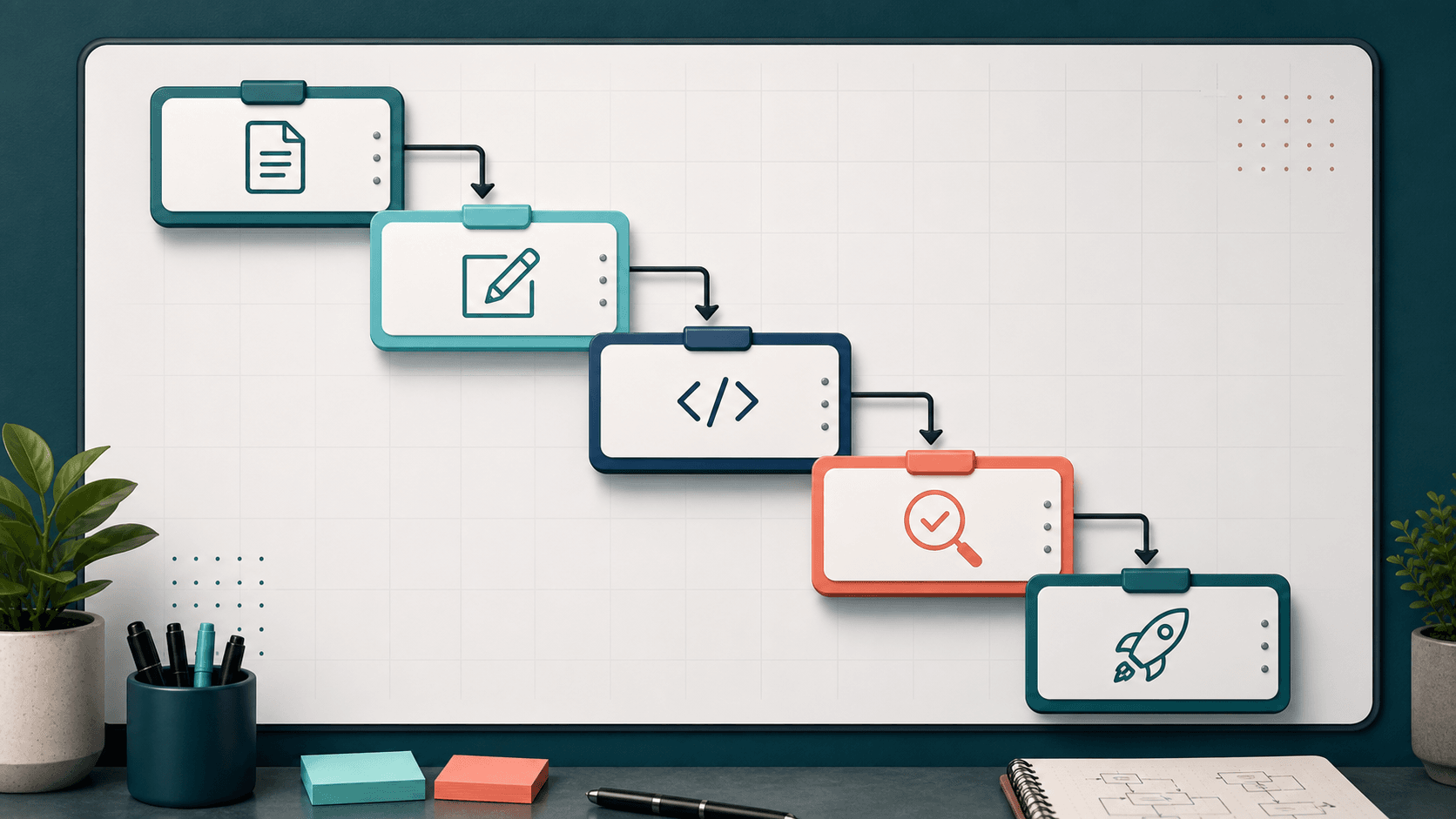
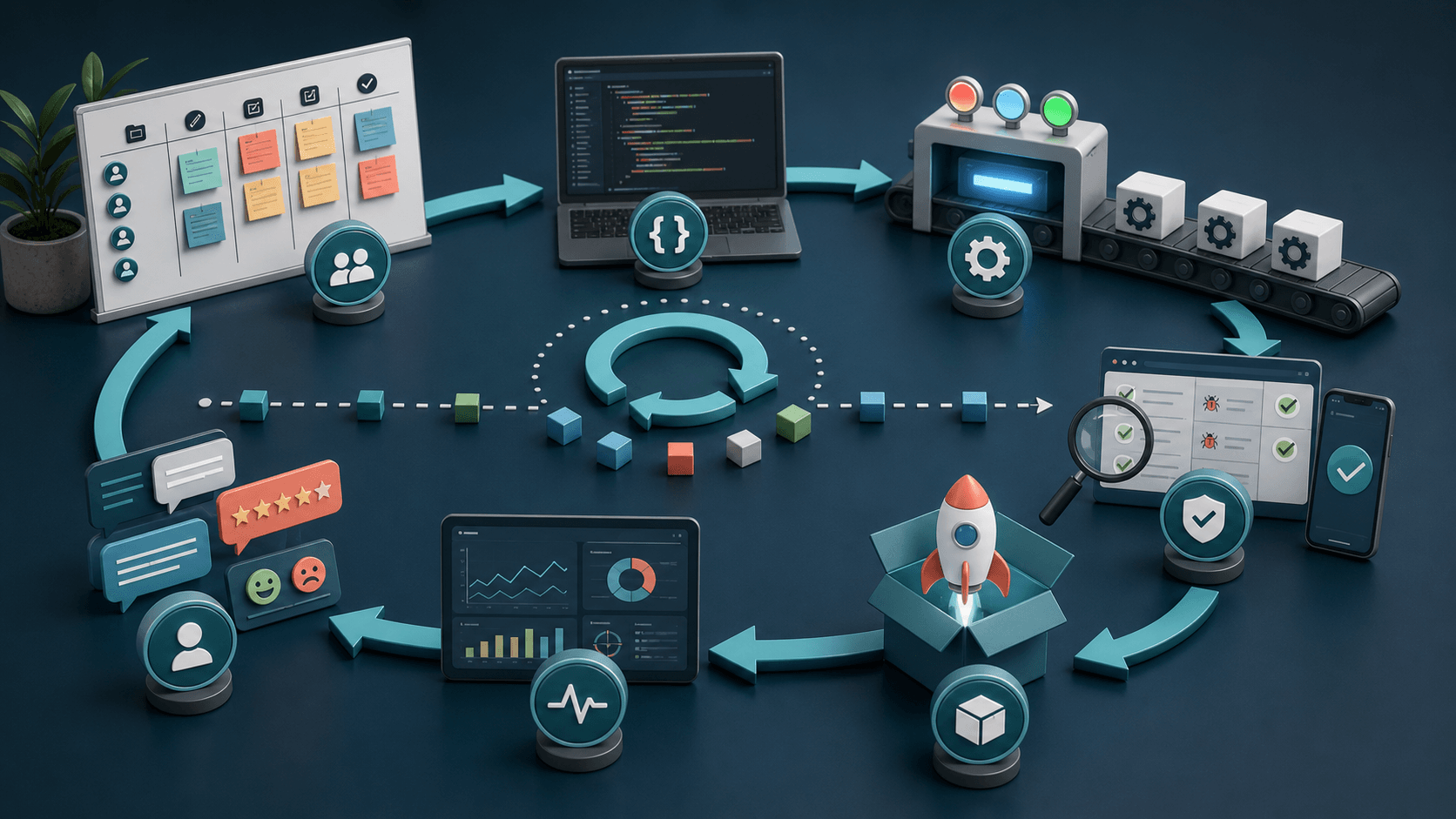
The SDLC is just the delivery loop: plan, analyse, design, build, test, maintain. Do not get attached to drawing a perfect circle for an exam. The point that actually matters is that risk and feedback belong in every phase, not only the test phase near the end. When testing is treated as one box before release, you inherit problems created back in planning and design, and there is no time left to fix them properly. When testing thinking lives in every phase, the loop gets shorter and the surprises get smaller. So wherever a decision is being made on your team, a requirement, a design, a build, ask yourself what a tester would question right there.
Study notes from Julia
Each phase hands QA a different question, and knowing them is what lets you sound like a tester instead of a button-pusher. Planning: is the problem actually clear? Analysis and spec: are these requirements testable, or just adjectives like “fast” and “easy”? Design: can a real person use this, and can I observe it? Build: what exactly changed, and what could that have broken nearby? Testing: what evidence do we need before we ship? Maintain: what are production and support tickets teaching us that our tests missed? You do not need to recite this list. You need to look at any phase and name one concrete thing that can go wrong there, then turn it into a question.
Study notes from Julia
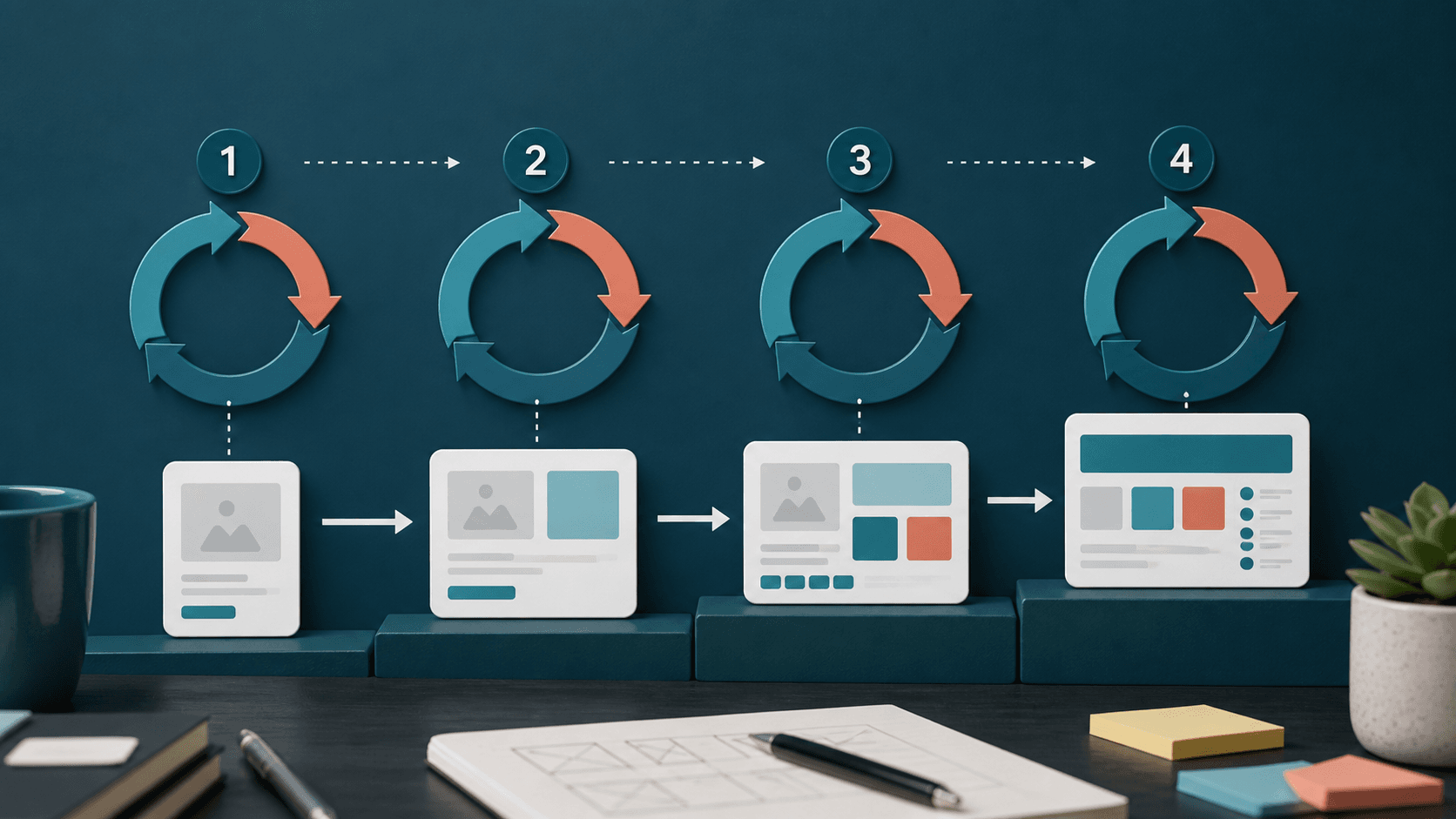
You do not need to crown one “best” model. You need to read the team’s rhythm, because the rhythm tells you when feedback arrives and where you can still prevent rework. In Waterfall, feedback comes late, so you put real energy into requirements and reviews up front; by the time you are executing tests, changing direction is painful and expensive. In iterative work, the product grows in cycles, so you watch what changed from one cycle to the next and check that the newest increment did not quietly break what already worked. Same QA brain, different timing. And yes, both are still alive in 2026. Waterfall has not vanished; you still find it where the scope is fixed and an audit trail is required, like government contracts, banking core systems, telecom, and large ERP rollouts. Iterative and incremental delivery is the default almost everywhere else: SaaS, e-commerce, mobile apps, fintech, anything shipping to users continuously. The skill is matching your effort to where the decisions are still open instead of fighting the process, and that starts with knowing which rhythm you are actually standing in.
Study notes from Julia
In the V-model, every build activity has a matching test activity, so requirements, design, and code each need their own planned evidence rather than one test pass at the end. You still meet the V-model in safety-critical, regulated work where every requirement has to trace to a test that proves it: automotive (ISO 26262), medical devices (IEC 62304), aerospace, and rail. In Agile and DevOps, feedback never stops, so you keep risk visible in small slices: refinement questions, automation candidates, exploratory charters, release checks, and what production tells you afterwards. That is the rhythm running most of the web and mobile world you use every day. The lesson is not that one model is morally superior. It is that QA adapts to where decisions get made and where feedback can still change the work. On an Irie Eats team shipping every day, that means small, constant checks woven through the week, not a giant test phase you save up and cram in before a launch.
Study notes from Julia
Testing is not pessimism, and it is not breaking things for sport. It is disciplined realism. Every team has limited time and budget, users still expect things to work, requirements are often incomplete or misread, and the technology keeps shifting under you. You cannot test everything, so you choose based on risk: what would hurt these users and this business most if it failed. A good tester says that part out loud. Instead of “I tested the app,” you say “I focused on the riskiest paths, here is what I covered, and here is what I deliberately left for monitoring.” That honesty about coverage and trade-offs is exactly what makes a tester someone the team trusts.
Study notes from Julia
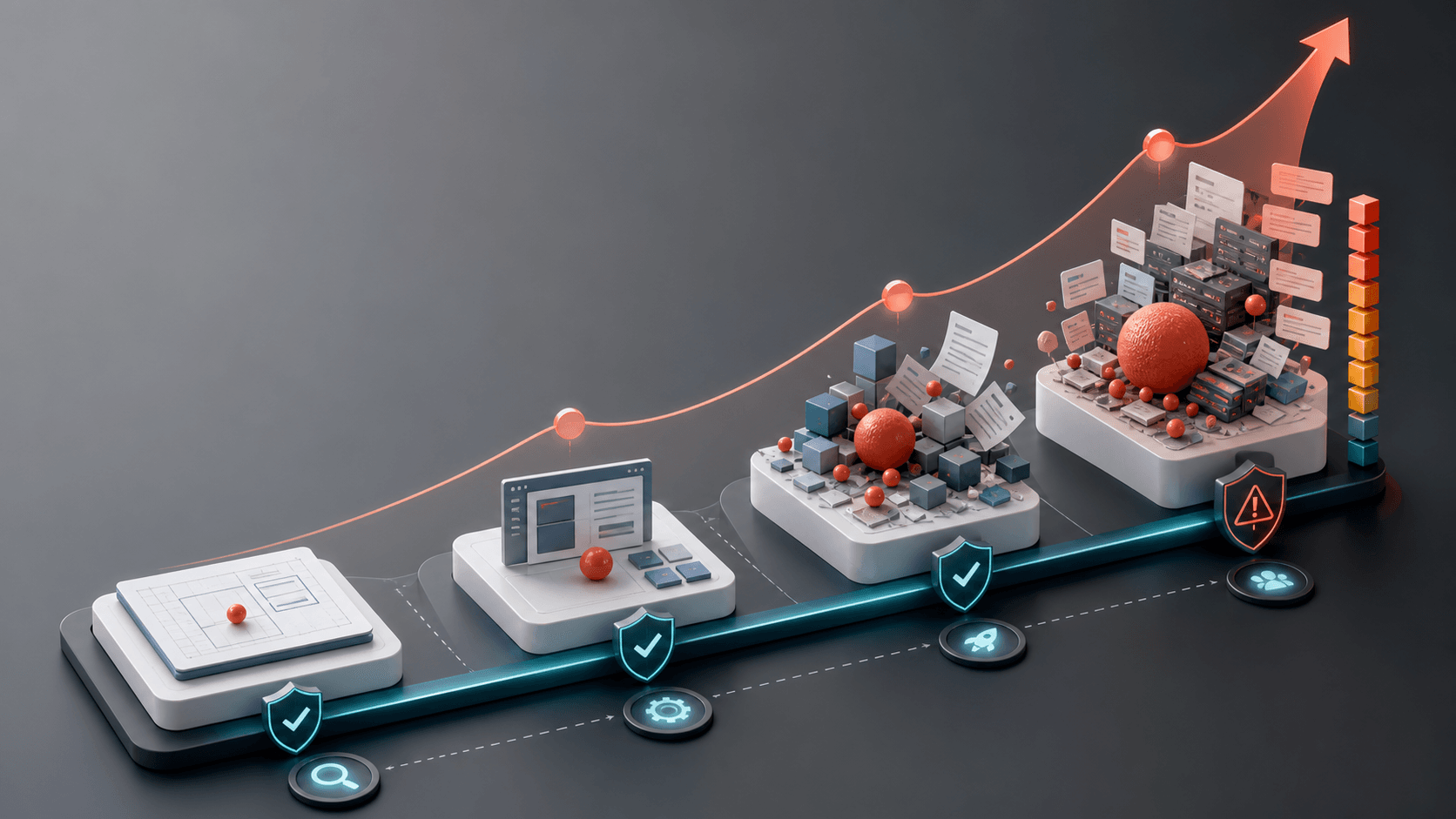
You will hear old rules like “a bug costs a hundred times more in production.” Treat the exact multiplier with suspicion; it varies wildly by team and study. What stays true is simpler and more honest: the later a defect surfaces, the more things have come to lean on it. A wrong rule in Tallawah Billing caught during a story review is a one-sentence edit. The same rule caught after release is the code, the automated tests, the docs, the support replies, the release you already announced, and the trust you now spend explaining it. So reviewing requirements and designs is not “not real testing.” It is the cheapest testing you will ever do.
Study notes from Julia
Read this curve for its shape, not for exact multiples. A defect caught in design is usually a quick edit while the idea is still soft. The same defect caught in production at Irie Eats pulls in retesting, a customer email, a coordinated hotfix outside the normal release, and someone reassuring users it will not happen again. Same bug, far bigger blast radius, purely because it was found later. This is why testers fight to get involved early: not to slow the team down, but because finding the problem while only one person depends on it is the difference between a five-minute fix and a bad week. Timing is leverage.
Study notes from Julia
This is QA thinking before execution, and it is the single most useful habit to build now. Take the feature “users can reset their Tallawah Billing password” and refuse to leave it vague. Who is allowed to request a reset? What proof do we require? How long should the link stay valid, and what happens after that? What if the email is mistyped, the link is reused, it expires, or it is opened on a different device than it was requested from? In ten minutes you have turned one fuzzy sentence into concrete examples, permissions, timing rules, and failure paths the whole team can discuss, all before anyone has built a screen to click.
Study notes from Julia
Now place QA inside the team, because the job is much broader than the stereotype. Yes, you run tests. But you also read requirements, ask the questions nobody else asked, design what counts as evidence, manage risk, and help the team make better product decisions. Some of your most valuable work happens in a refinement meeting, not in a test run. The teams I have worked on lean hardest on the tester who can take a confusing feature and a nervous developer and turn both into clear examples and a clear plan. This section is about that wider role: communicator, risk-spotter, evidence-designer, not just the last gate before release.
Study notes from Julia
ISTQB is clear that testing and quality assurance are not the same thing, and the distinction is genuinely useful on a real team. Quality assurance is about the process that creates the product: clearer requirements, review habits, readiness criteria, prevention. Quality control evaluates the product that exists right now, and testing is the major QC activity because it produces evidence about behaviour, defects, and risk. In day-to-day work the words get mixed together, so do not get hung up on policing them. The practical move is to ask what kind of work the moment actually needs: should I improve how we work, inspect what we built, or gather evidence about how it behaves?
Study notes from Julia
Notice how much of this list is communication, not clicking. A strong tester turns confusion into clear examples, clear risks, and clear next actions other people can act on. On a real team that looks like reading the requirement, asking what would make everyone uncomfortable about shipping it, choosing tests based on risk, checking the system behind the screen and not just the screen, writing defects with evidence, and verifying the fix on the build that is actually going out, not the one from last week. The clicking is real, but it is the smallest part. The judgment around it, what to check and how to explain what you found, is where you become valuable.
Study notes from Julia
It is tempting to think testing is only a hunt for defects, but that sells the job short. Testing also builds confidence, checks the assumptions a team has been quietly making, reveals the gap between what the requirement said and what users actually needed, and gives product and engineering leaders evidence for the release decision. When a lead asks “are we good to ship Cedar & Calabash this week?”, your answer should be information, not a feeling: here is what I checked, here is what passed, here is what I did not get to, and here is the risk that remains. That is what “decision-quality information” means, and it is the real product of testing.
Study notes from Julia
QA is not only negative testing, and this is the slide where that clicks for most people. Hunting for what is broken is one job. The others matter just as much: you increase the team’s confidence by showing exactly what was checked and under what conditions, you inform the release decision with evidence about risk, you prevent some defects entirely by questioning requirements and designs before they are built, and you help the team understand what it still does not know. That last one is underrated. A tester who can map the blind spots, the paths nobody verified, often saves the team more than the one who logs the most bugs.
Study notes from Julia
Testers and developers are not two strangers passing code over a wall. The strongest QA is collaborative without losing its independent judgment. Before you start testing, find out what the developer already covered in unit tests and code review, so you are not duplicating their work or assuming it was skipped. Then ask the question that finds the most bugs for the least effort: “what part of this change worries you most?” Developers almost always know where the fragile bit is. You point your sharpest attention there, while still checking the things they were confident about, because confidence and correctness are not the same. You stay friendly, and you stay independent.
Study notes from Julia
Shift left is not a slogan to drop in a stand-up. It is a timing strategy: go looking for ambiguity, missing examples, risky architecture, and things you simply cannot observe while the cost of changing direction is still low. Before the build, you clarify examples and name risks. During the build, you review, pair with developers, and automate the checks worth repeating. After the build, you explore, verify fixes, and report what still matters. The mistake beginners make is hearing “shift left” and thinking it means “test earlier and also skip testing later.” It does not. It means start earlier so that by the end you are confirming, not discovering disasters.
Study notes from Julia
A testable requirement has observable behaviour, conditions, and a clear expectation. “The Nyam Box app should be fast” is none of those; it is a wish. Rewrite it as “search results should appear within two seconds for 95 percent of requests under normal load” and suddenly you can test it, argue about it sensibly, and measure whether you hit it. This is one of the easiest ways to add value before a single test case exists: take the adjectives the team throws around, fast, secure, easy, reliable, and turn each one into an example with a number or a condition attached. Do this in refinement and you will catch disagreements while they are still cheap words.
Study notes from Julia
This section is the shared language of the profession, and it is worth slowing down for. It is tempting to rush past principles and definitions to get to the “real” testing, but this is the vocabulary that lets you explain your decisions. By the end you should be able to say why you picked one test, why you skipped another, and why you still cannot honestly promise zero bugs. Those explanations are what turn “I tested it” into “here is my reasoning,” and reasoning is what gets you hired and trusted. Do not memorise these as exam trivia. Learn them as the tools you reach for when someone asks you to justify how you spent your testing time.
Study notes from Julia
These seven come from the ISTQB foundation syllabus, and they are far more useful as thinking tools than as lines to memorise. Together they tell you to keep your confidence honest, sample intelligently instead of pretending to test everything, test earlier than execution, pay extra attention to risky clusters, refresh checks that have gone stale, adapt to the product in front of you, and remember a product can match its written spec and still fail the people using it. The next few slides take them one at a time and tie each to a real decision, because a principle you cannot connect to an action is just a poster on the wall. Watch for how often they push you toward humility and away from false certainty.
Study notes from Julia
This principle keeps your confidence honest, and it changes how you talk. A passing test lowers uncertainty for the exact conditions you tested. It does not prove every browser, account state, parish, integration, or timing path is safe. So get in the habit of writing down what you actually checked: which browser, device, account type, data, environment, build, and integration state. Then, when someone asks “are we good?”, you answer with evidence instead of a blanket promise: “Irie Eats checkout works for a Visa card on Chrome in one parish; I have not yet checked Mastercard, mobile web, or the failed-payment retry.” That sentence is more honest, more professional, and far more useful than “yeah, it works.”
Study notes from Julia
This is why test design exists, and why sampling is a skill rather than laziness. A single date field can generate years of valid, invalid, boundary, locale, timezone, and leap-year cases; multiply that by every other field and you could test forever and never finish. You are being professional, not lazy, when you sample based on risk, boundaries, representative classes, and the ways the product is most likely to fail. The practical move is to list the dimensions that could change behaviour, role, data state, device, permissions, timing, browser, payment type, parish, external service, then pick the handful of cases that would teach the team the most if they broke. Choosing well is the craft.
Study notes from Julia
Early testing is bigger than running tests sooner. It includes static testing: reviewing stories, acceptance criteria, designs, API contracts, data rules, and test ideas before the software even runs. Catching “Tallawah Billing reset links never expire” in a story review costs you one comment; catching it after customers are holding links that never die costs a security fix, a forced reset, and an awkward email. A simple way to start: in every refinement, ask three questions out loud, what is unclear here, what data does this depend on, and what would make us uncomfortable shipping it. That is real QA work, performed before a single test case exists, and it is some of the highest-leverage testing you will ever do.
Study notes from Julia
Bugs are not spread evenly, so your attention should not be either. They gather around complex code, risky integrations, unclear requirements, rushed changes, and areas that have broken before. If login on Tallawah Billing has failed two releases running, give authentication, sessions, permissions, and recovery paths sharper coverage this time. But hold this loosely: past defects are a clue, not a guarantee, and yesterday’s fragile area can be solid while a brand-new feature quietly becomes the next cluster. So spend extra time where history points, and still ask what new risk this specific change introduced. Following the clusters is how you get more signal out of limited testing time.
Study notes from Julia
This is the pesticide paradox: run the same checks forever and eventually they stop catching anything, the same way pests adapt to one spray. Regression tests are valuable, but a suite needs review and renewal, not just re-running. If a set of checks always passes and has not caught a real issue in months, ask honestly whether it still proves something worth the maintenance. Keep your stable smoke checks, but rotate your exploratory charters, vary the data, add new boundary cases, retire stale tests, and add coverage for the journeys that did not exist last quarter. A test suite is a living thing. Left untended, it gives you a green build and a false sense of safety.
Study notes from Julia
Context is what saves you from cargo-cult testing, copying someone else’s checklist because it looked thorough. Tools and templates help, but the product’s risk profile decides the strategy. Tallawah Billing moving real money needs different attention from a children’s game, a personal blog, an internal dashboard, or a medical workflow. So instead of asking “how much testing is enough?”, ask sharper questions: who gets hurt if this fails, what data could be wrong, which device or environment actually matters here, what regulations or accessibility needs apply, and what evidence does this particular release decision need. The same feature on two different products can deserve completely different testing, and recognising that is a sign you are thinking like a tester, not following a recipe.
Study notes from Julia
This principle connects two words you will hear constantly: verification and validation. Verification asks whether the product matches the spec. Validation asks whether the product solves the real user or business problem. A feature can pass every written acceptance criterion and still be the wrong thing. If Cedar & Calabash asked for “export the data” and you ship a flawless CSV button, you can tick every box and still have missed that what they actually needed was scheduled reporting landing in an inbox every Monday. So test the promise, not just the screen: check the user outcome, the downstream data, the support impact, and whether the business can genuinely rely on what got built. Working software is not the same as useful software.
Study notes from Julia
ISTQB names the major test activities: planning, monitoring and control, analysis, design, implementation, execution, and completion. Read it as a cycle, not a checklist you march through once. In real teams these activities loop and overlap as risk changes: you plan, you start designing tests, you learn something that sends you back to analysis, you execute, and what you find reshapes the plan. The names matter less than the shape. Most of testing is thinking, deciding what matters and how you will know, and only part of it is execution, the clicking and running. Beginners often picture testing as just the execution step. The professionals spend most of their value in the thinking around it.
Study notes from Julia
These two get blurred constantly, and keeping them separate makes you clearer to work with. Testing discovers that something is wrong and gathers the evidence: a tester reports that Irie Eats checkout fails when a coupon is reused, with the steps, the build, and a screenshot. Debugging is what happens next: a developer traces the cause inside the code, changes the system to remove it, and confirms the fix. Both are quality work, but they are not the same activity, the same skill, or the same evidence, and they are usually done by different people. When you keep the line clear, your bug reports stop trying to guess the root cause and start doing their real job, describing exactly what you observed.
Study notes from Julia
The current CTFL syllabus names five levels: component, component integration, system, system integration, and acceptance. Older beginner material often squashes the two integration levels together, but the distinction is genuinely useful. Component integration is about interfaces inside your own system, two modules of Tallawah Billing talking to each other. System integration is about interfaces between systems, Tallawah Billing talking to a payment provider or an email service. They fail in different ways and need different tests. You do not have to recite the list, but you should be able to point at a bug and say which level it belongs to, because that tells the team where to look and who owns the fix. Levels answer “where am I testing?”
Study notes from Julia
Keep two questions separate and a lot of confusion disappears. A test level tells you where you are testing; a test type tells you what objective you care about. Functional asks what the system does. Non-functional asks how well it performs, protects, scales, or feels. Black-box works through inputs and outputs without caring about the code; white-box uses the structure and the code paths. Change-related covers confirmation, did the fix work, and regression, did the fix break anything nearby. The useful part is that these combine: system testing of Cedar & Calabash can include functional, performance, accessibility, security, and regression objectives all at once. Naming the objective keeps you from saying the vague “I tested it” and nudges you toward “I tested this, for this.”
Study notes from Julia
Here is a genuine unlock for new testers: reading and reviewing can be testing, as long as it is systematic and aimed at finding defects. Static testing means examining requirements, designs, code, and testware without running anything; dynamic testing means executing the software and watching what it does. Static testing is where you catch ambiguity before it becomes expensive implementation work. Sit with a Cedar & Calabash story and review the acceptance criteria, the wireframes, the API contract, the data rules, the error messages, and your own test ideas. Then ask what is missing, what cannot be observed, what depends on real production data, and what would make the team uneasy shipping. You will be amazed how many bugs you prevent before the code exists.
Study notes from Julia
This is the practical craft, the part that earns you trust on a team. Because exhaustive testing is impossible, you cannot test everything, so your value comes from two things: choosing high-information examples, and writing reports that make the next action obvious. Anyone can click around and log whatever breaks. A tester chooses cases on purpose, can explain why each one exists, and writes the finding so clearly that a developer reads it and immediately knows what to do. The next slides give you techniques for choosing cases and a structure for reports. Treat them as a toolkit you reach into, not rules to recite, and you will stand out fast, because most beginners skip straight to clicking.
Study notes from Julia
A test case is a chosen sample of reality, and the word chosen is doing the heavy lifting. You will never run every possible input, so each case you do run should earn its place by representing a boundary, a rule, a state, an integration, or a risky journey. The trap on both sides is real: testing only the happy path misses everything that actually breaks, and testing random values and hoping is just slower luck. Good design turns “I clicked around for a while” into “I selected these cases because they represent this risk.” That sentence is what makes your work repeatable, reviewable, and worth trusting, because someone else can look at it and understand your reasoning, not just your result.
Study notes from Julia
These five give you a vocabulary for why a case exists, and that vocabulary is the difference between a checklist and real skill. Equivalence groups inputs the system should treat the same, so you test one from each group instead of all of them. Boundaries hit the edges where off-by-one and validation bugs hide. Decision tables combine rules with several conditions. State techniques follow how behaviour changes as something moves through its lifecycle. Exploration learns, designs, and executes in one focused session. Each one reveals a different kind of risk, so a strong tester reaches for whichever fits the problem in front of them. When you can name the technique behind a case, you can defend it, and you can teach it.
Study notes from Julia
Here equivalence and boundaries team up on one rule: a Yaad rental requires renters to be 18 through 65. Equivalence splits that into three classes, 0 to 17, 18 to 65, and 66 plus, so you test one representative from each instead of every age. Boundaries then sharpen the edges, where the real bugs live: 17, 18, 19 and 64, 65, 66 catch the classic “less than” versus “less than or equal” mistakes that come from a developer reading the rule slightly differently than it was written. Notice the middle values, a 40-year-old, teach you almost nothing. A tiny, well-chosen suite beats a hundred random ages, because you spent your cases where the logic actually changes.
Study notes from Julia
Many of the worst defects are not in a single field; they live in combinations the team never sat down and listed. A decision table forces that conversation by laying every condition against its outcome. Take an Irie Eats order: combine user type, payment status, and coupon validity, and you quickly find the row nobody discussed, like a guest user with a valid coupon but a failed payment. State transitions catch the other hidden class of bug: an action that is fine in one state and wrong in another, such as editing an order that is already “submitted,” or approving one that was “archived.” Both techniques drag invisible logic into the open, where you can actually test it instead of discovering it in production.
Study notes from Julia
Exploratory testing is not random clicking, and confusing the two is why some teams undervalue it. It is learning and testing at the same time, steered by a charter and recorded as evidence. Start with a focused mission, “explore Tallawah Billing password reset recovery on mobile,” then deliberately vary the things that expose bugs: the data, the timing, the network conditions, the permissions, the device, and the way a real impatient person would actually behave. As you go, keep light notes, what you tried, what you learned, what still worries you, so the session produces something the team can reuse, not just a vague “looks fine.” When you find something valuable, turn it into a repeatable regression check so the next release cannot quietly lose it.
Study notes from Julia
Think of a bug report as a handoff, not a complaint. Your job is to get another person to the problem as fast as possible so they can reproduce it, understand it, prioritise it, and fix it. A vague report, “checkout is broken sometimes,” creates more work, because now someone has to interview you to recover the details you already had. A clear report creates momentum: it shows the path with exact steps, the gap between expected and actual behaviour, and the context, the environment, data, device, build, and evidence. The test of a good report is simple. Hand it to someone who was not in the room and see whether they can hit the same bug without asking you a single question.
Study notes from Julia
Severity and priority get used interchangeably, and keeping them apart will make you sound sharp in any triage meeting. Severity is impact: how badly does this hurt when it happens. Priority is urgency: how soon must we deal with it. They genuinely come apart. A typo on the Cedar & Calabash homepage is low severity but high priority, because everyone sees it and it looks careless, so you fix it today. A rare crash in an admin screen that two staff use, with a known workaround, can be high severity but lower priority. When you report a bug, give your read on both and your reasoning, then let the team decide. Confusing the two is how teams either panic over cosmetics or ignore quiet disasters.
Study notes from Julia
This is the structure of a report a developer can act on without coming back to you, and the worked Irie Eats example beside this shows every field filled in. A precise title names the symptom and the area, so it is searchable and triageable at a glance. The environment line, build, browser or device, account type, data, feature flags, is the field beginners skip and developers beg for, because a bug that only happens on one build or one account is invisible without it. Steps must be exact enough to follow cold. Expected versus actual states the requirement gap plainly. Evidence, screenshots, logs, video, console and network details, removes the guesswork. Fill these in and the next person says: I see it, I understand it, I can start.
Study notes from Julia
This is the fastest way I know to get better, and you can do it today without a job, a client, or special access. Open an app you already use, pick one small workflow, and probe it like a tester: try one unusual input, one interruption like backgrounding the app or killing your connection mid-action, and one repeated action like tapping submit twice. When something behaves oddly, write it up properly, title, steps, expected, actual, environment, and evidence, then reread it and rewrite it until a stranger could reproduce the issue without sitting beside you. Do this a few times a week and your reports get sharp quickly, because clear writing under real conditions is a muscle, and most people never train it.
Study notes from Julia
The tools have changed faster than ever, and that makes the fundamentals you just learned more important, not less. Automation, CI, API testing, mobile, and AI-enabled features are all on this menu, but every one of them sits on the same foundation: knowing what risk you are chasing and what evidence would settle it. A tester who only knows a tool is stuck when the tool changes. A tester who understands the thinking can pick up any tool and aim it well. So treat this section as “where do I point the skills I already have,” not “learn these tools or fall behind.” The judgment travels with you. The specific tool is just this year’s implementation of it.
Study notes from Julia
Automation is a multiplier for judgment, not a substitute for it, and the biggest mistake I see beginners make is starting with the tool. Start with why instead: what risk are you trying to cover, what value does automating it bring, and who will maintain it when the UI shifts. Treat automation as a complete development project, with planning, learning time, maintainability, team buy-in, and a real return on investment, because that is exactly what it is. And let go of two myths: not everything has to be automated, and not every tester has to become an automation engineer. Automate the Tallawah Billing checkout that must pass every release. Leave the things that are still changing shape, or that need a human eye, to judgment.
Study notes from Julia
Every few years someone announces that automation, and now AI, will end manual testing. It will not, and here is why. Automation is very good at repeating checks you already understand, but someone has to understand the product first. Exploratory and manual testing are how you build that understanding and how you find the risks nobody wrote a script for: the confusing flow, the strange state, the thing that is technically correct but wrong for the user. On Cedar & Calabash, automation can confirm the cart total to the cent, but only a human notices the checkout button has slipped below the fold on a small phone. Manual testing is not the past of QA. It is the judgment everything else in QA is built on.
Study notes from Julia
Metrics can sharpen a team or quietly poison it, and the difference is how you use them. Read a number as a prompt for a question, never as proof on its own. Escaped defects climbing is not “the testers failed,” it is “let us go find out why bugs are reaching production.” The fastest way to ruin metrics is to turn them into a scoreboard for blaming individuals: the moment bug counts judge people, people stop logging bugs, and you have made quality worse while feeling more in control. Watch trends, not single data points, and group them so they mean something, evidence, defects, flow, runtime quality. Used well, metrics start better conversations about risk and bottlenecks. Used badly, they teach your team to hide.
Study notes from Julia
AI features stretch the surface area of testing, and the same input no longer guarantees the same output. You still use core QA thinking, but you add new dimensions: evaluation criteria for “good enough,” prompt variation, guardrails, abuse cases, privacy boundaries, and a tolerance for uncertainty, because the answer can differ run to run. Lean on what AI is genuinely good at, combing through large amounts of data, checking how one service responds to another, drafting web test scenarios, and stay firmly in the loop where it is weak: spotting that a screen looks wrong, judging a real end-to-end user flow, finding the risks nobody listed, and deciding what is good enough to ship. Use AI to draft, then verify its output like any other artifact. The human judgment is the quality gate, and that is a strength.
Study notes from Julia
Nobody hands you a finished toolkit on day one, and nobody knows everything, not even people who have been testing for over a decade. A QA toolkit is a set of skills, resources, abilities, tools, and judgment that you keep growing for your whole career. Some days you add a skill, like a new test design technique. Some days you add a tool, like WebdriverIO or an API client. Some days the most valuable thing you add is judgment: the quiet sense of what is worth checking and what is safe to skip. Everything in this lesson is just the first handful of items in that kit. Do not try to do it all on your own; use the resources and people around you, and the kit fills up faster than you expect.
Study notes from Julia
Getting good at testing is half the job; the other half is making sure your growth is seen and steered. Advocate for yourself: ask for the projects and stretch opportunities you want instead of waiting to be offered them. Ask for specific feedback, because “what is one thing I could do better on my bug reports?” gets you much further than “how am I doing?” Keep a simple plan for where you want to grow next, automation, leadership, a domain like payments, and revisit it. Celebrate your small wins, because they compound over a career far more than you expect. And do not grow alone: find mentors and a community you can ask, the way I leaned on the people around me when I was starting out.
Study notes from Julia
Vocabulary sticks when it is grouped, because the groups mirror how the words actually come up in real conversations, not how a glossary lists them alphabetically. Quality language, assurance, verification, validation, is what you reach for when the discussion is about whether you built the thing right and the right thing. Defect language, bug, defect, debugging, regression, comes up when something is broken and you are coordinating the fix. Test approaches name how you are working. Release context, environment, deployment, production, alpha and beta, is the language of getting it out the door. Learn them in these clusters and you will not just recognise the words, you will know which conversation you are in and what your next sentence should be.
Study notes from Julia
Do not let this be the end of the road. The fastest growth comes from picking one thread and pulling it: if you want depth on fundamentals, work through the ISTQB foundation topics and the AST black-box courses. If you want hands-on automation, my free WebdriverIO course on Test Automation University and the Playwright docs will get you writing real tests. If you are drawn to the AI-era risks, the OWASP Top 10 for LLM apps gives you the vocabulary. And my YouTube channel walks through a lot of this with real examples. Pick the one that matches where you want to work next, go deep, then come back for the next thread. Breadth comes from stacking depth, not skimming everything at once.
Study notes from Julia
That is the foundation, and it is more than most people start with. You can now see software as a chain of decisions, place QA inside the team, reason with the fundamentals, choose test cases on purpose, and write up what you find so others can act on it. From here, go deeper into the areas that pull at you: bug reports and triage, API testing, automation, quality strategy, building a portfolio, and testing AI-era features. In Jamaica we say “one one cocoa full basket”: small, consistent steps fill the basket. Keep turning vague ideas into clear questions and clear evidence, add one skill at a time, and you will keep growing as a tester long after this lesson. You are not just looking for bugs anymore. You are learning to see risk.