
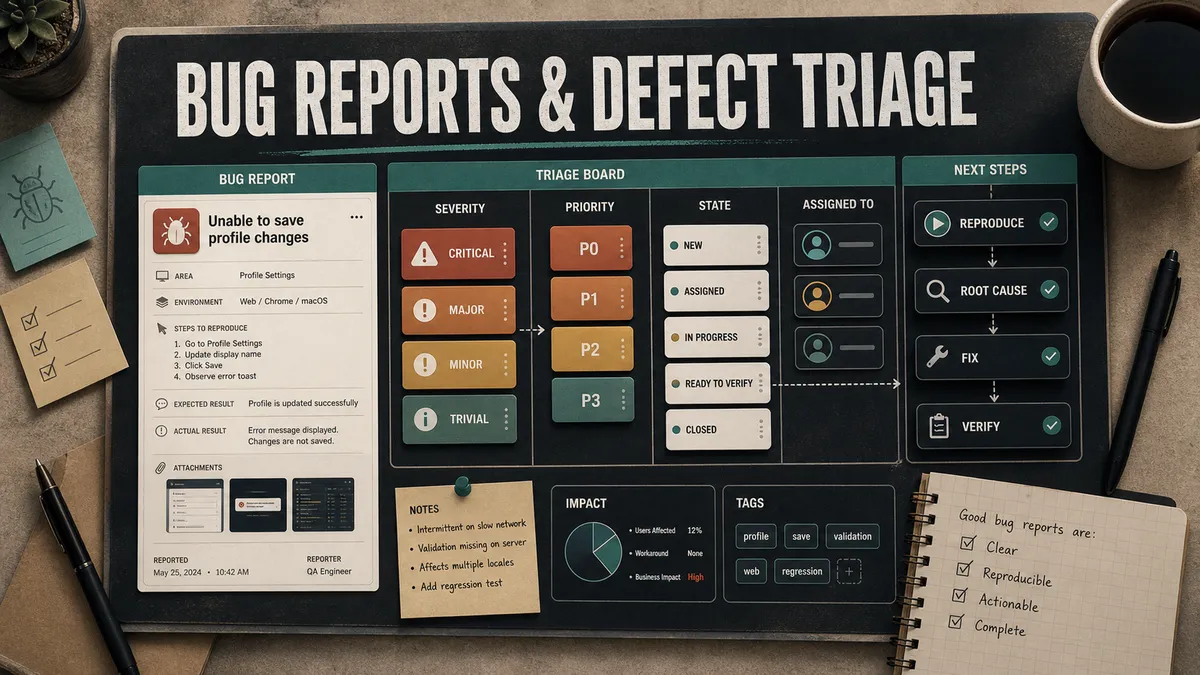
Finding a bug is the easy part. Getting it fixed is where the time goes, and most of that time is wasted on bugs that were reported badly. A vague report bounces back and forth for days. “It’s not working.” Not working how? On what? Doing what? By the time the developer has asked three questions and waited for three answers, a clear report would have been fixed and closed.
Reporting a bug well is just as important as finding it, and it is a skill people are rarely taught. So let me show you how to write a report a developer can act on without asking you anything, and how to triage a backlog of bugs so the right ones get fixed first instead of whatever is loudest.
What a developer actually needs from you
A good bug report answers one question completely: how do I see this for myself? If the developer can reproduce it, they can almost always fix it. Everything in a report exists to get them to reproduction as fast as possible. That means every report carries the same handful of parts, every time. None of this is invented on the fly. The contents of a defect report are well established in testing standards, and the ISTQB Foundation syllabus treats them as core competency for a reason.
- Title. A one-line summary that says what is broken and where. Not “checkout bug.” Something like “Checkout: order total ignores the discount code on the payment step.” Someone scanning fifty open bugs should know exactly what each one is from the title alone.
- Environment. Where you saw it. Browser and version, operating system, device, the build or environment (staging, the specific release), and the user account or role if that matters. A bug that only happens on Safari on an iPhone is a completely different fix from one that happens everywhere, and the developer cannot guess which one you hit.
- Steps to reproduce. The heart of it. Numbered, specific, starting from a known state. Include the actual data you used. “Log in” is weaker than “Log in as a standard user (qa.user@example.com).” The test is whether someone who has never seen the bug can follow your steps and land on the same broken screen.
- Expected versus actual. What separates a bug from a misunderstanding. What did you expect to happen, and what actually happened? Be precise. “Expected the total to drop to $45.00 after applying SAVE10. Actual total stayed at $50.00.” This is also where you sometimes find out the “bug” was the feature working as designed and you read the requirement wrong, which happens to all of us.
- Evidence. The proof. A screenshot with the problem circled, or better, a short screen recording for anything involving a sequence of steps or timing. For anything technical, attach the console errors, the failing network request (a HAR file, the browser’s recorded HTTP archive, is gold), and the relevant server logs or request ID. A screenshot of a blank page tells the developer nothing. The console error behind it tells them everything.
- Severity and reproducibility. How bad is the impact, and how often does it happen? “Crashes every time” and “the avatar is slightly misaligned, seen once” are both bugs and they do not deserve the same urgency.
Reproducibility is its own field for a reason. The IEEE 1044 standard for classifying software anomalies exists precisely so teams record this kind of detail consistently, because a bug that happens one time in twenty is a very different investigation from one that happens every time.
A bug report template you can copy
Here is the template I drop into teams. Put it in your tracker as the default issue template so nobody has to remember the fields.
**Title:** [Area]: short description of what is broken

**Environment:**
- Build / environment: e.g. staging, release 4.2.0
- Browser / OS / device: e.g. Chrome 140 on macOS 15 / iPhone 15, iOS 18
- User / role: e.g. standard user, qa.user@example.com

**Steps to reproduce:**
1.
2.
3.

**Expected result:**

**Actual result:**

**Severity:** Critical / High / Medium / Low
**Reproducibility:** Always / Sometimes (X out of Y) / Once

**Evidence:**
- Screenshot / video:
- Console errors:
- Failing network request / HAR:
- Logs / request ID:

**Notes:**
- Workaround, when it started, related tickets, anything else useful
It looks like a lot. In practice a clear bug takes two minutes to fill in and saves an hour of back-and-forth. The fields that feel like overkill on an easy bug are exactly the ones that crack a hard one. If you want a ready-made version of this, grab the bug report template from my resources and drop it straight into your tracker.
Here is the same template filled in, taken from a real promotions bug I reported on a large retail platform and scrubbed of anything client-specific. Read it next to the blank skeleton above and you can feel the difference between a field and an answer.
Title: Spend & Save shows the wrong "spend X more" amount at the tier boundary

Environment: build 482, web checkout, Brand A test environment

Steps to reproduce:
1. Add eligible items until the counted subtotal is exactly $100.00
2. Evaluate offers on the basket
3. Read the "spend X more to reach the next tier" value on the active offer

Expected result: at exactly $100.00 the next tier ($200) is $100.00 away,
so the amount to next tier reads $100.00

Actual result: the amount to next tier reads $200.00, ignoring the $100
already in the basket. The discount applied correctly, only the tracker number is wrong.

Severity: Medium
Reproducibility: Always (5 out of 5)

Evidence:
- Screenshot of the evaluate response with the bad amount circled
- The recomputed expected value from the tier table, shown next to it
- Request ID from the response header for the log trail

Notes:
- Only shows at the exact boundary; one cent above or below is correct.
- The discount math is fine, so happy-path checks pass; this is the tracker only.
Every field earns its place. The boundary detail in the notes is what tells a developer where to look, and the recomputed expected value is what makes “it is wrong” impossible to argue with.
Severity and priority are not the same thing
This is the single most common mix-up I see, and getting it right is what makes triage work. The two words get used as if they mean the same thing, and they do not. The ISTQB glossary is precise about it: severity is “the degree of impact that a defect has on the development or operation of a component or system”, while priority is “the level of (business) importance assigned to an item, e.g. defect”. In plain terms, severity is how broken it is, priority is the order you fix things in. They are related, but a bug can sit high on one and low on the other.
A typo in the company name on the homepage is low severity. Nothing is broken, no data is lost, the app works fine. But the priority might be very high, because it is on the most visited page and it looks unprofessional to every single visitor. Fix it today.
The other way round: a crash in an admin report that three internal users run once a quarter might be high severity, because it is a hard crash, but low priority, because almost nobody hits it and there is a workaround. It can wait for the next sprint.
Here is the same idea as a grid. Severity runs up the side, priority runs across the bottom, and where a bug lands tells you what to do with it.
Keep the two as separate fields in your tracker. When you only have one, every bug becomes a fight about whether it is “critical,” and you lose the ability to say the honest thing, which is usually “this is genuinely broken, but it is not what we should fix first.” Severity is the tester’s call, since it is a technical judgement about impact. Priority is the team’s call, weighing severity against how many users are affected, the business cost, and how much effort the fix takes.
A simple way to think about severity:
- Critical: data loss, a security hole, a crash or block with no workaround, or anything that stops users from doing the core thing the product is for. Payments failing. Login broken.
- High: a major feature is broken or badly wrong, but there is a workaround or it does not hit everyone.
- Medium: something works incorrectly but users can still get their job done, often with annoyance.
- Low: cosmetic issues, minor wording, edge cases that rarely happen.
Running triage so it actually decides things
Triage is the meeting, or the running process, where new bugs get a priority and an owner. The goal is not to discuss every bug in detail. It is to make a fast, consistent decision on each one: is it real, how bad is it, when do we fix it, and who owns it. A triage that turns into a debugging session has failed.
Keep the group small and the right people in the room. You want someone who represents the product or business side to speak to impact, a tech lead or developer to speak to effort and risk, and QA to speak to severity and reproduction. Three people who can actually decide beats ten who cannot. This is also where you protect against priority inflation, where every bug somehow arrives marked “high” and the label stops meaning anything.
For each new bug, the questions are quick, and each one has a clear owner and a clear finish line:
- Owner: QA. Confirm it is reproducible and actually a bug. Done when: there are repeatable steps, or the report is sent back for detail, or it is closed as working-as-designed and raised as a change request instead.
- Owner: QA. Check for a duplicate before creating anything. Done when: you have searched existing reports and either linked the duplicate or confirmed it is new. Deduplicating aggressively is one of the highest-value things you can do, because ten reports of the same crash is one bug, and tracking it as ten wastes everyone’s time. This is not a rare edge case either; in research on large bug repositories, more than a tenth of reports in some trackers turn out to be duplicates.
- Owner: QA sets severity, PM sets priority. Record both as separate fields. Done when: the bug has an agreed severity and an agreed priority. This is the actual decision.
- Owner: EM or PM. Assign it to a person or a clearly prioritised backlog. Done when: the bug has a named owner or a backlog rank. A bug with a priority and no owner does not get fixed.
Here is what that looks like on a real morning, using four genericized bugs from a retail platform I tested, run through the same questions. Notice that no two of them land the same way.
| Incoming bug | Reproduced? | Duplicate? | Severity | Priority | Owner |
|---|---|---|---|---|---|
| Checkout returns no price object for any basket | Yes, every time | No | Critical | Fix now | Offers dev |
| ”Spend X more” tracker off by the basket total at the tier boundary | Yes, only at the exact boundary | No | Medium | Next sprint | Offers dev |
| Free gift still applies after a discount drops the line below the threshold | Yes | Linked, third report of the same thing | High | This release | Offers dev |
| Review count on the product page is one higher than the list shows | Could not reproduce, needs the reporter’s product id | n/a yet | n/a | Sent back for detail | Back to reporter |
The grid did the work. The first one is a clear stop-the-line fix. The second is real but narrow, so it waits. The third was reported three times, which is one bug, not three, and the duplicate link is what kept the team from triaging it three separate ways. The fourth never became a ticket at all, because it could not be reproduced without the reporter’s data, and a bug you cannot reproduce is not yet ready to assign.
How often you triage depends on how fast bugs come in. A team shipping daily probably wants a short daily or every-other-day triage so nothing sits unseen. A slower-moving product can do it weekly. What matters is that it is regular and that bugs do not pile up unlooked-at, because an untriaged backlog is just a pile of anxiety nobody trusts. If your team runs on sprints, fold triage into the rhythm you already have.
A note for 2026: a lot of trackers now offer to triage for you, suggesting a severity, flagging likely duplicates, even drafting the priority. Treat that as a fast first pass, not the decision. The model is good at spotting that two reports describe the same crash and bad at knowing that this particular crash sits on the path your biggest customer renews through next week. Let it clear the noise, then have a human make the call.
Give every bug a clear lifecycle
A bug should move through states everyone understands, and the state should always tell the truth about where it is. The exact names vary by tracker, but the shape is the same one you will find in any defect-management workflow, and it looks like this.
A bug is New when it is reported, Triaged once it has a severity, priority, and owner, In progress when someone is actively working it, Ready for test when the fix is merged and deployed somewhere you can verify it, and Closed when QA has confirmed the fix against the original steps to reproduce. Reopened is the loop back when the fix did not hold. It should be rare, and a rising reopen count is a signal worth paying attention to.
The two states people skip are the costly ones. Skip the verify step and you get “fixed” bugs that were never actually checked, and you find out when the customer does. And a bug that has quietly sat in “in progress” for three weeks is really blocked; the honest state would have surfaced that. The verify step is also the natural seam between testing and shipping, which is why it shows up again in the bug-report-to-beta-build release workflow.
Watch the numbers, but the right ones
Once you have clean reports and real triage, the data starts to mean something. A few things are worth tracking, lightly.
- Time to triage. How long bugs sit before they are triaged tells you whether the process is keeping up.
- Reopen rate. Whether fixes are real or rushed; a climbing reopen rate usually means people are closing things without verifying.
- Bug clusters by area. Where bugs gather tells you which part of the product is fragile and might need more than bug fixes.
- Incoming versus resolved. The trend tells you whether you are getting ahead or falling behind.
If you ship continuously, DORA’s change failure rate, the share of deployments that cause a failure in production, sits right on top of all of this and connects your bug data to delivery health.
Resist the urge to turn raw bug counts into a scoreboard. The moment “number of bugs found” becomes a target, people start gaming it: testers inflate counts, developers argue every report, and you have traded a healthy process for a number that no longer means anything. Use the data to find weak spots and improve the process, not to rank people. I have a whole post on the QA metrics that quietly mislead teams if you want to see how this goes wrong in practice.
The payoff
Write the report so the developer never has to ask you a question. Keep severity and priority as separate decisions. Triage on a regular cadence with the few people who can actually decide, deduplicate hard, and make sure every fix is verified before it is closed. None of this is glamorous, but a team that reports and triages well ships fixes in a fraction of the time, and that is most of the job. The very best version of this loop is the one where you keep getting better at stopping bugs from reaching the report stage at all, which is exactly what preventing bugs before testing begins is about.
Steal the template above, drop it into your tracker as the default issue template, and watch how much faster bugs get fixed when developers stop having to play twenty questions.

Written by
Julia Pottinger
Hi, I'm Julia. I've been in QA for over a decade. I spend my days testing software and my own time building apps and games, and I write here to share what I learn, the practical, honest lessons you can actually use.

Comments 0
Share your thoughts, ask questions, or add to the conversation.