
Finding the bug is the part people remember. It is also the smallest part of the job.
The harder, more valuable work is everything after: proving where the failure really lives, confirming the fix addressed it, checking that the build about to ship actually contains that fix, and handing it off with enough evidence that someone can approve the release without redoing your work.
That fourth step is the one that quietly bites teams. The build you verified on your machine is frequently not the artifact that ships, so a fix you signed off on a debug build is a fix nobody has really verified yet.
This is the part of QA I care about most, because it decides whether a release goes out on evidence or on crossed fingers. A tester who stops at “I found it” has done a fraction of the job. The version that moves a team forward is “I found it, we understood it, we fixed the right layer, I verified it on the artifact that is shipping, and here is the evidence for sign-off.”
It matters more now than it used to. Teams are shipping faster and leaning on AI to draft code, tests, and even bug reports.
The 2024 DORA State of DevOps report found that AI adoption raised individual productivity while it pushed software delivery stability and throughput down. Speed without judgment is just faster guessing. The workflow below keeps the speed and adds the proof.
The shape of the workflow
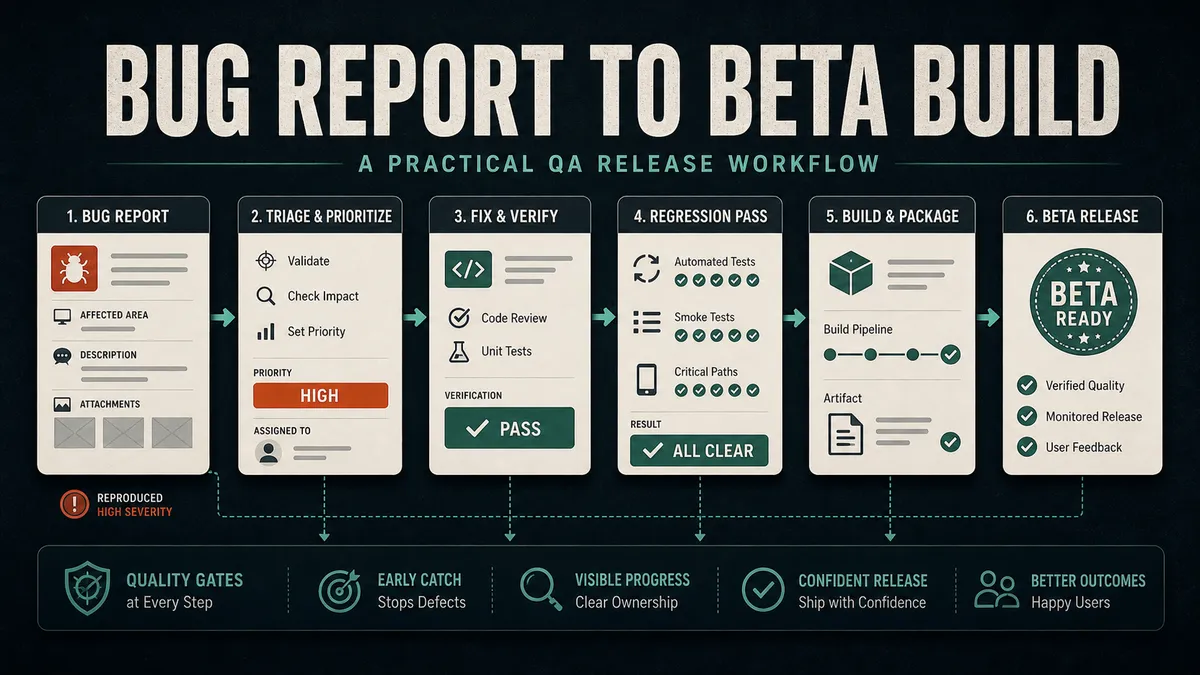
Here is the whole path on one picture, because a bug report and a beta build are two ends of the same line, not two separate jobs.
If you would rather see a checklist than a picture, here is the same path as a table. Each stage has one job and one piece of evidence, and you do not move on until that evidence exists.
| Stage | The job | Evidence it leaves behind |
|---|---|---|
| Report | Capture the problem so the next person can act on it cold | A bug report with steps, expected vs actual, environment, attachments |
| Reproduce | Prove the failure exists in a form you can re-run | A failing test, recording, log, query result, or trace |
| Isolate | Find the layer where it actually fails, not where it shows | A named layer (request, backend, response, storage, render, feedback) |
| Fix | Change the root cause, not the symptom | A diff scoped to the layer that failed |
| Verify | Confirm the captured failure is gone, the way you captured it | After-evidence matched to the before-evidence |
| Protect | Leave coverage so the bug cannot quietly return | A test, constraint, alert, or checklist line at the right layer |
| Build | Confirm the artifact being shipped contains the fix | Version, build number, signing, and config checks on the artifact |
| Smoke | Run the beta a real tester will get | A short build-verification pass on the installed build |
| Handoff | Give the approver everything they need to decide | A handoff note: what changed, what was tested, risks, recommendation |
| Release-risk | Pause on the whole build before promoting it | A risk check: rollback path, observability, owner, gaps named |
Step 1: Capture the problem clearly
A good bug report makes the next step obvious.
If a developer can read your report and know where to look without three follow-up questions, you have done it well. If they have to ask “on what device” or “what were you logged in as,” the report cost the team a day it did not need to spend.
I will not re-teach the report itself here. Writing one a developer can act on cold, with the right steps, environment, expected-versus-actual, severity, and evidence, is a craft in its own right, and I cover the full skeleton and a copy-paste template in how to write a bug report and triage defects. To build one against a guided checklist, the Perfect Bug Report tool walks you through every field.
The one thing worth repeating for a release workflow is evidence: a report with none forces the next person to recreate the failure from scratch, and a fix for a bug nobody can reproduce is a guess with code attached.
Step 2: Reproduce before you touch the fix
If you cannot reproduce the issue, say so plainly and document exactly what you tried: the device, the data, the steps.
An honest “I could not reproduce this on three devices with these accounts” is real information. It tells the team the bug is intermittent, environmental, or already gone, and that changes how they treat it.
When you can reproduce it, capture the evidence before a single line of code changes. This is the step people skip when they are in a hurry, and skipping it is what leads to a team accepting a fix on hope. Depending on the bug, your before-evidence might be:
- a failing automated test
- a screen recording of the broken flow
- a log window from when it happened
- a database query result that shows the bad state
- a network trace of the failing request
- a console error
- a screenshot diff
The point is to pin down what “broken” looks like in a form you can re-run, so that when you check the fix you are comparing against something concrete rather than a memory of how it felt.
Step 3: Find the layer where it actually fails
Most bugs show up in the user interface, but plenty do not start there. A spinner that never resolves can be a frontend state bug, a backend timeout, a missing retry, a permissions failure, a data-shape mismatch between what the API sends and what the app expects, a stale cache, or bad production data that no test environment ever had.
Flatten all of that into “the page is broken” and you send the developer to the wrong file, where the fix lands in the wrong place.
So separate the layers before anyone fixes anything. Walk the request from the tap to the pixel and ask where it stops behaving:
The first “no” you reach is the layer that needs the fix, and it is usually not where the symptom appeared. This is the difference between fixing a bug and decorating it.
If the backend returned a malformed response and you “fix” it with a loading guard in the UI, the spinner stops but the real defect ships. This layered thinking is exactly why data problems often masquerade as UI bugs.
Step 4: Validate the fix against the original evidence
After the fix, repeat the exact path that proved the bug and check it the same way you captured it.
- If the failure showed up in logs, read the new logs.
- If it was a duplicate row, run the same query and confirm there is one row now.
- If it was a real-device performance lag, measure it again on that device, not on a simulator that was never slow to begin with.
Do not accept a fix because the code changed and a unit test went green. A passing unit test tells you the unit behaves as the developer expected. It does not tell you the user-visible bug is gone.
Match your verification to the failure you captured, and the gap between “the code changed” and “the problem is gone” closes.
I keep a tiny validation record so the verification is repeatable and not just a vibe:
FIX VALIDATION
  Bug:                  <link to the original report>
  Root cause:           <one line: what actually failed and where>
  How I reproduced before:  <the exact path + the before-evidence>
  How I checked after:      <same path, same way I captured it>
  Before evidence:      <trace / log / query / recording>
  After evidence:       <the same artifact, now clean>
  Re-tested on:         <device / OS / browser / account>
  Result:               fixed / partially fixed / not fixed
The “how I checked after” line has to mirror “how I reproduced before”. If the bug showed up in a network trace, the proof it is gone is a clean network trace, not a developer saying it should be fine now.
Step 5: Leave behind some protection
Every bug worth fixing should teach the system something so it cannot quietly come back. That is the heart of building quality in instead of testing it in afterward: you do not just remove the defect, you make the regression visible the next time someone gets close to it.
The cheapest version is catching the gap before anyone builds it, its own discipline I cover in how QA can prevent bugs before testing begins. Here the bug already exists, so the job is to make sure it cannot return. The right protection depends on where the bug lived:
- a unit test, when the bug was in logic
- an API or contract test, when a response shape or status code drifted
- a database constraint, when bad data was able to get written in the first place
- a UI regression or visual test, when layout or a user flow broke
- a real-device smoke test, when the failure only appears on actual hardware
- an alert or observability check, when the symptom is something you would rather catch in production before a user reports it
- a line on the release checklist, when the safest fix is a human remembering to look
Not every test deserves to be automated, and not every bug needs a full end-to-end test. Bolting one on for every defect is how suites grow slow and flaky, until a red run no longer tells the team anything and they stop listening; that is its own problem, which I work through in flaky tests and test maintenance.
For the release workflow, the rule is just this: aim the coverage at the layer that actually failed. A logic bug gets a fast unit test, not a fifteen-second browser test that will be the first thing to go amber in your pipeline.
The coverage you leave behind should be small, stable, and meaningful enough that when it fails, people pay attention.
Step 6: Verify the build artifact, not just the code
This is the step that separates a release workflow from a debugging session, and it is the one most often skipped.
The build that passed on your machine is frequently not the build that gets uploaded for beta: different signing config, a different environment file, a release variant with code shrinking turned on, a stale version number. QA should know precisely which artifact is being handed off and confirm it is the right one.
Releases taught me to care about the unglamorous questions:
- What build is this?
- What environment is it pointed at?
- What device was it tested on?
- What data was loaded?
- Was the fix verified on the artifact actually going out, or on the developer’s debug build?
None of those sound exciting in a planning meeting, and every one has saved a release from going out wrong. The screen can look fine while the artifact behaves differently from the build everyone tested.
For a mobile release, run the build-verification checklist against the artifact itself:
BUILD VERIFICATION (run on the actual artifact)
  [ ] version name and version/build number are bumped and match what you expect
  [ ] artifact is signed correctly for the channel it is going to
  [ ] release configuration is baked in, not a debug or staging environment
  [ ] backend points at the right environment for this channel
  [ ] crash symbols / mapping are in place so production crashes come back readable
  [ ] the artifact you are checking is the one that will actually be uploaded
That last point trips up more teams than it should.
On iOS, you need the matching dSYM files for the build, from the build’s metadata in App Store Connect, or every crash report comes back as raw memory addresses.
On Android, if you build an App Bundle with the Android Gradle plugin 4.1 or later, Google Play grabs the R8 deobfuscation mapping straight from the bundle, but only future crashes for that version get deobfuscated, so the mapping has to be in the artifact you are shipping right now.
Confirming this before release is the difference between a debuggable beta and a black box.
Step 7: Install and smoke test the beta
If the request was “fix it and create a beta,” the work is not done when the export finishes. Install the actual beta build, the one testers will get, and run a quick smoke pass before you tell anyone it is ready.
The ISTQB glossary defines a smoke test as “a test suite that covers the main functionality of a component or system to determine whether it works properly before planned testing begins,” which is exactly the bar here.
You are not re-running the whole suite. You are confirming the build is worth anyone’s time:
BETA SMOKE PASS (on the installed build, not your dev build)
  [ ] app launches and gets past the splash and login
  [ ] core navigation works and nothing critical is obviously broken
  [ ] the path you just fixed actually works on this build
  [ ] the most important existing flow still works (the fix did not break a neighbor)
  [ ] logs are clean on launch, no immediate errors or crashes
  [ ] the build number on screen matches the one you are handing off
That last check sounds trivial and catches real mistakes. I have seen a “verified” beta turn out to be yesterday’s build because the wrong artifact got uploaded. Reading the version off the running app takes five seconds and closes the hole.
Here is the shape of a real fix-validation record I hand off, names and IDs scrubbed:
Ticket:      QA-1042  [BE] Search fails for emails with special characters (. _ + -)
Severity:    High
Fix built:   release 2026.06.r2
Validated:   re-ran the email-search suite (valid / special-char / boundary cases) on QA
             → all pass; added a regression check so it cannot silently break again
QA sign-off: verified fixed, OK to ship
This step matters most for things with state and money behind them: games, in-app purchases and subscriptions, and anything that depends on a backend being in the right environment.
Step 8: Hand off so someone can approve without redoing your work
A handoff is the moment your work becomes someone else’s confidence, so make it short and specific. The approver should be able to trust it from your note alone.
“Looks good” is not a handoff; it forces them to re-derive everything you already know.
When I am on the approving side, here is exactly what I want in front of me before I sign off on a beta. If something here is missing, I am not approving yet, I am asking for it.
BETA HANDOFF
  Original bug:         <link to the report this build is meant to fix>
  Reproduction:        <the before-evidence: trace / log / query / recording>
  Root cause:          <one line: what actually failed and at which layer>
  Files / area changed:<the part of the system the fix touched>
  Tests added/updated: <regression coverage left behind, and where it runs>
  Build number:        <the exact artifact, version + build, channel>
  Tested on:           <device + OS, or browser + version + viewport>
  Known risks:         <what could still bite, and how likely>
  NOT tested:          <what you deliberately did not cover>
  Recommendation:      <ship to beta / hold / ship with this caveat>
The last three lines are the ones people are tempted to drop, and they are the most valuable. “Known risks” and “NOT tested” are not admissions of weakness. They are what let the approver make a real decision instead of a blind one.
A handoff that only lists what passed is quietly asking the approver to assume everything else was covered, and that assumption is where releases go wrong. Give me the evidence and the gaps, and I can make a real decision. Hide the gaps and you have handed me crossed fingers.
I have watched this discipline get formalized, and it works. On a large retail platform that shipped every single week, a release did not move until a written sign-off questionnaire was filled in and cleared. It asked the boring things: what changed, what was tested, on what, what the known risks were, and whether there was a way back.
If the reviewers had a question, they pulled the team into a short meeting and asked it. If they did not, the release moved on to regression.
It is the same instinct as the handoff above, scaled up to a whole team: nobody approved on “looks good,” everybody approved on the answers. At a weekly cadence you cannot afford anything looser, because a vague handoff does not slow down one release, it slows down every release stacked up behind it.
Here is the same handoff filled in, so you can see how little it actually takes:
| Field | Example |
|---|---|
| Original bug | QA-1184: checkout spinner hangs on slow networks |
| Reproduction | Before-trace shows the request timing out with no retry |
| Root cause | Backend request had no timeout or retry; UI waited forever |
| Files / area changed | Checkout network client, retry policy |
| Tests added/updated | API test for the retry path; smoke step on the checkout flow |
| Build number | Build 482, version 3.4.0, TestFlight channel |
| Tested on | iPhone 14 / iOS 18 and Pixel 8 / Android 15 |
| Known risks | Retry adds a few seconds on very poor networks; acceptable |
| NOT tested | Tablet layouts; offline-then-reconnect mid-checkout |
| Recommendation | Ship build 482 to external testers; revisit the offline case next sprint |
Step 9: Run the release-risk check before you click ship
The handoff tells the approver what happened to one bug. The release-risk check is the wider question they actually have to answer: is this build, as a whole, safe to put in front of real people?
It is a short pause before promotion, and it catches the things that have nothing to do with your fix and everything to do with the release going sideways.
RELEASE-RISK CHECK (before promoting the beta)
  [ ] every change in this build is accounted for, not just the headline fix
  [ ] nothing high-risk is riding along untested (a sneaky dependency bump, a flag flip)
  [ ] the fix did not break a neighboring flow (you checked the obvious adjacent one)
  [ ] data and migrations are safe: nothing destructive runs on first launch
  [ ] there is a way back: a rollback, a kill switch, or a feature flag you can turn off
  [ ] observability is in place: crashes and key errors will actually reach you
  [ ] the known risks are written down where the approver and on-call can see them
  [ ] someone owns watching this build after it goes out, not just shipping it
That second-to-last line is the one that separates feeling safe from being safe. A green pipeline can make a whole team feel fine while the product is quietly wrong, so the question I keep asking before any release is the plain one: what would make us uncomfortable shipping this?
If the answer is “we are not sure the fix is in the build” or “we have no way to roll back,” that is not a release. That is a guess with a version number.
Where AI fits, and where it does not
AI genuinely speeds up parts of this. It can summarize a wall of logs into a likely failure layer, draft a first bug report from your notes, propose test cases you missed, read a diff and flag the risky part, and sketch a regression test for you to refine.
Used well, it shaves time off the slow, mechanical steps so you can spend more on judgment.
Here is the line I hold, though. AI can move through the steps, but it does not own the chain of proof.
| AI can | You own |
|---|---|
| Suggest the failing layer | Confirming it against real evidence |
| Draft a regression test | Deciding whether it tests the right thing and stays stable |
| Summarize the release evidence | Signing your name to “this is safe to ship” |
AI raises your output, not your judgment, and the verification discipline above is what turns that extra output into a release you can stand behind.
I make the fuller case in QA is the control layer for AI-assisted development; the short version is that the chain of proof is the part that stays yours.
The release mindset
Quality work is not only finding bugs. It is moving uncertainty into evidence, one step at a time, until there is none left to guess about. A bug report is the first piece of uncertainty named out loud. A beta build you can hand off with confidence is the last.
So when the request is “fix it and ship a beta,” let that be the start of the workflow, not the end. Carry the bug all the way through: reproduce it, find the layer, fix the root, validate against what you captured, leave protection behind, verify the artifact, smoke test the build, hand it off with the risks named, and run the release-risk check before you promote.
That is the difference between telling a team “the issue is fixed” and handing them a release they can ship with evidence instead of crossed fingers.

Written by
Julia Pottinger
Hi, I'm Julia. I've been in QA for over a decade. I spend my days testing software and my own time building apps and games, and I write here to share what I learn, the practical, honest lessons you can actually use.

Comments 0
Share your thoughts, ask questions, or add to the conversation.