
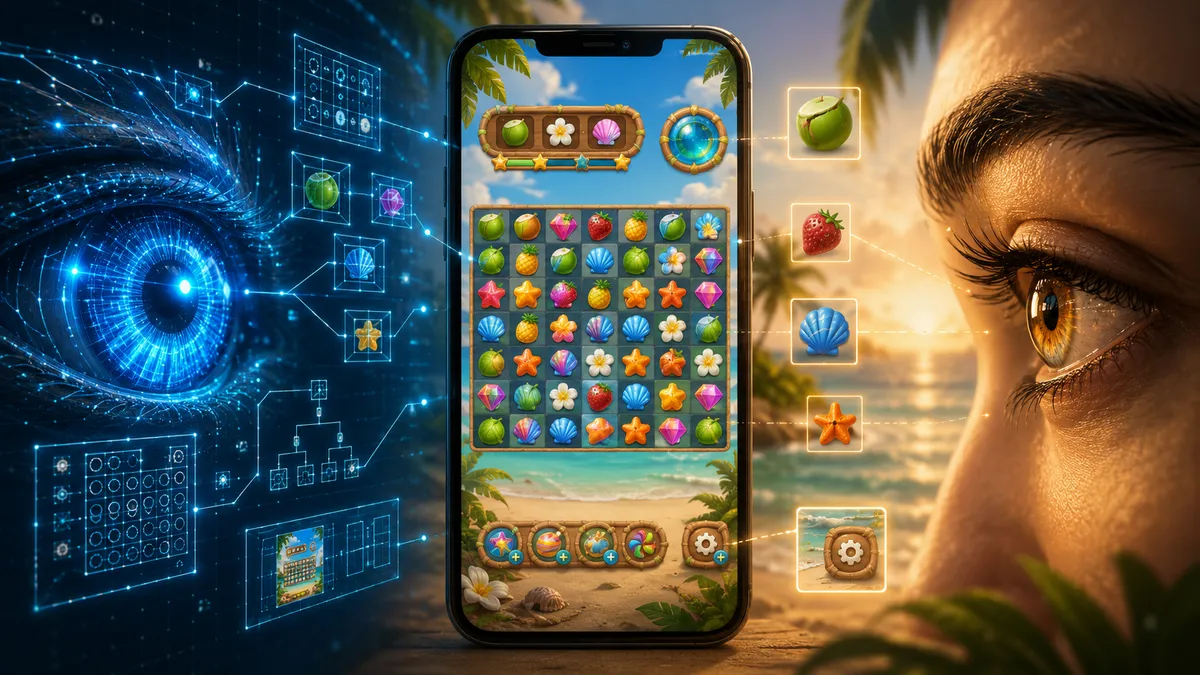
The agent said the screen was done. The build passed. The elements existed. The buttons were wired. Every check it had run came back green.
Then I opened the game and saw this.

Here is the whole premise in one line. An agent can build the structure of a screen, but it cannot be the final judge of the player’s experience. Every bug in this article is the same gap: green in the tree, wrong on the glass. My job is to look, touch, and notice, then turn what I find into a rule or a test. Building Tropic Tumble with AI agents for JPott Studios, now live on iPhone and Android, the gap fell into three shapes, and knowing them is what made it catchable.
| The gap | What the agent sees | What the player meets |
|---|---|---|
| Pixels it could not judge | Elements present, in bounds | Overlap, crowding, dead space, a cheap-looking screen |
| Touch it could not feel | Button wired, popup opens | Tap misses the target, popup flashes shut under a real thumb |
| Trust it could not evaluate | Screen opened, data correct | The screen trapped behind the wrong layer, or lying about its own state |
The full build is its own honest log, and the broader testing model lives in AI Visual Testing: What It Can Check and Where Humans Decide. This piece stays inside the game: the real screens, the real bugs, and the human pass that caught them.
Pixels AI could not judge
The code knows each node exists. It does not know two nodes occupy the same pixels.
That fail popup is the plain version. It was not a crash or a missing asset. Everything the agent had checked was true: the popup appears after a failed level, the level number is present, the retry button fires, the home and map buttons fire, the objective area renders, the build runs, the tests are green. Every one of those is correct while the star icon and the score text collide in the middle of the screen. The scene tree said the layout was valid. The screenshot showed otherwise. Image-capable models can inspect screenshots and may flag an obvious overlap, but I still have to make the final visual call across every size, state, and path.
The bigger version of the same gap is that one phone is not every phone. I designed against a tall 9:16 base, and on that shape everything looked deliberate. Then I ran it on a short phone, a wide one, and a tablet.
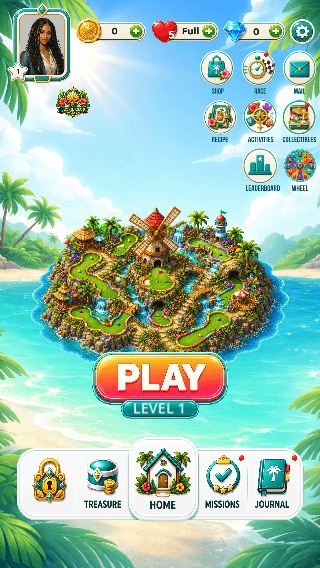
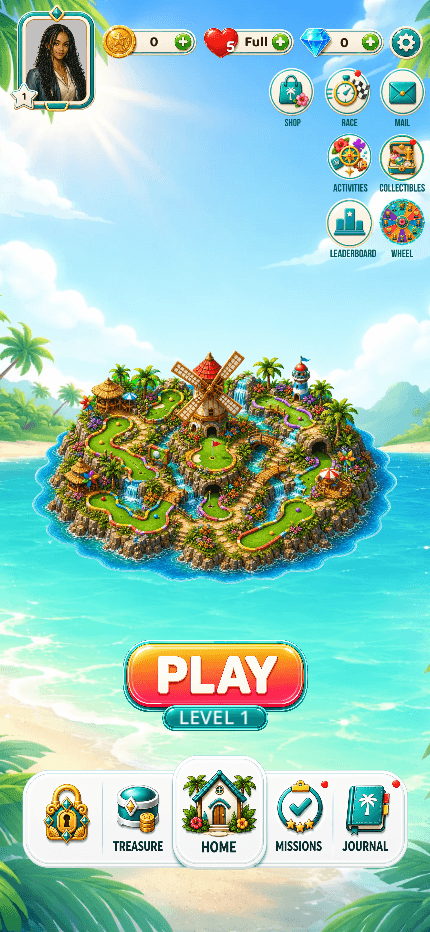
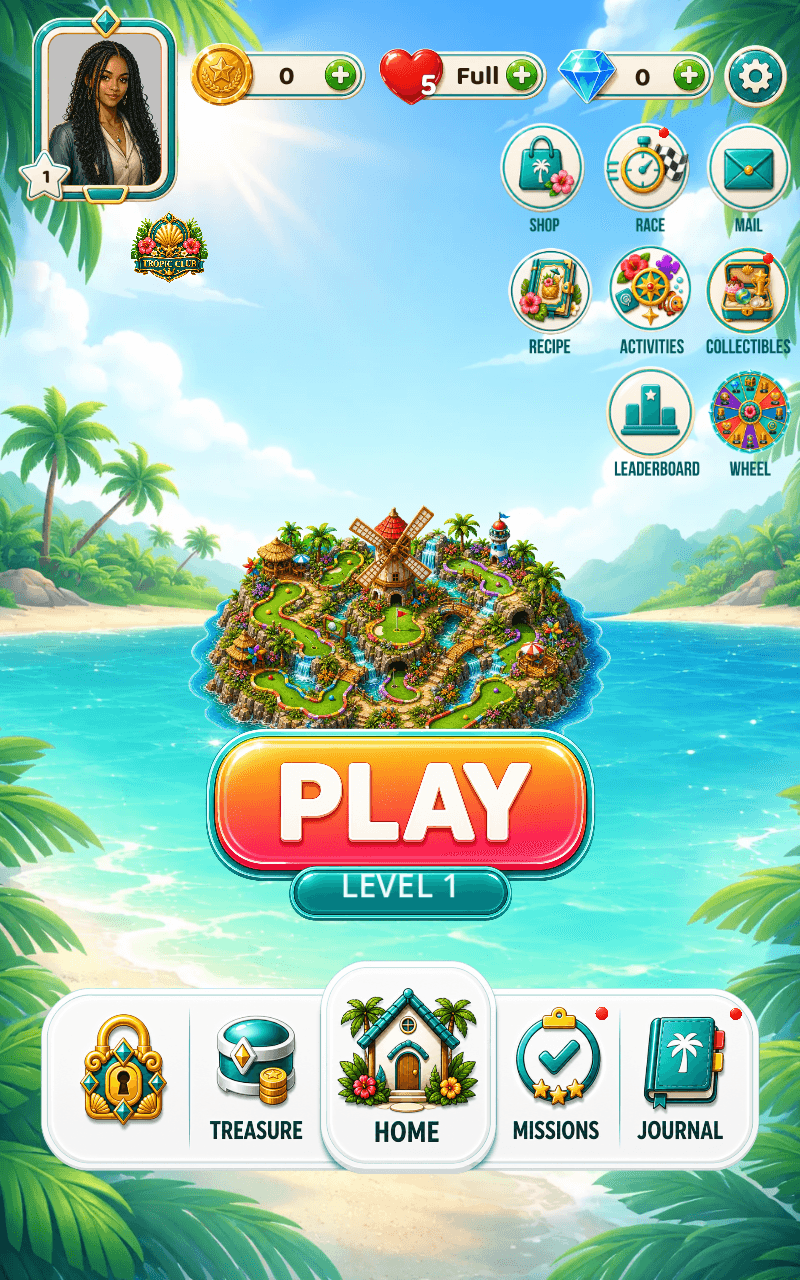
The same layout came apart in a new way on each device. On bigger tablet variants, a row of side buttons drifted up and overlapped the HUD. On iPad, text from a starter pack sat on top of the ribbon behind it. On a small phone, a shop grid that breathed on a tall screen packed in tight and tipped from full into crowded.

A phone is not one target. It is a family of them, and the agent can confirm every element is within bounds while a person still has to look and say “this leaves an awkward gap” or “this only looks designed at one ratio.” The board itself dodges most of this because it sizes from the space it is given rather than fixed pixels. The screens around it do not, and that engine-level part is what I wish I had known about Godot.
Pixels can also just look cheap. The screen is in the right place, every element works, and an agent has quietly rebuilt a premium screen out of code-drawn rectangles.
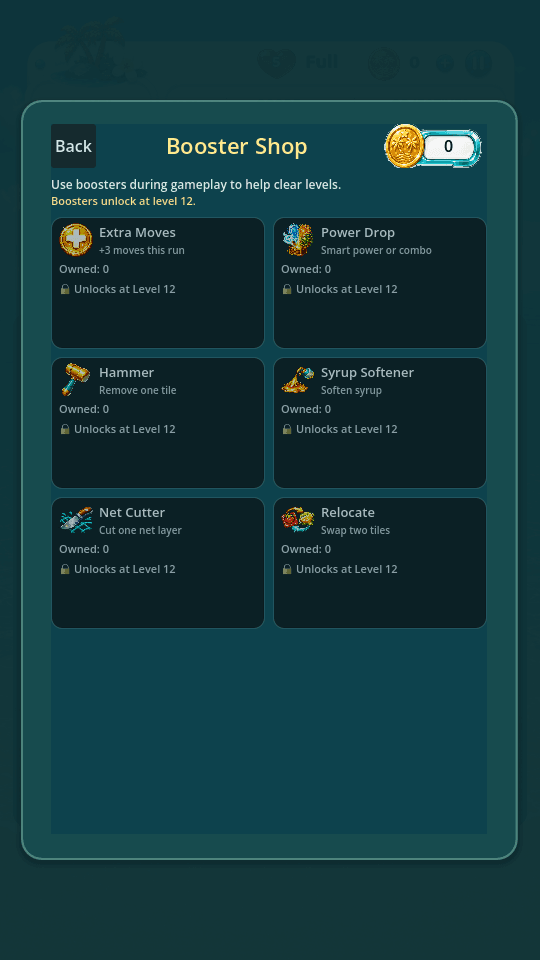
This is how a game slides into programmer art one “good enough” panel at a time. The code is fine and the feel is gone, and an agent will do it happily, because a code-drawn rectangle passes every check it can run. The same blind spot lives in sound: whether a track fits an island is a judgment I make, so I pick it, and a catalog plus resolver tests make sure the right track actually plays. Taste is my call. The wiring gets a test. The wider taste story is designing a game with AI.
Touch AI could not feel
A mouse click and a finger press are not the same event, and that difference hides bugs no editor will ever show you.
The one that cost me the most was the in-run booster popup. You are mid-level, low on a booster, so you tap the little plus to buy more. At first, it looked like a simple broken plus button: I tapped it, saw a bounce, and the popup disappeared before I could understand what happened. In the editor, with a mouse, it worked every time. The real cause was stranger than a dead button: on the phone, the same tap that opened the popup kept traveling in the same frame and hit the tap-outside-to-close layer behind it, so the popup opened and closed on one touch, too fast to see. The code was correct. The engine did exactly what the nodes described. A touch and a click simply do not behave the same. The fix was small once I could see it, the close layer now ignores taps for a quarter second after the popup opens, and it went straight into a regression test.
The other touch bug was quieter and even more humbling: a close button whose tappable area did not sit on the X the player could see. The X is painted into the artwork, and the invisible hit rectangle is laid on top of it separately. The two had been authored in different spots, so taps landed low and to the left of the visible X, and the button “did not work” about half the time. Nothing was broken in code. The picture and the hit box just disagreed, and the fix was the bluntest thing in this article: I measured the X in the actual art by eye and set the hit box by hand until a tap on the visible button registered.
This is the actual file I edit when that happens. Every popup has a small layout file, booster_purchase_layout.json for this one, holding hand-tunable rectangles written as [x, y, width, height] in the artwork’s own coordinate space. The close button’s tap area is one line of it:
{
  "page_size": [1080, 1920],
  "top_coin_area": {
    "plus_button_rect":  [402, 326, 76, 76],
    "close_button_rect": [840, 288, 150, 150]
  }
}
I had that close rectangle at [810, 315, 132, 132] first, sitting where the button “should” have been. The X painted into the art was actually centred lower and to the right, so I nudged the numbers by hand until a tap on the visible X landed. The tests I had did not catch it, because they verified the rectangle in code, not whether it matched the X a player could see.
Underneath both of those sat a whole quiet category: tap targets that were simply too small. Buttons across the home, the HUD, the shop, and settings had been built at the size of their art instead of the size of a thumb, so they worked in every test and still felt fiddly in real hands. An agent has no way to feel that a control is hard to hit. This one has a check you can run on anything you build, and it is the fastest visual test there is: put the screen on a real phone and try to hit every control once, without looking twice. Anything you fumble is a bug, even if the code is perfect.
“It works in the editor” is not “it works.” The device is the honest reviewer of touch.
Trust AI could not evaluate
Sometimes every element is correct and the screen still cannot be trusted. It sits in the wrong place in the stack, or it tells the player something that is not true.
Every node can be correct while the whole screen sits in the wrong place. Opened from the main menu, the shop was perfect. Opened from a mid-game popup, it was not.

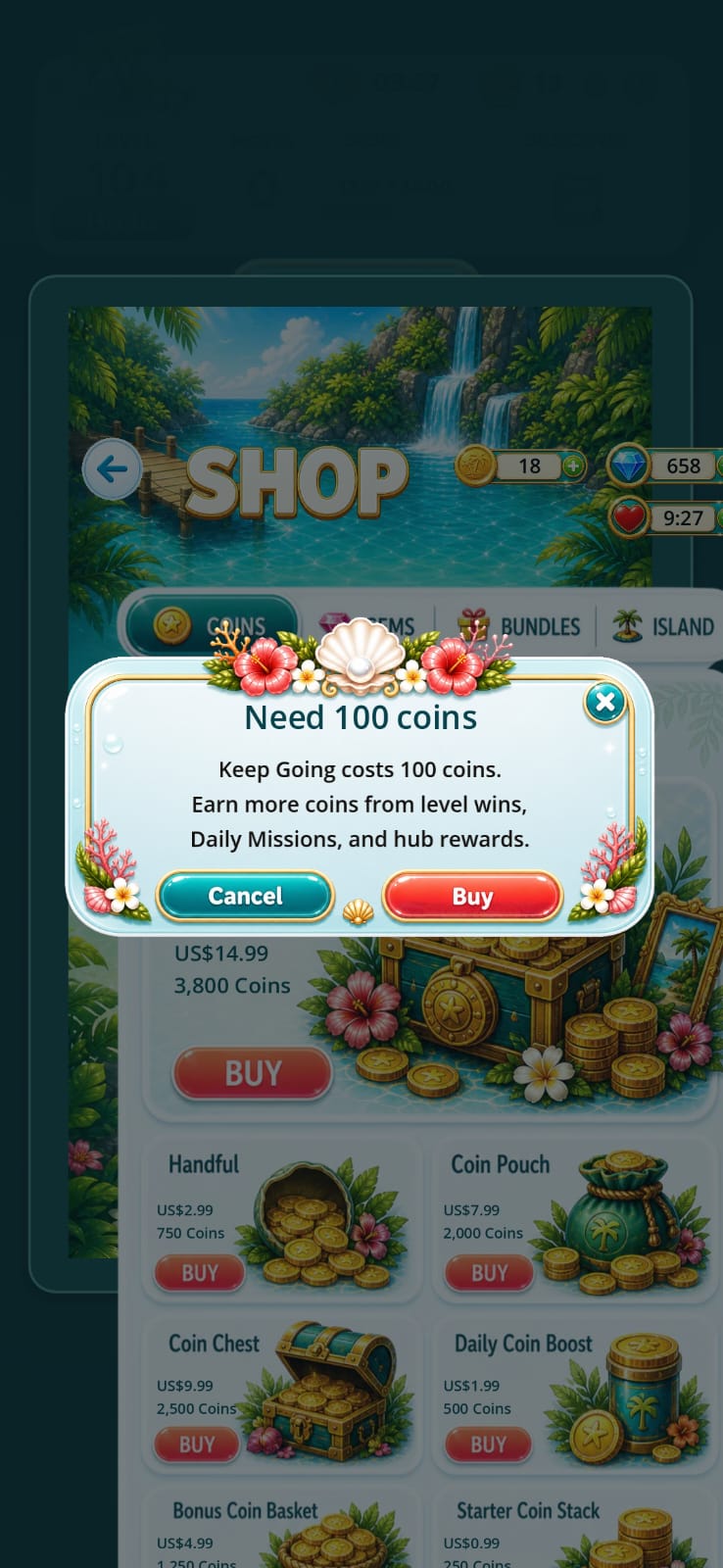
Left, the shop opened from the menu, full screen and correct. Right, the same shop reached from a mid-game popup: the popup never dismissed, so the shop rendered small and dimmed behind it. Every element existed and worked. It was just boxed in behind a layer that should have closed.
The agent had confirmed the checks it was given here too, once, for the whole screen: the shop opened, the products rendered, the buttons fired, the tests passed. What that pass missed was that, reached from this one entry point, the screen was trapped behind an overlay that should have been gone. I only caught it by opening the game from that exact path and looking.
The screen can also lie about its own state, where every check passes and it still shows the player something that is not true.
- The leaderboard spun forever. The spinner only hid after both tab requests came back. If one hung, it kept turning over a board that had already loaded behind it. The fix hides it on the first real data, with a watchdog so a stuck request cannot freeze the screen.
- The map came back still loading. After a level, the world map returned with its spinner turning at full strength, so a finished screen read as if it were still working.
- A frozen frame read as ready. Entering a level, the board loaded on the main thread and locked the screen for over a second, with nothing to explain it. A player cannot tell “loading” from “frozen.” The fix moved the heavy load off the main thread and showed something honest while it worked.
None of these are crashes. Every one is the code believing “done” while the screen tells the player otherwise, and I still need a person watching to referee that. Underneath all three buckets sits one question the agent cannot answer for the player: would they trust this screen with their money, their progress, or their next tap? If the answer is not a clear yes, it is not done, whatever the build says.
A few more I had to correct, and how to stop them
The three buckets cover the shapes. Underneath them sat specific mistakes that repeated often enough that I wrote each into the agents’ rules. The useful part for you is not the mistake, it is the prevention, so here they are together:
- An agent painted the wrong screen’s art onto a popup. The rate-the-game dialog once showed the baked “get more lives” artwork instead of its own buttons. Prevention: give each popup a capture test that asserts its own art and buttons render, so a screen cannot ship wearing another screen’s face.
- A tap that closed a popup fell straight through to the button behind it. Prevention: route every popup through one shared modal host with an input shield, so a dismiss tap is swallowed instead of leaking to the home screen or the board underneath.
- A full-screen modal painted underneath the game’s HUD. Prevention: set an explicit stacking order for overlays and write it into a layout contract, so a new screen cannot quietly slide under the chrome.
- An agent “tidied up” by deleting art it decided was unused. One wrong guess and a piece of the game is gone. Prevention: retire an asset by removing its use in code and leaving the file on disk. Never delete to clean up.
- Label art got stretched to fit and looked cheap. Prevention: scale art uniformly only, never independently on width and height, and if it will not fit cleanly, fall back to plain text instead of a squashed image.
The thread through all of them is the same. An agent optimises for “passes the check it can run.” A person optimises for “a player would be happy with this.” Every rule above is just me writing down a spot where those two goals came apart.
So what do I actually do
Noticing is mine. Fixing is theirs, and they are fast at it. Once I named a problem, the agents were real leverage. They could:
- Find where a screen or popup was created.
- Trace which asset a screen was using.
- Update layout anchors and safe-area math.
- Run the engine checks and inspect the logs.
- Add a regression test after I described the issue.
- Make the same fix across every related screen at once.
The job I still do not hand over is the final call: noticing that the screen feels wrong, reproducing it on the right device and path, and deciding whether it is good enough to ship. So I made the agents feed that pass instead of pretending to replace it. Two rules from my project’s manual do most of the work.
Fresh visual evidence is mandatory. When an agent reports visual work as ready, it hands me a screenshot captured after the latest change, never an older one from earlier in the chat. A picture from before the fix is not evidence about the screen after it.
A scene that parses is not visual QA. “It compiles and the suite is green” says nothing about what a player sees. So the screens that kept breaking got renderer-enabled capture tests, at real mobile sizes, run against a list of actual phone and tablet resolutions rather than generic browser windows. That is the loop that made it sustainable: I catch a bug by looking, the agent fixes it, and the fix ships with a capture test so the screen cannot quietly break again.
Both of those live in my agent instructions as a rule the agents have to clear before they can call any visual work done. If you build with agents, this is the single most useful thing to copy from this whole article. Here it is, close to what is actually in my project:
## Visual work is not done until it is proven on screen
1. After any UI, layout, art, or copy change, capture a FRESH screenshot,
   taken after that change. Never reuse an earlier screenshot from the chat.
2. Capture at real mobile sizes, not a desktop window.
3. If I ask you to check it on a phone, do the full export, install, and
   on-device screenshot. A simulator, a source read, or "the build exists"
   is not proof.
4. Tell me plainly what you could NOT verify (device, gesture, real data)
   instead of implying it all passed.
That rule is why the agents fed my visual pass instead of quietly skipping it. It does not turn an image-capable agent into the final judge. It forces the current screen in front of both of us, every time, so I can verify what it flags, catch what it misses, and make the release call.
How I caught them: the actual test strategy
The screenshot helper is not the strategy. It is one tool inside it. The strategy starts with the risks, the states that expose them, and the evidence I need before I trust a screen.
For this game, I modelled visual risk as a combination of screen, state, entry path, viewport, and input type. Testing the shop once on one phone only covers one combination. The bug in this article lived in another one: the same shop, reached from a mid-game popup, with a modal still active underneath it.
That gave me five risk areas:
| Risk area | What could fail | How I covered it |
|---|---|---|
| Layout and safe areas | Content overlaps, clips, crowds, or sits under device chrome | Layout contracts plus rendered captures at small-phone, tall-phone, tablet, and near-square sizes |
| Input routing | A finger press behaves differently from a mouse click, misses painted art, or leaks through a popup | Headless mouse and screen-touch events, hit-rectangle checks, then a real-thumb pass on the device |
| Navigation and stacking | A screen works from the menu but opens behind the wrong layer from another route | The same destination opened from every real entry path, not only through direct scene loading |
| Loading and state truth | A spinner stays after data arrives, a frozen frame looks ready, or stale content survives a state change | Delayed, partial, empty, returning, and already-loaded states, with assertions against what the player is told |
| Visual quality | The screen is functional but crowded, flat, stretched, or inconsistent with the game | Fresh captures for every high-risk state, followed by a human visual review |
I use four layers, because one type of test cannot prove all of that
| Layer | What it proves | What it cannot prove |
|---|---|---|
| Headless contracts | Nodes exist, hit areas are large enough, controls stay in bounds, modal gates block input, prices and state labels are present | Whether the rendered screen looks good or a thumb can comfortably use it |
| Renderer-enabled captures | The real scene, art, text, and state can be rendered at a named viewport and saved as current evidence | Whether the result feels polished, trustworthy, or comfortable on a physical device |
| Journey coverage | The player can reach the screen through the real route with the right state carried between screens | Every visual or physical-device problem |
| Real-device exploratory pass | Touch feel, safe areas, loading perception, animation, sound, and the complete player experience | Repeatable regression coverage on its own |
That separation matters. I do not call a screenshot test an end-to-end test, and I do not call a scene-tree assertion visual QA. Each layer has one job.
The tests are in the game, not only in a checklist
The suite has separate runners for popup click safety, in-run booster input, shop layouts, secondary-page safe areas, fail-overlay captures, loading behavior, and a real player journey. These are examples of the commands I run from the game repository root:
# Functional contracts can run without a renderer.
godot --headless --path game -s res://tests/run_popup_click_safety_tests.gd
godot --headless --path game -s res://tests/run_in_run_booster_tray_input_contract_tests.gd
godot --headless --path game -s res://tests/run_shop_screen_layout_tests.gd
godot --headless --path game -s res://tests/run_secondary_page_safe_area_tests.gd

# Pixel evidence needs a real renderer, so this one does not run headless.
godot --path game -s res://tests/run_fail_overlay_level_matrix_capture.gd
Those names are specific because the tests are specific. run_popup_click_safety_tests.gd checks both mouse and screen-touch routing. It verifies that tapping the popup body does not close it, tapping outside or on the painted X does close it, and none of those taps leaks to the screen behind. run_shop_screen_layout_tests.gd opens the real shop at 540 by 960, 540 by 1260, and 768 by 1024. It checks that visible buy targets stay inside the viewport, render at least 40 by 40, do not materially overlap their sibling buttons, and do not show an empty price.
I ran those four headless contracts again while reviewing this article. Popup click safety, booster input routing, shop layout, and secondary-page safe areas all passed. That is useful evidence. It still does not replace opening the captures and testing the release build with my hands.
I seed the state that creates the risk
Random play is useful for exploration, but it is not a repeatable regression strategy. I deliberately create the player and screen state needed for each problem:
- The fail-overlay runner covers score and objective levels, moves and timed levels, and both continue and no-continue variants. That catches a layout that only breaks when one combination changes the copy or buttons.
- The booster tests seed the inventory so each tray state can be reached, including a zero-count booster that has to open the purchase flow.
- The shop is opened from the main menu and from the in-game route that originally left it behind a modal.
- Leaderboard coverage includes loading, real rows, an unranked current player, a ranked player at the bottom of the list, empty data, and the point where loading has finished and the loading copy must disappear.
- The journey capture seeds a mid-campaign player, then goes through the main menu, island map, level list, game board, and a real pointer swap. It saves evidence along the route instead of loading every scene in isolation.
That is the difference between “the screen works” and testing the conditions under which it failed.
These are the regression cases I expect to pass
| ID | Priority | Test case | Evidence |
|---|---|---|---|
| VIS-01 | P1 | Verify that every fail-overlay combination keeps its objective icon, score, copy, and actions visible without overlap or clipping at each release viewport. | Named capture for every state and viewport, reviewed by a person |
| TOUCH-01 | P0 | Verify that opening a booster purchase popup with a screen touch leaves it open and does not let the same touch close it or activate the board underneath. | Screen-touch contract plus real-device replay |
| TOUCH-02 | P0 | Verify that the painted close control responds across its visible area, closes only the intended popup, and does not pass the release tap to the screen below. | Hit-rectangle assertion, modal-gate assertion, and thumb pass |
| NAV-01 | P0 | Verify that the shop opens full-screen from both the main menu and the in-run purchase route, with the previous modal dismissed and no dim layer trapping it. | Journey assertion and fresh capture from both entry paths |
| SHOP-01 | P0 | Verify that every visible shop action remains inside the viewport, has a usable tap area, shows a price, and does not materially overlap another action at phone, tall-phone, and tablet sizes. | Headless layout matrix plus rendered shop captures |
| SAFE-01 | P1 | Verify that the title, back control, and primary content of every secondary page begin inside the calculated safe area. | Safe-area contract at 390 by 844, plus tall-phone and iPad captures |
| STATE-01 | P0 | Verify that loading feedback appears while leaderboard data is pending and disappears when loading is idle, without stale rows or a permanent spinner. | Controlled backend states, UI assertions, and capture of loading, loaded, and empty states |
| FLOW-01 | P0 | Verify that a mid-campaign player can move from home to the island map, level list, game board, and first real swap without a blocked control, stale overlay, or unexplained frozen frame. | Real-route journey run, named captures, logs, and final on-device pass |
The priority is based on player harm, not on how easy a case is to automate. A clipped decoration is a P1. A tap that buys, closes, or activates the wrong thing is P0. A shop trapped behind another layer is P0 because the player cannot trust what will receive the next tap.
My evidence and release gate
For every failed or changed screen, I keep enough evidence to answer six questions:
- Which build and commit did I test?
- Which device or viewport did I use?
- Which player state and entry path reproduced it?
- Which automated contracts passed or failed?
- Where is the fresh screenshot or recording from after the fix?
- What still was not verified on a real device?
I accept the visual change only when the P0 cases pass, the relevant contract tests are green, the fresh capture matrix has been reviewed, the real route has been exercised, and the release build has had a real-device touch pass. If one of those is missing, the evidence is incomplete. “The agent fixed it” is not an exit criterion.
How I produce the capture evidence
The capture layer has four moving parts:
- A real device list, not browser sizes. I keep a matrix of actual phone and tablet resolutions and test against those, because the bugs live in the gaps between real shapes: a short phone at 1080 by 2280, a tall modern one at 1080 by 2400, a QHD+ at 1440 by 3120, a tablet at 1600 by 2560, a foldable’s near-square inner screen. A generic 375-wide browser window would have hidden every screen-size bug in this article.
- A capture test per screen that renders and saves a picture. Each one loads the real screen into a phone-sized viewport, forces a render, waits for the art to actually load, and saves a screenshot. It is not judging pixels for me. It is producing the evidence I look at, one screen per file: the fail overlay, the booster popup, each journal tab, the leaderboard, the safe-area pages.
- A filename that says device, screen, and state, so a folder of captures is browsable at a glance instead of a pile of
screenshot_1.png. - The fresh-evidence rule from above, so the agent regenerates those captures after every change rather than pointing me at an old one.
Here is a copyable Godot 4 version of the load, render, save spine. Pass it the real screen scene and the output path from your own test. If your screen loads assets asynchronously, wait for its real ready signal before the render. Godot also recommends waiting for RenderingServer.frame_post_draw before saving the viewport texture, so the image is current instead of black or stale.
# Load a real screen at a phone size, render it, and save the picture.
const CAPTURE_SIZE := Vector2i(540, 960)

func capture_screen(screen_scene: PackedScene, output_path: String) -> void:
    var viewport := SubViewport.new()
    add_child(viewport)
    viewport.size = CAPTURE_SIZE
    viewport.render_target_update_mode = SubViewport.UPDATE_ONCE
    viewport.add_child(screen_scene.instantiate())

    await RenderingServer.frame_post_draw

    var image := viewport.get_texture().get_image()
    var save_error := image.save_png(output_path)
    assert(save_error == OK)
    viewport.queue_free()
That is the whole trick. The capture gives the agent and me the same current evidence at real sizes. It can inspect the screenshot and flag likely problems. I still verify the result on the device and decide whether the experience is ready.
Before I accepted any screen, I ran that human pass, and it maps straight onto the three buckets:
| Bucket | The look-check |
|---|---|
| Pixels | Nothing overlaps or crowds, it holds on a small phone, a tall phone, and a tablet, and it looks like the game rather than programmer art. |
| Touch | Every tap lands on the thing the player can see, and reaches the thumb, tested on a real device. |
| Trust | The screen is where it belongs in the stack, it shows loading only when loading, and I would take money, progress, or a reward action on it without hesitating. |
That last one is blunt, but it works. If a shop does not feel trustworthy, it is not ready. If a reward popup does not feel rewarding, it is not ready. If a fail screen looks broken, it does not matter that the retry button works.
That is the split: the suite produces evidence; I decide whether that evidence is enough to ship.
Let the agent build and instrument the screen. Then make the human visual pass non-negotiable. It helps fix what I can name; it is not a substitute for what only a player can feel.

Written by
Julia Pottinger
Hi, I'm Julia. I've been in QA for over a decade. I spend my days testing software and my own time building apps and games, and I write here to share what I learn, the practical, honest lessons you can actually use.


Comments 0
Share your thoughts, ask questions, or add to the conversation.