
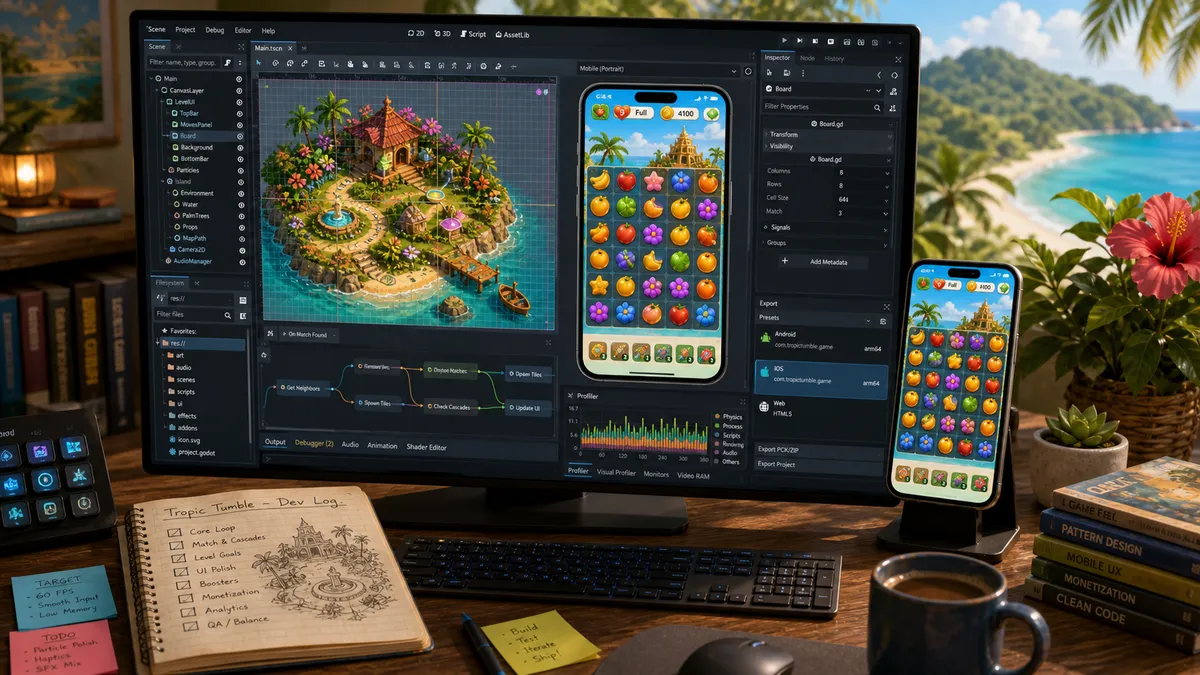
Godot was not the hardest part of building my mobile game. That was the surprise.
I built Tropic Tumble, a tropical match-3 game, in Godot, from rough prototype to a game that shipped on Android and iOS, with purchases, leaderboards, a compressed build, and real-phone testing.
The engine handled the game well. The painful parts were the mobile assumptions I made too late, the AI agent mistakes that looked correct at first glance, and the store plumbing around the build.
So this is not a broad argument for Godot. It is the version I wish I had read before I started: what I would set up on day one, what caught me out, and what was not really a Godot problem at all.
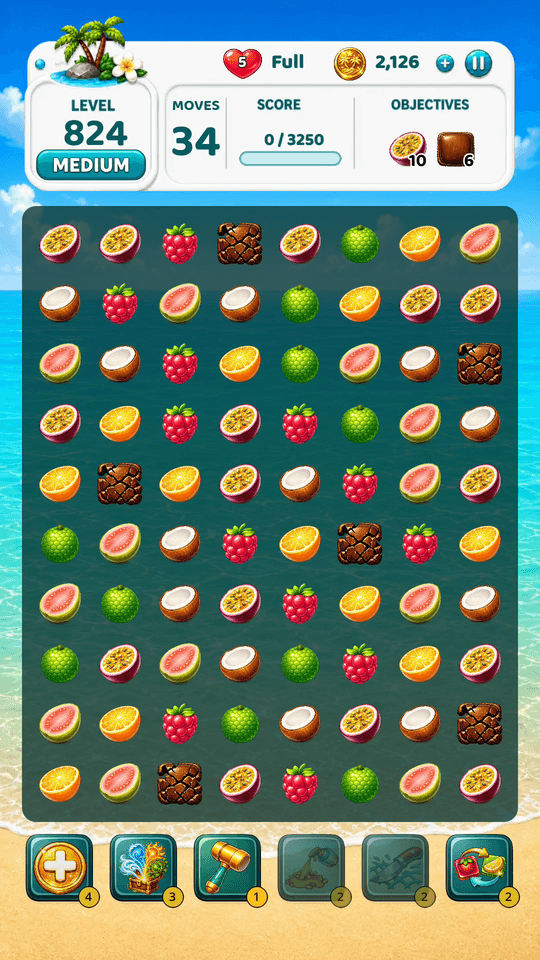
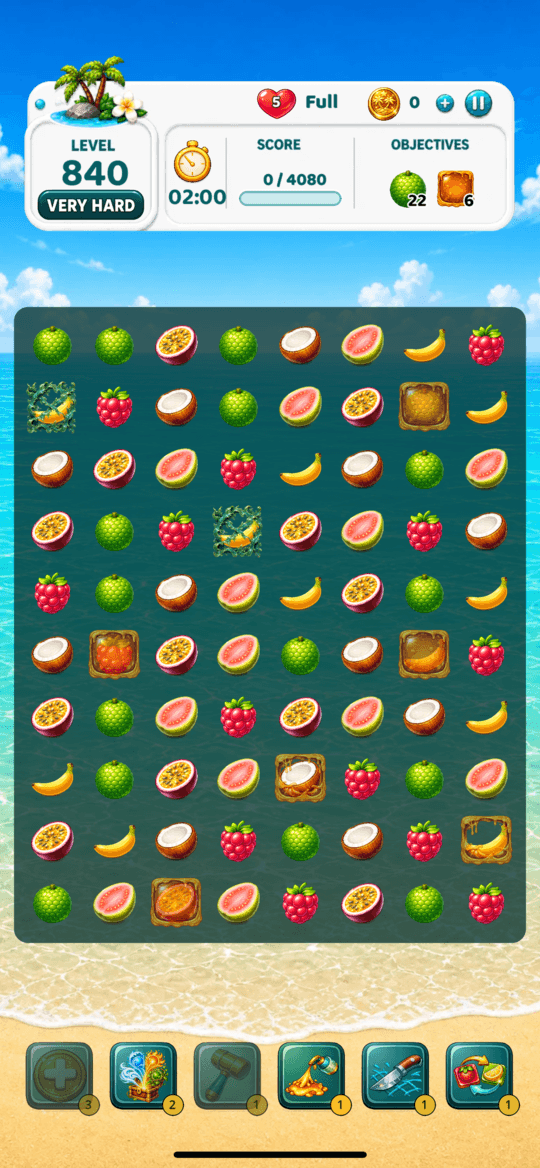
Tropic Tumble on the mobile path: Android gameplay on one side, iPhone simulator gameplay on the other. Godot was good for the game. Mobile release work was the part that needed more respect.
Would I use Godot again?
Yes, for this kind of game.
For a 2D mobile puzzle game, Godot gave me what I needed: scenes, signals, fast iteration, a friendly scripting language, no engine fee, and enough control to build the game my way.
I was not fighting the engine. Most days I was fighting product decisions, device behaviour, store rules, build size, and AI agents that were confident where they should have been careful.
Here is the honest split.
| Part of the project | How it felt |
|---|---|
| Match-3 board logic and scenes | ✓ good fit |
| UI screens, overlays, and game flow | ✓ good, with discipline |
| Real-device layout across screen sizes | ~ set up early |
| AI agents writing GDScript | ~ useful, but needs rules |
| Android export and signing | ~ learnable, not instant |
| Ads and purchases | ~ plugin and store work |
| iPhone export and TestFlight | ✗ start earlier than you think |
| Store gates after the build is ready | ✗ not Godot, still blocks launch |
✓ smooth enough ~ plan time ✗ serious lead time
That table is the article. Godot was ready for my game. I was the one who had to learn the mobile release path.
Why Godot, honestly
I did not start with a deep engine opinion. I picked Godot because it let me start fast and free, and it earned the choice as I went. The reasons I would point a new solo developer here first:
- Free and open source, no strings. Godot is MIT-licensed: no engine fee, no seat cost, no royalty on what you earn. For one person funding a game out of pocket, that beats any feature list.
- It starts in seconds. Small download, opens fast, and I could run the game in a window and see it on different screen sizes almost immediately. The change-play-look loop is fast enough to stay in flow.
- The configuration was learnable. The settings that matter for mobile are a short list, not a semester. I was not stuck fighting setup before I could build.
- You can drive it, and so can AI. Friendly enough to learn by hand, structured enough that a coding agent can work in it (with rules, below). You are not locked out either way.
- It is genuinely good at 2D. For a match-3 game, the scene-and-node model, signals, and the scripting language fit the work instead of fighting it.
How it sits next to the usual names, from a solo, 2D, mobile point of view:
| Engine | Cost model | Weight to start | 2D mobile fit |
|---|---|---|---|
| Godot | Free, open source, no royalty | Tiny download, fast | Strong, 2D-first |
| Unity | Free tier, paid plans at scale | Heavier, more setup | Strong, but more than a 2D game needs |
| Unreal | Free, royalty on revenue past a threshold | Heaviest, 3D-first | Overkill for casual 2D |
| GameMaker | Free to start, paid for commercial export | Light, 2D-focused | Strong for 2D, smaller ecosystem |
Check each engine’s current pricing yourself before you commit, because these models change. But the shape held for me: Godot asked for the least up front and got out of my way.
I am an early adopter, and you can feel it. The engine has improved release over release while I have been building, and the gaps that exist now are the kind that close over time, not walls.
Choose the renderer deliberately
The first setting I would check in any Godot mobile project is the renderer.
Godot 4 gives you three: Forward Plus, Mobile, and Compatibility. The names mislead. Forward Plus sounds more powerful, so it sounds like the better one. For a phone game, it is usually the wrong starting point.
Godot’s own renderer documentation describes Forward Plus as the high-end desktop option, Mobile as the modern path for newer phones, and Compatibility as the broadest path for older and lower-end hardware. Godot also says Compatibility is usually enough for 2D. For Tropic Tumble, supporting a wider range of phones mattered more than Mobile-renderer features.
| Renderer | Use it for | My mobile-game take |
|---|---|---|
| Forward Plus | Desktop and high-end visuals | ✗ do not start here |
| Mobile | Newer phones and tablets | ~ use when its features earn the hardware requirement |
| Compatibility | 2D and the widest device reach | ✓ Tropic Tumble’s mobile choice |
The lesson is simple: choose the renderer against your actual game and device range before you build screens, effects, and assumptions on top of it. Choosing deliberately on day one beats chasing compatibility later.
Here is that choice in my actual project.godot, the first block I would check in any mobile project:
[rendering]
renderer/rendering_method="mobile"
renderer/rendering_method.mobile="gl_compatibility"
textures/vram_compression/import_etc2_astc=true
The base renderer is Mobile, but the .mobile override means the exported phone builds deliberately use Compatibility through OpenGL, with ETC2/ASTC texture compression enabled. The exact choice depends on your art, features, and target devices. The point is to make that tradeoff on purpose and verify the renderer the phone actually runs.
Design for real phone screens from the start
The first board is not where mobile catches you. The screens around the board are.
Tropic Tumble has a home hub, island map, level intro, board HUD, win and fail screens, shop, journal, missions, leaderboard, settings, profile, unlock screens, popups, and purchase flows. Every one has to work across different screen heights and widths, Android status bars, iPhone safe areas, notches, rounded corners, and real thumbs.
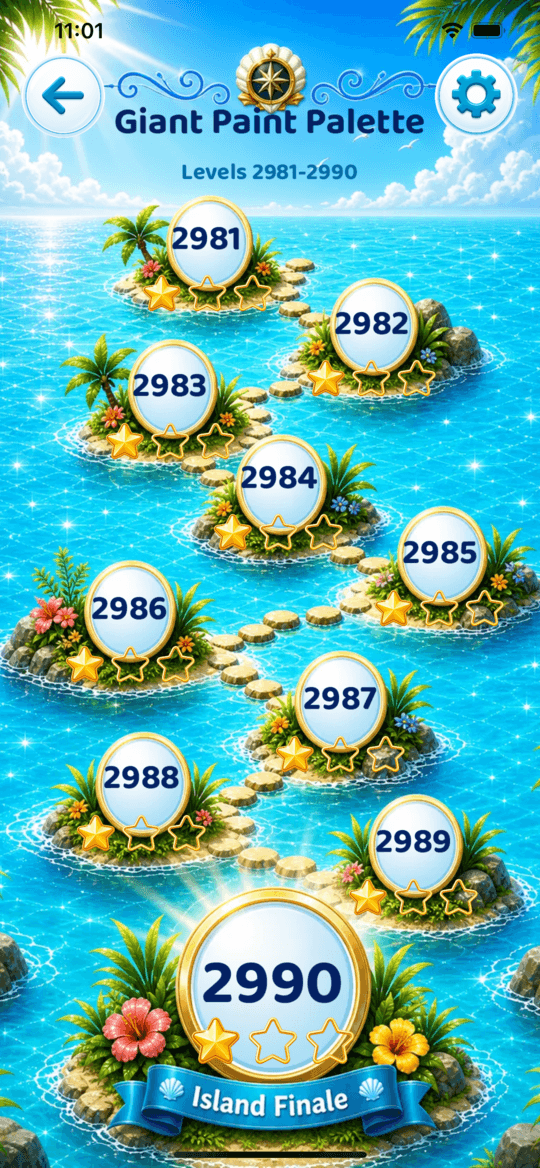
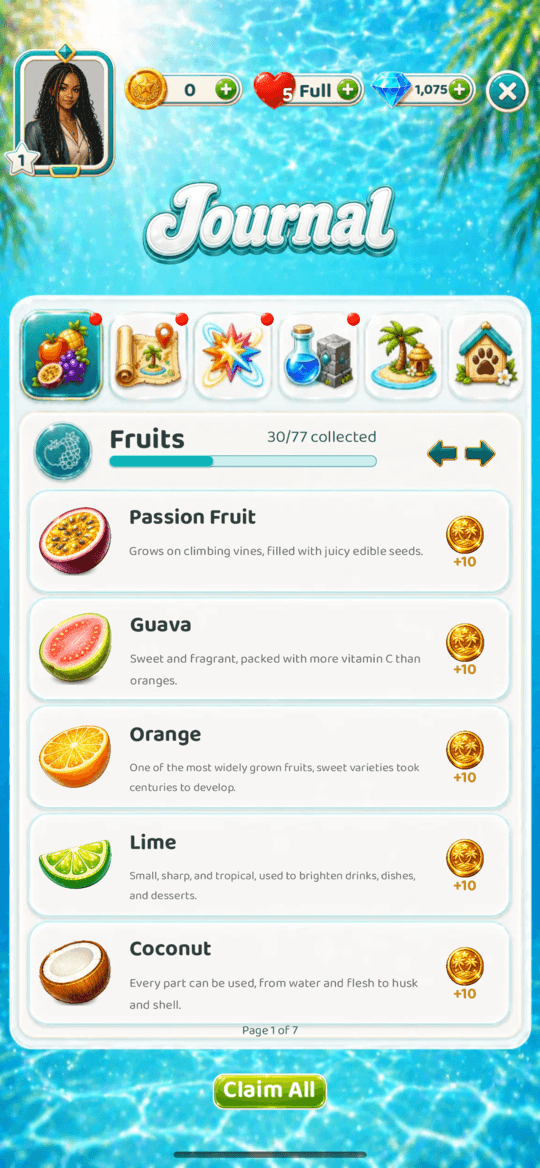
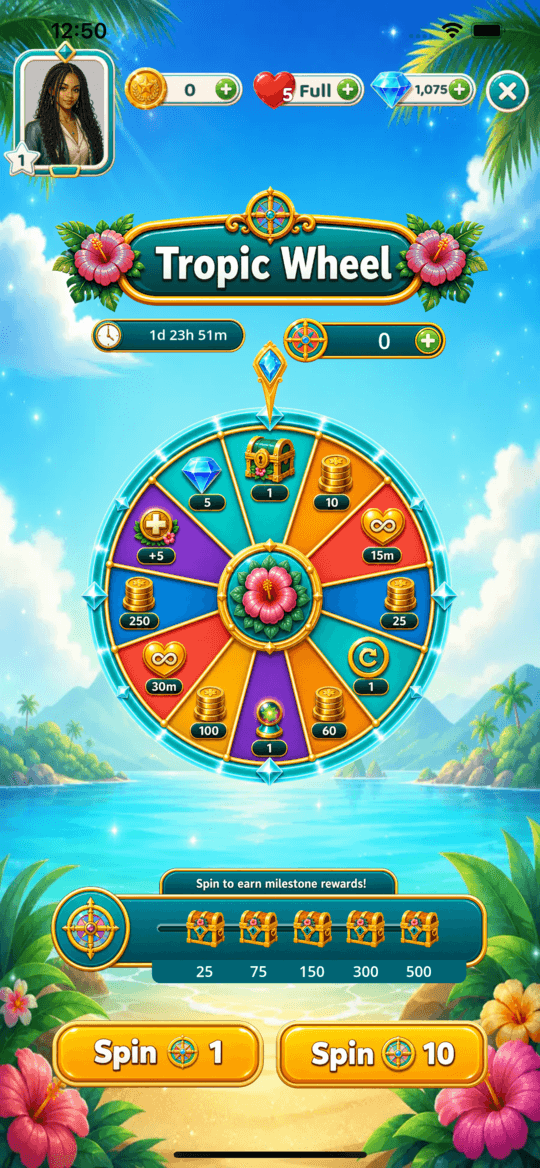
A handful of those screens. The map running out to its island finale near level 3000, the collectibles journal, the prize wheel. Each one is its own layout, not a variation on the board, and each one has to hold its shape on every phone.
The settings that did the heavy lifting for me were the base portrait resolution and stretch mode.
; project.godot: the real settings, trimmed to what matters on mobile
[display]
window/size/viewport_width=540
window/size/viewport_height=960
window/size/resizable=false
window/stretch/mode="canvas_items"
window/stretch/aspect="expand"
window/handheld/orientation=1
That is only the start. The board still has to size itself from the available space, not fixed pixels, and safe areas have to be handled explicitly.
A tall phone makes a layout feel empty, a small phone makes a board feel cramped, and an off-centre notch makes a centered layout look wrong even when the math is right.
Here is the real runtime sizing from my config.gd, lightly trimmed. It takes the space the board is allowed plus the live column and row count, and derives the cell size from that, with no fixed pixel positions anywhere:
# Cell size is derived from the space the board is given, never hard-coded.
func compute_runtime_board_pixel_metrics(play_width, play_height, cols, rows) -> Vector2i:
    var gap := float(BOARD_PLAY_SIDE_GAP_MIN_PX)
    if cols == 7:                                  # 7-wide boards get a tighter side gap
        gap = float(BOARD_PLAY_SIDE_GAP_7X6_PX)
    var usable_w := maxf(40.0, play_width - 2.0 * gap)
    # Width-primary: larger cells on narrow boards, shrinking as columns grow.
    var cell := clampi(int(usable_w / float(cols)), BOARD_CELL_MIN_PX, BOARD_CELL_MAX_PX)
    # Re-clamp so every row still fits the height we are allowed to use.
    var target_h := play_height * board_play_height_fraction_for_play_rect(rows, cols, play_width, play_height)
    if rows * cell > int(target_h):
        cell = mini(cell, int(target_h / float(rows)))
    var tile := clampi(int(round(cell * float(TILE_SIZE) / float(CELL_SIZE))), cell - 22, cell - 4)
    return Vector2i(cell, tile)
That is the whole difference between a board that fits every phone and one that only looks right on the screen you happened to design on.
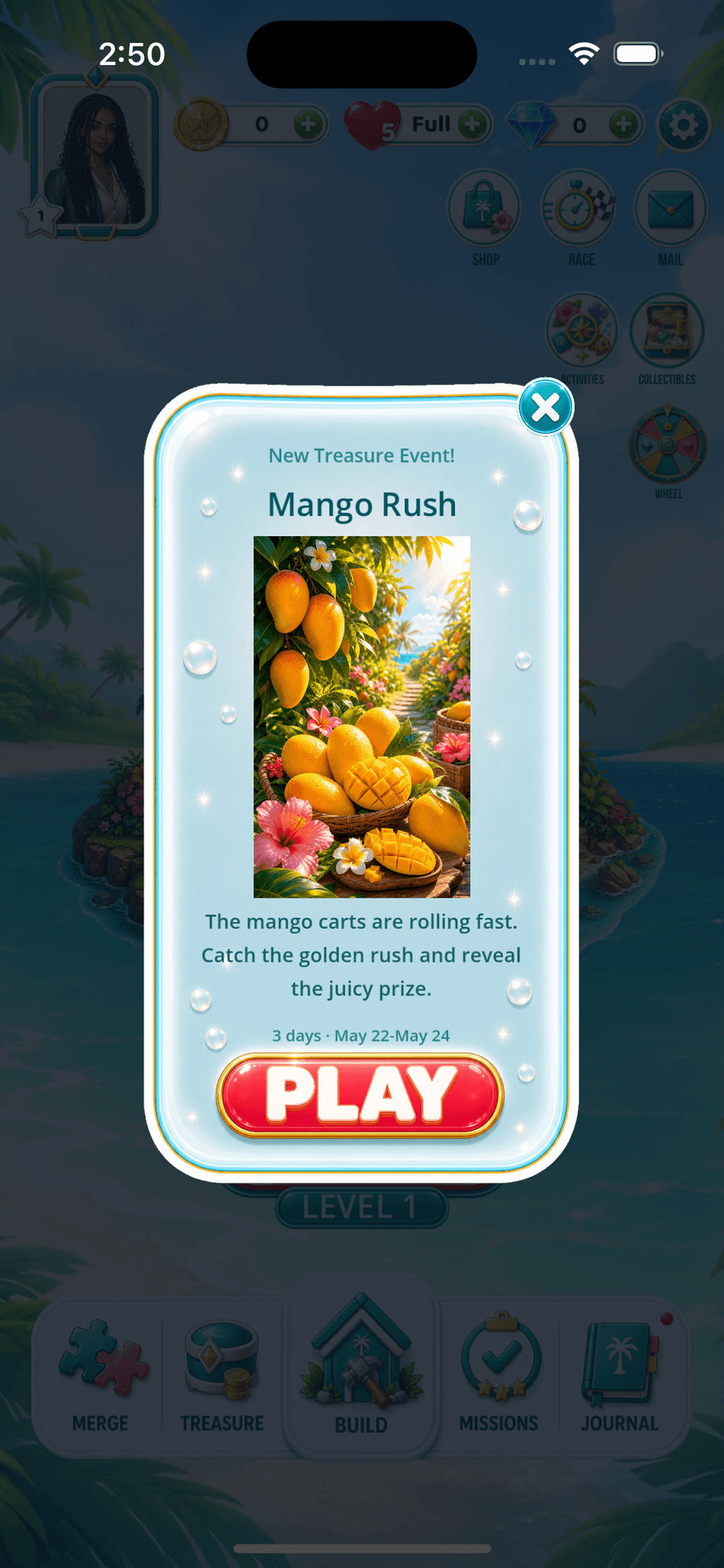
The same rule on a real iPhone. The top HUD clears the Dynamic Island and status bar, the navigation row sits above the home indicator, and the popup stays inside the safe area. You only get that by handling the insets on purpose. The editor will happily let you draw underneath all of it and never complain.
This was one of the places AI was least useful. It could read a scene tree and confirm the nodes existed. It could not look at the phone and say “that button is too big” or “that panel is not centered.” I had to be the eye, on the actual device.
The day-one rule now is simple:
- Pick a portrait base resolution.
- Set stretch mode before building screens.
- Make the board calculate from available space.
- Handle safe-area insets on both platforms.
- Test the smallest and tallest screens you can get access to.
If you skip this, the game may still run. It just will not feel polished.
AI agents need Godot rules
I built a lot of Tropic Tumble with AI coding agents. They helped, but Godot exposed their weak spots quickly.
The problem was not that they could not write GDScript. They could. It was that they wrote plausible Godot code that was wrong in small, engine-specific ways, which is more dangerous than a loud syntax error because it looks finished.
The mistakes repeated until I wrote rules for them.
- Do not create a script and forget its companion files. Godot tracks resources in ways an agent does not always respect. Incomplete generated files make the editor and export behave differently from what the agent expected.
- Do not grab global state through fragile scene-tree lookups. Agents love whatever compiles fastest. I had to push shared access through typed helpers and managers so references did not become a pile of string lookups.
- Find the owner before patching behaviour. A match-3 game has board managers, tile nodes, animation queues, save stores, purchase services, and backend clients. Adding logic to the file already open is not the same as fixing the system. The power classifier, combo geometry, and evidence layers are worked through in the match-3 mechanics article.
- Be careful with animation timing. Tiles fall, settle, clear, spawn, and trigger powers. Update the board on the wrong frame and you cancel a tween or create a state that only fails while the player is watching.
- Verify the exported build, not only the editor run. Some problems only showed up after export, signing, packaging, or installing on a phone.
The sharpest example was a touch bug I could only see on iPhone. The treasure board’s tiles took their taps through a signal connected to gui_input, which worked in the editor and on Android, so every check came back green. On an actual iOS build the taps simply did not register.
The fix was small and engine-specific: override the _gui_input method on the control instead of connecting the gui_input signal, matching what the booster slots and mission cards already did. That is the whole danger of this section in one bug. Plausible Godot code, wrong in a way only the real device on the right platform would show you.
This changed how I used AI. I stopped treating agent output as “done” and started treating it as a fast draft that needed proof.
When it got something wrong twice, I did not just patch the code, I updated the project instructions so the same mistake got harder to repeat.
That is the real Godot lesson for AI-assisted development: the engine is learnable, but your agent needs local rules.
Lean into what the engine already does
Here is a mistake I made early, and the correction is worth more than the mistake. I used my own PNG art for almost everything instead of leaning on Godot’s sprite and 2D tooling.
The upside is real: the game looks like nothing else, because the art is mine and not a stock pack. The cost is real too. Hand-made PNGs mean you own all the UI placement and sizing yourself, with less of the engine helping you lay things out.
If I started again, I would buy a proper game-art asset pack. Not because the custom art was wrong, but because a ready-made pack arrives already sized, consistent, and in a system the engine and the coding agents both handle without being told how to treat every image.
Instead I generated and hand-cleaned hundreds of one-off assets, and that time cost was real. When art genuinely has to be yours it is worth it, and that trade-off is its own decision in designing a game with AI. But to ship a good game quickly, a pack is the smarter start.
The deeper mistake was building effects from scratch when the engine already shipped them. I wanted fruit to glint and shine and a hint to glow, and at first I was inventing that logic. Then I realised Godot already had the parts. Once I stopped reinventing and started telling the agents to use the built-in nodes, the game got more polished and the code got smaller.
The Godot features that did the most for Tropic Tumble:
- Tweens for motion. Almost every animated thing, tiles falling and settling, a popup easing in, a button press, is a tween. They are in over a hundred of my scripts. For a 2D game this is the built-in workhorse.
- Shaders for shine and surface. The shimmer on fruit, the lava on a volcano island, the moving water, and the hint glow are small custom shaders, not painted into the PNGs. One shader makes a static image feel alive across the whole board.
- Environment glow for reward moments. Godot’s glow gives wins and treasure their lift without baking a glow into every asset.
- Particles for the satisfying beats. Clears and bursts use the engine’s 2D particle system instead of hand-animated frames.
- The hint, as a concrete example. My hint does not blink a hard-coded sprite. It drives a glow shader on the tiles to point you at the move (in
tutorial_manager.gdand a smalltile_hint_glow_visuallayer). The engine draws the effect; my code only decides which tiles and how strong.
Here is that hint glow, trimmed. It is a few lines of canvas_item shader the GPU runs for free, instead of a stack of hand-drawn glow frames:
shader_type canvas_item;
render_mode blend_add, unshaded;

uniform float fade_start = 0.32;   // glow strongest at the bottom of the fruit, fading up
uniform float rgb_boost  = 1.5;    // so the additive gold reads solid, not wispy
uniform float alpha_boost = 1.35;

void fragment() {
    vec4 tex = texture(TEXTURE, UV) * COLOR;
    float w = smoothstep(fade_start, 1.0, UV.y);
    COLOR = vec4(tex.rgb * rgb_boost * w, clamp(tex.a * alpha_boost * w, 0.0, 1.0));
}
The lesson for AI-assisted game development is specific. A coding agent will happily write a custom solution for something the engine already does well, because writing code is what it does.
Part of your job is knowing what Godot ships, so you can point the agent at the node, the tween, the particle system, or the shader instead of asking it to recreate engine behaviour in custom code. It is a game engine. Use the game-engine parts.
Android export is a pipeline, not a button
The Android editor export looks simple enough to trick you: click export, get a file, install it. A release build is more than that.
Godot’s Android export guide matters because the toolchain has real requirements: Java, the Android SDK, export templates, package name, signing, version code, and Android App Bundle output.
Get any wrong and you can have a game that runs in the editor but no build Google Play will accept.
The traps I hit were practical:
- A debug build and a signed release bundle are not the same artifact.
- A phone refuses an update if the installed app has the same package name but a different signing key.
- Store plugins for billing and ads are not magic. They bring native Android libraries and configuration that need correct packaging.
- A repo check can pass while the final app bundle is missing something it needs at runtime.
- The only build that matters is the one you can install, open, test, and upload.
- Bundle size is a release constraint, not a detail. My assets and Godot’s import cache had ballooned past twelve gigabytes, and an early test build weighed more than six, far too heavy to install and test comfortably. Converting runtime art to WebP, removing duplicate PNGs, archiving the source art out of the shipped build, and tuning texture compression brought the installable app under half a gigabyte. The number that counts is the one a player downloads, not the one in the editor.
So I never trust “the export succeeded” alone. I check the signed bundle that actually ships, its version code, and a real-device install. Boring, and it saves you from very expensive confusion.
Google Play adds a waiting period
This is not a Godot issue, but it shapes your timeline, so plan for it. A new personal Google Play account has to run a closed test before you can apply for production access, and that request is then reviewed, so “the game is built” and “the game can launch” are different dates.
I walk through that gate, and the rest of the store setup, in how I built a mobile game with AI agents. The Godot-specific takeaway: treat tester recruitment and store setup as work that runs alongside the build, not after it.
iPhone is a separate project
iPhone was the path I respected too late.
Godot’s iOS export documentation is clear about the shape of it: Godot exports an Xcode project. You still need a Mac, Xcode, Apple signing, provisioning profiles, bundle identifiers, App Store Connect setup, and TestFlight or App Review.
That is a lot coming from “the game runs in Godot.”
The first iPhone milestone should not be “the whole game is done.” It should be “can I get a tiny exported build through Xcode and into the TestFlight path?” Do that early, before you have thousands of levels and store systems waiting behind it.
The mistakes here are expensive because they are slow:
- Signing problems do not care how good your game is.
- A missing provisioning profile can stop you before testing starts.
- iOS build numbers need their own lane; do not treat them like Android version codes.
- TestFlight and App Review are platform processes, not code tasks.
- If you do not own an iPhone, testers become your eyes and hands, so your feedback process has to be clear.
Keep repo-ready and store-ready separate: a clean Godot export can still be blocked by Apple-side signing or review, and mixing the two produces the vague “almost done” answers that hide where you really are.
Where Godot makes you do the work
Honesty cuts both ways, so here is the other side. Godot does the gameplay well, but a real product needs a lot of scaffolding around it, and more of that is on you than in a bigger commercial engine.
The clearest example was payments. Some third-party services I wanted had no ready Godot plugin, so I could not drop them in the way you can in a more established ecosystem. I worked with what had native support and left the rest.
I expect that to change, the plugin ecosystem is growing fast, but right now you have to confirm the integration you need exists before you plan around it.
More broadly:
- You build the scaffolding. Save systems, store plumbing, backend clients, the glue between screens: a lot of that you wire up yourself or assemble from community add-ons, rather than getting it out of the box.
- You will do research. When something is not built in, the answer is usually in the docs, a forum thread, or someone else’s project, not a single official button.
- The community is genuinely good. Strong creators, solid resources, solid official docs. You are not figuring it out alone, but you are figuring it out.
None of that changed my answer. For a solo developer starting a 2D mobile game, Godot does what you need for the gameplay and asks little to begin.
Just go in knowing that “the engine can do it” and “the engine does it for you” are two different promises, and a lot of the product is the part you build around the game.
The engine was rarely the bottleneck, with one honest exception
Most of the problems that felt biggest were not “Godot cannot do this.” They were the release pipeline, the iPhone lane, build size, agent rules, real-device testing, and waiting on store processes, the work around the game more than the engine itself.
But the exception is real, and I will not wave it away: the plugin gaps shaped the build. More than once, a missing integration meant dropping or reworking a feature to fit what had native or community support, the way the payments work went above. That is a younger-ecosystem cost, the kind that closes over time, but it was real and it changed decisions.
So the honest diagnosis is mixed. I would still choose Godot, and the engine was usually not what blocked me, but where it lacked a plugin it pushed the project down a path I would not have picked. With that said, here is how I would run the project differently.
My day-one checklist now
If I started another mobile game in Godot tomorrow, I would not begin by building ten screens. I would prove the pipeline first.
- Choose and verify the renderer for your real device range.
- Choose the portrait base resolution and stretch settings.
- Build one ugly board and one ugly menu that scale on different phones.
- Export a throwaway Android App Bundle.
- Sign it, install it on a real Android phone, and write down the version code.
- Create the Play Console app early if you are going there.
- Recruit closed testers before you need them.
- Export a tiny iOS project to Xcode early if iPhone is in scope.
- Keep Android and iOS build numbers separate.
- Pick purchase and ad plugins early, then test them on real devices.
- Write Godot-specific agent rules before the codebase gets large.
- Verify the final artifact, not only the editor build.
That checklist is not glamorous, but it is the difference between a fun prototype and a release path you can trust.
Godot earned its place for Tropic Tumble. It let me build a real mobile game without engine fees and without fighting the core 2D workflow.
But the lesson I would carry forward is not “Godot makes mobile easy.” It is sharper:
Godot can absolutely be the engine. You still have to respect the phone, the store, the signing, the plugins, the exported artifact, and the real player holding the device.
Before you build the polished game, prove the whole path once. Ugly board, real Android export, real iOS export if you need it, real device, real store setup. The day you prove that path is the day you know what project you are actually building.

Written by
Julia Pottinger
Hi, I'm Julia. I've been in QA for over a decade. I spend my days testing software and my own time building apps and games, and I write here to share what I learn, the practical, honest lessons you can actually use.

Comments 0
Share your thoughts, ask questions, or add to the conversation.