
An AI coding agent is only as useful as what it can actually reach. Give one a clever prompt and nothing else, and it will write you a confident test against an application it has never seen, find a locator that does not exist, and reproduce a bug it had to imagine.
The model is not the problem there. The problem is that you sat it down in front of a locked room and asked it to describe the furniture.
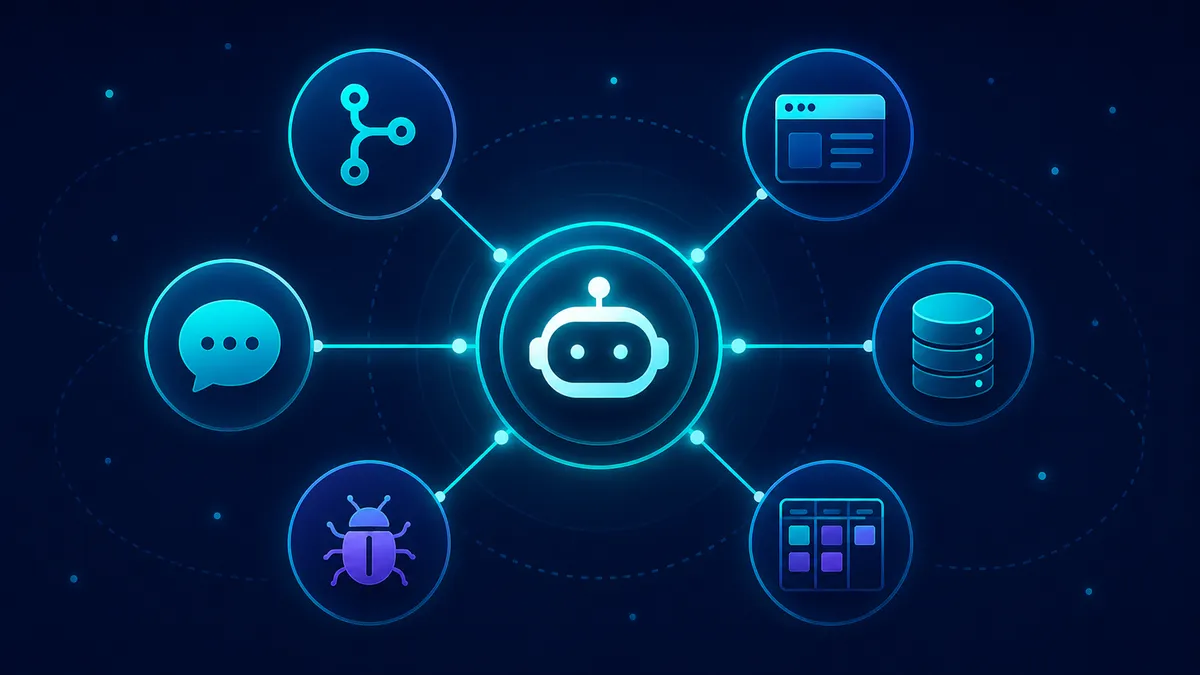
The fix is to connect it to your real sources through the Model Context Protocol (MCP). An MCP server is a small connector that plugs the agent into one real thing: your repo, your running app, the ticket the work came from, your database. Once those are plugged in, the work it gives back stops being generic and starts being about your system.
Context is the difference between a useful agent and a guessing agent. I have written the conceptual version of that argument, which sources to connect and why, in give your AI real context. This is the hands-on companion: less about why, more about which servers to switch on today and how to do it without handing over the keys.
What MCP actually is, in one read
The Model Context Protocol is the open standard behind those connectors. It started at Anthropic in late 2024 and is now vendor-neutral, supported across Claude and Claude Code, Cursor, OpenAI Codex and ChatGPT, VS Code, and Windsurf. That support is the part that matters day to day: wire a server up once and you can point whichever of those tools you use at it, so the context you set up follows you between editors instead of being rebuilt each time.
A server gives the agent three things:
- Tools are actions the agent can take, like “open this page” or “run this query”.
- Resources are read-only context, like a file or a log.
- Prompts are reusable templates.
For QA, the tools are where the interesting work happens, because they are what let the agent do something against your system instead of talking about it.
One thing to get right before you install anything
Many of the original reference servers got archived. The first wave shipped reference implementations for GitHub, GitLab, Slack, Postgres, Sentry, and Google Drive, and those have all been archived and explicitly marked no longer maintained, with no security guarantees.
Do not go install the old reference GitHub server you find in a year-old tutorial. The vendors now ship their own official servers, and those are the ones to use.
The reference servers still actively maintained are a smaller, lower-level set: Filesystem, Fetch, Git, Memory, Sequential Thinking, and Time. Filesystem and Git are the two that earn their place in a QA setup straight away. The rest of your shortlist comes from the vendors themselves.
The shortlist worth switching on
You do not need twenty servers. You need the handful that map onto what QA actually does: read what changed, exercise the running thing, ground a test in the spec, verify the data, and turn a failure into a real, contextualised issue.
Start with these three
If the full table feels like a lot, you only need three to get the real jump, and they map onto the three things a QA agent is otherwise missing:
- Filesystem and Git, so it can read what actually changed: the diff, the test files, the fixtures, the logs.
- Playwright (or another browser server), so it can drive the running app instead of guessing at selectors.
- One source of truth for the work: GitHub for pull requests and CI, Jira for the spec, or Supabase for the data, depending on whether your bug lives in code, in a ticket, or in a row.
Add those three, feel the difference, then reach for the rest.
Before you switch any of them on, one rule outranks the whole list: give every server the least access that still does the job, prefer read-only, and keep a human approving anything that writes. The full guardrails are further down, but least privilege is the price of entry, not an afterthought. A server that can only read is easy to reason about. A server with write access and no approval step can change things you never reviewed.
Here is the set worth switching on, in plain terms:
- Playwright drives your website like a person would, so the agent can walk a flow or reproduce a UI bug.
- Chrome DevTools shows why a page is slow or which request is failing.
- Filesystem reads your test files, fixtures, and logs in one folder you allow.
- Git reads what changed in the code, so tests target the change.
- GitHub reads pull requests, issues, and CI runs.
- Atlassian reads the Jira ticket and the Confluence spec, so tests match what was actually asked for.
- Supabase reads the database, to prove a record really changed.
- Sentry pulls the real error details behind a failure.
- Postman fires API requests and checks the responses.
And the detail on each: who maintains it, and what it unlocks.
| Server | Who maintains it | What it gives QA | Official |
|---|---|---|---|
| Playwright MCP | Microsoft | Drives a real browser through the accessibility tree, so the agent can reproduce a UI bug and walk a flow | ✓ |
| Chrome DevTools MCP | Live Chrome for performance traces, network inspection, and console logs with source-mapped stacks | ✓ | |
| Filesystem | MCP reference | Scoped read/write to a directory you allow, so it reads test files, fixtures, and logs, and writes reports | ✓ |
| Git | MCP reference | Read, search, and diff the local repo, so it tests what actually changed | ✓ |
| GitHub MCP | GitHub | Read code, manage issues and pull requests, read Actions runs and logs | ✓ |
| Atlassian Rovo MCP | Atlassian | Read the spec and acceptance criteria in Jira and Confluence, file or update tickets with your permissions | ✓ |
| Supabase MCP | Supabase | Query the database read-only to verify data after a test | ✓ |
| Sentry MCP | Sentry | Pull stack traces and event context in, turn a failing test into a contextualised issue | ✓ |
| Postman MCP | Postman | Run and manage collections and exercise APIs, the strongest official pick for API testing | ✓ |
✓ official, maintained by the vendor or the MCP project ~ partial ✗ not maintained
A picture helps here, because the point of all this is that one agent sits in the middle and reaches out to every source at once. That is what changes the work.
Drive the running app: Playwright and Chrome DevTools
The single most valuable thing you can give a QA agent is the ability to use the real application. Playwright MCP (the @playwright/mcp package) drives a real browser through the accessibility tree rather than screenshots, with deterministic locators.
That matters: the agent navigates the page the way a screen reader does, by role and label. So it can reproduce a UI bug from a description, walk a checkout flow end to end, and help with exploratory checks against something live instead of reasoning about a static image.
Chrome DevTools MCP (the chrome-devtools-mcp package), which Google launched in late 2025, is the diagnostic counterpart. It opens live Chrome and exposes performance traces, network request inspection, and console logs with source-mapped stack traces.
When a page is slow or a request is silently failing, the agent can characterise it: which request blocked, what the trace shows, which line the console error traces back to. That is the difference between “the page feels slow” and a recorded trace you can act on.
Read what changed: Filesystem, Git, and GitHub
Filesystem (@modelcontextprotocol/server-filesystem) gives the agent scoped read and write inside a directory you name, so it can read your test files, fixtures, and logs, and write a report back where you can see it.
Git lets it read, search, and diff the local repo, which is how it tests what actually changed in a branch instead of re-testing the whole app blind.
GitHub MCP is the official server that supersedes the archived reference one. It reads code, manages issues and pull requests, and reads Actions runs and logs.
This is two loops at once: the find it, fix it, open a pull request loop, and the file-a-real-bug loop. A failing run in continuous integration (CI) becomes something the agent can read the logs for and explain, rather than a red X you go spelunking through yourself.
Ground the test in intent: Atlassian Rovo
A test is only as good as the behaviour it is checking, and the intended behaviour usually lives in the ticket, not your head. The Atlassian Rovo MCP server reads the spec and acceptance criteria in Jira and Confluence, and files or updates tickets using your own permissions.
So the agent can write tests grounded in what the story actually asked for. When it finds a gap, it can file the ticket back in your tracker rather than dropping it in a chat that scrolls away.
Verify the data: Supabase
This is the check the UI cannot give you. The screen says “Saved.” Did the record actually change? The Supabase MCP server lets the agent query the database read-only to confirm the outcome after a test runs.
This is the check you want any time the screen claims something the database has to back up: the UI says the record saved, and the agent reads the row straight back and reports whether the value, the owner, and the timestamp are really what they should be.
Check the real behaviour, not just the screen. Switch on read-only mode and the agent can verify all day without ever being able to change a thing.
Turn failures into real issues: Sentry
When something breaks in a real environment, the context is sitting in your error tracker. The Sentry MCP server pulls stack traces, events, and issue details into the agent, so a failing test stops being “it broke” and becomes a contextualised issue with the actual exception, the affected release, and how often it has happened.
That is most of a good bug report already assembled, from real production signal rather than a guess.
Exercise the APIs: Postman
For API testing, the Postman MCP server is the strongest official pick. It runs and manages collections and exercises your APIs directly, so the agent can fire the request, read the response, and check the contract without ever opening the UI. That is how an agent works a request flow against live endpoints instead of mocking it.
How to switch them on
The configuration is JSON that describes how to launch each server: a command to run for a local server (over standard input/output, stdio) or a URL for a remote one (over HTTP). In Claude Code you can add servers with the command line or with a checked-in project file, .mcp.json.
The same mcpServers JSON shape is what Cursor, VS Code, and Windsurf read too, so one config travels across tools.
The fastest way to add a few is the CLI. These are real commands:
# A local server launched over stdio (the browser)
claude mcp add playwright -- npx -y @playwright/mcp@latest

# A local server with an argument: the one directory it may read and write
claude mcp add filesystem -- npx -y @modelcontextprotocol/server-filesystem /path/to/your/project

# A remote server over HTTP (sign in as yourself when the browser opens)
claude mcp add --transport http github https://api.githubcopilot.com/mcp/
If you would rather check the config into the repo so the whole team gets the same servers, drop a .mcp.json at the project root. Here is a real one with the two servers worth committing first:
{
  "mcpServers": {
    "playwright": {
      "command": "npx",
      "args": ["-y", "@playwright/mcp@latest"]
    },
    "filesystem": {
      "command": "npx",
      "args": ["-y", "@modelcontextprotocol/server-filesystem", "."]
    }
  }
}
One thing to understand before you commit anything: Claude Code has three scopes, and they decide who gets the server.
- Local is just you, in this one project. Good for anything tied to your own credentials.
- Project is checked into
.mcp.jsonand shared with the team. Good for the servers everyone needs, like the browser and the repo. - User applies across all your projects. Good for a tool you always want, everywhere.
Connect a server, then confirm it. In Claude Code, /mcp lists every server and whether it is connected. A server that is missing or failing is not a small thing; it is a source the agent will quietly guess about instead of read.
Once it says connected, prove the wiring is real the same way you would test anything else: ask one question that only works if the connection exists, and tell it to cite its sources.
users: id 7c2a, created 2026-06-19, role standard (Supabase MCP, read-only). All three came back from the live servers, not memory.If it answers with a real PR number, an open ticket, and the row it just read back from the database, you are connected. If it stays vague or hedges, something is not wired up yet, and that is exactly what you want to catch before you trust its output.
Pair the whole setup with a CLAUDE.md at your repo root so the agent has both your live systems and your conventions, and the answers get sharper again.
Who does what once it is wired up
Real access changes who does the tedious part, not who makes the call. With these servers connected, you can wire the pieces into a full QA loop, from a Slack message to a pull request. But the agent is still genuinely good at only a specific set of jobs, and there is an equally specific set it should never own. Be clear about the line, because that clarity is what makes the speed safe.
Connect every server in the table and the line between what AI is good at and what stays human does not move. It just gets clearer. I make that full case, where AI is strong, where it is weak, and why someone still has to be the control layer over everything it generates, in QA is the control layer for AI-assisted development. Here, the short version is enough.
The agent does well at the work that is about reading and reaching:
- Reading the repo, the diff, and the CI logs to test what actually changed.
- Reading the ticket for intended behaviour and writing a clean one back.
- Driving the browser through the accessibility tree to reproduce a flow.
- Querying data read-only to confirm an outcome really happened.
- Pulling error context out of the tracker and assembling it into an issue.
You keep the work that is about judgment:
- The decision to ship, every time.
- The visual and user-experience call the accessibility tree cannot capture, whether a layout is off, an element is a few pixels out, a screen falls apart on a real device.
- Approving which tool calls run and what scope each server gets.
- Deciding what “correct” even means for this feature.
I am building a mobile game right now, and the line is sharpest there. The agent can read the Supabase row and tell me whether a score really saved. It cannot tell me the win animation feels wrong or that a button is too big under a thumb on a small phone. That stays my eyes.
If you want the longer version of this division of labour, I wrote it up in working with coding agents as a QA engineer.
The security guardrails a QA must know
Do not skip this part. Connecting an agent to real systems is connecting real systems to a thing that follows instructions, and not all of those instructions come from you. The official MCP security guidance is blunt about why, and two facts drive everything else.
First, tool descriptions and the content a tool returns are untrusted. That makes indirect prompt injection a real attack, not a theoretical one. A malicious web page can carry instructions in its content, and a browsing agent reading that page can be steered by them. So you never point a write-capable browsing agent at untrusted sites.
Second, a local server you install runs code with your privileges, so an untrustworthy server is an untrustworthy program on your machine.
The good news is that a short, strict set of rules covers almost all of it. Run through this before you connect anything that touches a real system, and keep it somewhere your team can see it.
- Trusted servers only. Install the official vendor server or the maintained reference one, from its real repo. Skip archived reference servers and random forks; a local server runs with your privileges.
- Least privilege, minimum-scope tokens. Give each server the narrowest access that does the job. No broad wildcard scopes, no blanket production write to read a flow. Mint tokens scoped to exactly what the task needs.
- Read-only by default for data. Switch on read-only mode for database servers so the agent can verify outcomes without being able to change a row. Reach for write access deliberately, never as the default.
- No write-capable agent on untrusted content. Do not let a browsing or write-enabled agent loose on pages and inputs you do not control. The content it reads can carry instructions.
- Human approval before any write. The host should require explicit approval before a tool runs, and especially before anything that writes: filing a bug, pushing a commit, changing data. You approve the action, not just the idea of it.
That last one is the load-bearing rule. Real access speeds the work up; it does not move the release decision, and it should never move a write past you silently.
Where to start this week
Do not try to switch on all nine at once. Connect Filesystem and Git so the agent can read what changed, add Playwright so it can use the running app, and verify the wiring with one specific question. That alone turns a blind assistant into one that tests your actual system.
Then add the rest as the work asks for them:
- GitHub when you want the pull-request loop.
- Atlassian when you want tests grounded in the spec.
- Supabase when you need to confirm the data.
- Sentry when a real failure needs context.
- Postman when the APIs are the point.
The agent does the reaching and the reading. You keep the judgment and the call to ship. Wire it up carefully, scope it tightly, approve every write, and you get an agent that works against your real system with evidence behind it instead of crossed fingers.
Once you have done that, a custom skill is the natural next step, and I walk through building one for QA in how to build a Claude skill for QA.

Written by
Julia Pottinger
Hi, I'm Julia. I've been in QA for over a decade. I spend my days testing software and my own time building apps and games, and I write here to share what I learn, the practical, honest lessons you can actually use.
Comments 0
Share your thoughts, ask questions, or add to the conversation.