
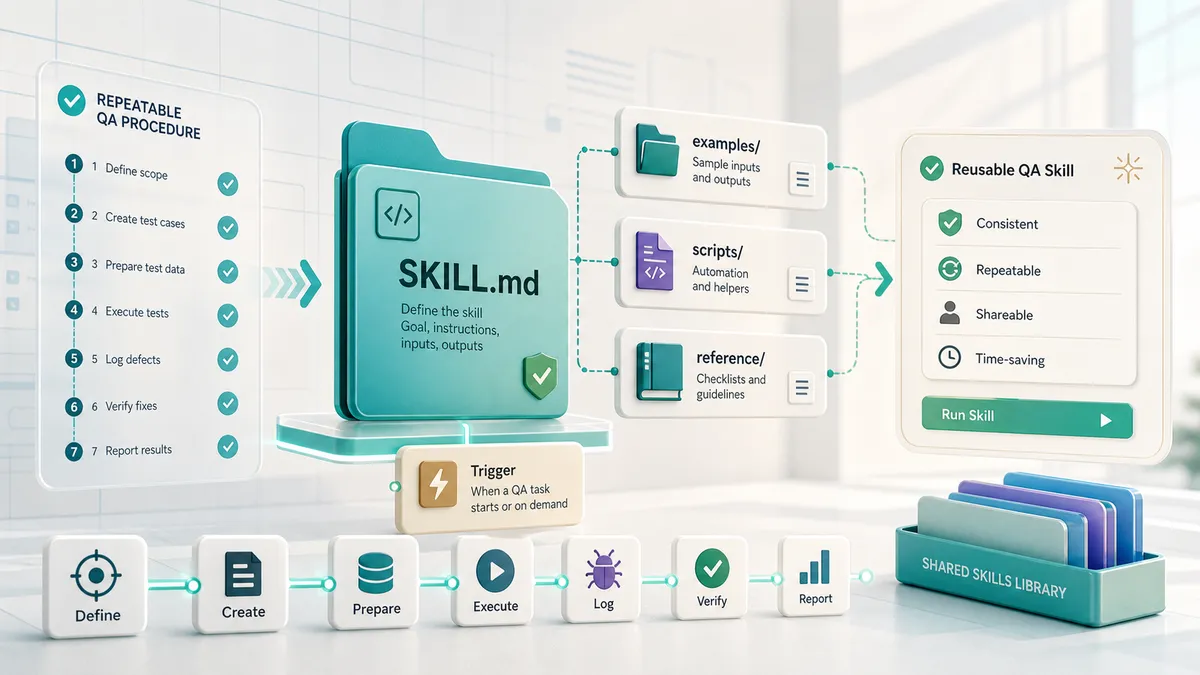
The most useful piece of AI work I have shipped is not a test I wrote. It is a skill that writes test plans, and the whole team uses it.
You point it at a feature, a ticket, or a spec and say “write me a test plan.” It reads the ticket, climbs up to the parent epic when the ticket is a thin stub, weighs the risk area by area, and hands back a structured plan with every case written as a “Verify that…” row. Then it publishes the plan where the team actually works, a wiki page or the ticket itself, instead of leaving it stranded in a chat. I built it over five rounds, and now anyone on the team can plan testing the same way, in the same shape, without me in the room. The payoff is not really speed. It is that the whole team plans the same way instead of each person inventing their own format.
That is what a skill is for, and you probably already have one waiting to be built.
The signal that you have a skill to build
You have a procedure you run every time. Maybe it is how you turn a requirements doc into a test plan, how you write a bug report, or how you decide what to automate. You have run it so many times you barely think about it, and every time you open a chat you type it out again, or dig through old conversations for the version where you finally got the wording right.
That re-pasting is the signal. When you keep handing an AI the same multi-step procedure, you have a skill waiting to be built: a folder the agent reads on its own, so the version you refined is the version it uses every time without you pasting anything.
I will use my own test-plan skill as the running example, with the company details stripped out. One thing matters more than the skill itself: the output is only ever as good as what the agent can actually see. Your real spec, your code, your tickets, the running app. Connecting those is the biggest lever on quality, more than any wording in the skill, and I cover it in give your AI real context for QA. Build that habit first; the skill is what makes it repeatable.
A skill is a folder, not a framework
Strip away the mystique and a skill is a folder with one required file in it.
.claude/skills/qa-test-plan/
├── SKILL.md          # required: frontmatter + instructions
├── reference/        # optional: long detail, loaded on demand
└── examples/         # optional: real worked outputs
The SKILL.md is the whole brain: YAML frontmatter at the top, markdown instructions below. The optional folders hold what would bloat that file, long reference material and real examples. No build step, no install command. If you can write markdown, you can write a skill. Commit the folder to your repo and the whole team gets it; put it at ~/.claude/skills/ and it is just you, across every project.
Skills follow the Agent Skills open standard, so the same folder works across tools that support it, not only one vendor.
If you already keep a rules file at your repo root, you might wonder why the procedure does not just go there. The split is about when each one loads. A rules file loads at the start of every session, which is right for facts the agent always needs: your locator strategy, your naming conventions, how the suite is structured. A skill loads only when its description matches what you asked for, so a procedure you run sometimes sits quietly until you need it.
A fact every session needs goes in your rules file. A procedure you invoke goes in a skill.
If a section of your rules file has quietly grown from a fact into a numbered procedure, that section wants to be a skill. If you have not written that rules file yet, start with a CLAUDE.md for your test suite first.
The anatomy of a SKILL.md
Here is the shape of my qa-test-plan skill, with the company details stripped out.
---
name: qa-test-plan
description: >-
  Generates a risk-shaped QA test plan from a spec, ticket, or feature description and
  publishes it as a page the team tests against. Use when the user asks to
  create a test plan, write QA test cases, or decide what to test for a
  feature, or shares a spec and asks about testing. Gathers context first,
  prioritises by risk, writes cases as "Verify that..." rows, and publishes
  to a wiki page or the ticket description, never a markdown file in chat.
allowed-tools: Read, Glob, Grep, mcp__wiki__*, mcp__tracker__*
---

# QA Test Plan

You write a test plan the team tests against, not a chat reply.

## 1. Gather context. Do not guess.
Read the spec or ticket in full. If the ticket is a thin stub, traverse up:
read the parent epic, linked design docs, and any spec. Confirm frontend,
backend, or both, the roles involved, and any feature flag. If anything is
still missing, ask before writing.

## 2. Assess risk before you count cases.
Weigh each area across revenue, security, customer-facing, data-integrity,
and operational impact. High-risk areas get P0 coverage and the most depth.
Do not spread cases evenly.

## 3. Write the cases.
Each case is a row: `ID | Verify that <condition> <expected result> | Priority | Status`.
ID is a section prefix plus a zero-padded number (FF-01). Priority is P0, P1,
or P2, driven by the risk pass.

## 4. List Open Questions.
For any undefined field, label, or error message, do not guess. Tie each
question to the cases it affects.

## 5. Publish it.
Create a wiki page or write into the ticket description. The page is the
artifact, not the chat.

## House style
Match the published plans in examples/. Read at least one before writing.Two fields earn special attention.
The description is the whole game. It is the only part of the skill loaded all the time, and it is the signal the agent uses to decide whether your skill is relevant at all. Write it in third person, and state both what the skill does and when to use it. I listed the real phrases people on my team actually say: “create a test plan”, “write QA test cases”, “what should we test for this.” Those are the triggers. The best instructions in the world do nothing if the skill never loads.
allowed-tools is the guardrail. It restricts what the skill can touch. Mine reads the codebase and the spec, and publishes the page. It cannot edit code or run arbitrary commands, because a test-plan skill has no business doing either. Give it exactly what the job needs and nothing more.
The thing that makes the output yours, though, is the examples/ folder. Instructions can say “write cases as ‘Verify that…’ rows.” They struggle to convey the hundred small judgments that make your plans yours: how much depth a medium plan gets, which sections you keep, how your Open Questions read. A real published plan carries all of that implicitly. I shipped mine with four real worked plans, one of each size I support, genericized, and told the body to read the matching one before writing. An example is worth more than a paragraph describing the example.
This is the shape that comes out the other end, so you can see what those “Verify that…” rows actually look like:
| ID | Verify that… | Priority | Status |
|---|---|---|---|
| AUTH-01 | Verify that a standard user signs in with valid credentials and lands on /dashboard | P0 | |
| FLAG-01 | Verify that with the flag off, the new panel is not rendered and the old view loads | P0 | |
| PERM-03 | Verify that a read-only user does not see the “Delete” control on any row | P1 |
A case that states the expected result in the same sentence tells you what to do and what proves it passed, in one line. “Test email validation” tells you nothing.
Three sizes, because not every feature needs eighty cases
One decision shaped the whole skill: it asks how big a plan you want before it writes a line. I support three sizes, and the labels are internal, so it offers them in plain language and lets the person pick.
- Mini is a quick smoke check, about ten to fifteen cases, P0 only, the core path and the highest-risk failures. It is what you drop straight into a ticket.
- Medium is balanced coverage across every area, about forty to sixty cases.
- Full is the exhaustive plan, eighty cases and up, for a big feature going to a wiki page.
The rule I had to teach it: medium and full cover every area and cut depth within each area, never whole areas. Mini is the only one that drops whole sections by design. Without that rule it kept “shrinking” a plan by deleting the boring-looking sections, which were sometimes the risky ones.
Build it by doing the task once, then encoding it
Here is the part I want you to actually try, because it is far easier than writing a SKILL.md from a blank page.
Do not start by writing the skill. Do the task once, in a chat, with a real spec or ticket, and correct the agent as you go. It will get things wrong:
- the priorities come out flat, with everything looking equally important
- it skips the permission split between the UI and the API
- it tries to hand you a file in chat instead of publishing the plan where the team works
Correct each one the way you would coach a sharp junior who does not know your team yet. That correction work is the real content of the skill.
Once the output is genuinely good, ask the agent to capture what just happened. This is the exact prompt I use, and you can paste it straight in:
Based on everything I corrected in this session, write a
SKILL.mdfor a skill calledqa-test-plan. Put the trigger phrases I would actually use in thedescription, in third person, and state both what it does and when to use it. Capture the gather-context step, the risk pass, the “Verify that…” case format, the Open Questions step, and the publish step as numbered instructions. Keep the body tight and point it at anexamples/folder for house style.
What comes back is a real draft, because the format is one the agent already understands. You are not teaching it the shape. You are handing it the procedure you just proved out loud.
Then test it in a fresh session with no memory of your corrections, and watch where it struggles. The cold session is the real exam, because it only knows what you wrote down. Where it stumbles is exactly where your instructions were thin. Feed that back in and run it again.
A good skill does not fall out of one sitting. Mine came together over five rounds, including a round of review feedback from the team and a later one that taught it to gather context before writing a single case. The first version wrote decent cases but planned against whatever the ticket happened to say, so a thin ticket produced a thin plan. That is why “Gather context. Do not guess.” sits at the very top of the body and not buried lower down. It was the correction I made the most, so it became the rule I encoded the hardest.
The corrections worth encoding are the bug classes you keep teaching
The rounds that improved the skill the most were not about formatting. They were the same bug-shaped corrections I make on real tickets every week, written down so the skill makes them for me:
- A hidden button is not an enforced permission. For any role-gated action, the skill now writes two cases: one that the UI hides the control, and one that a direct API call from that role is actually rejected. UI hiding is not backend enforcement, and treating it as one is how access bugs ship.
- Exact wording gets its own case. When a spec pins the exact text of a toast, an empty state, or a button, down to the punctuation, the skill pins that string in a dedicated case. Copy bugs ship constantly because nobody writes a case for them.
- A filter that swaps must not leave the old rows behind. Any table that filters, sorts, or paginates gets a case that the previous rows are actually gone after the swap. That stale-state bug is everywhere in modern front ends.
- One behavior per case. If a case bundles select-all, the bulk bar, and clear-selection into one line, the skill splits it, because when a bundled case fails you cannot tell which behavior broke.
None of those are clever. They are the judgments I would lose if I let a generic generator write the plan. Encoding them is the difference between a skill that produces plausible plans and one that produces mine.
The same caution applies to the skill as to any AI output: it amplifies whatever procedure you give it, good or bad, and it does not supply the judgment. That argument has its own home in QA is the control layer for AI-assisted development. Here it is enough to say the skill makes your output faster, not automatically better, so you still read what it produces.
Build a second skill the same way
Once you have built one skill, you have the method for every other one you want, because the loop never changes: do the task, correct it, encode it. So here is a second skill I built with that exact loop. The test-plan skill keeps everyone planning the same way; this one keeps everyone writing automation the same way.
It is a spec generator for our Cypress suite. Ask it to “create a test” for a feature and a role, and it scaffolds a brand-new test that already follows the suite’s conventions:
- the right folder for that feature and role
- actions wrapped in a driver, not raw framework commands
- selectors kept in the page object, not inline in the test
- the suite’s test-ID format
- the login for the role the test runs as
A new test starts correct instead of starting plausible and needing rework on review. That is what keeps a 167-file suite consistent even as different people add to it. Left to itself, each author reaches for slightly different structure, and the suite drifts a little with every new file. A conventions-aware scaffold means what lands in review is the testing decisions, not the boilerplate someone got wrong. That fewer-rejections effect is why I point at it again in how to review AI-generated automated tests.
Where I am taking this next
These two skills are pieces of something bigger I am building: an assistant that does the QA work, not just plans it. You talk to it in plain language, and it gathers the context, writes and runs the tests, looks at the screens, reports back, and files the bugs it finds. Every skill I write is one more piece of that. You do not need anything that ambitious to start, though. You need one procedure you are tired of typing.
Start this week
Pick the procedure you re-paste the most, whichever one you are tired of typing.
- Do that task once in a chat with a real example, and correct the AI until the output is genuinely good.
- Ask the agent to turn the corrected session into a
SKILL.md, with your real trigger phrases in the description. - Drop in two genericized examples of your best real output, and point the body at them.
- Test it in a fresh session. Note where it struggles and fix exactly those spots.
- Scope the allowed tools to only what the job needs, then commit it so your team gets it too.
The payoff is quiet but real. The procedure you spent months refining stops living in your memory and your old chat logs, and starts firing on its own, in your house style, every time someone asks for the thing it does. You stop re-pasting and start improving the one copy that everyone shares.
If you want to see what a finished test plan looks like coming out the other end, the AI test plan generator shows the full skill, a copy you can install, and a deep example of the page it produces.

Written by
Julia Pottinger
Hi, I'm Julia. I've been in QA for over a decade. I spend my days testing software and my own time building apps and games, and I write here to share what I learn, the practical, honest lessons you can actually use.
Comments 0
Share your thoughts, ask questions, or add to the conversation.