
My automation did not start with any of these three. It started with manual testing, then Nightwatch.js, then WebdriverIO, and a stretch of Selenium with Java on a different project. Cypress and Playwright came later. So when someone asks me which of the big three to pick, I am not reading down a feature list. I am remembering the tests I actually wrote and the flakes I actually chased.
The ones that stuck with me were Selenium tests missing a wait. The page was not ready, the command fired anyway, and the test went red overnight for no real reason. I would open it the next morning and there was nothing wrong with the product at all. That is when the real difference between these tools clicked for me. You are not really choosing a tool. You are choosing how your tests talk to the browser.
Selenium relays every command over HTTP through a driver. Cypress runs inside the browser, right next to your app. Playwright holds one persistent connection straight into it. That single difference shapes most of what you live with for years: how fast the suite runs, how it fails, how you debug it, and how many of those overnight flakes you end up chasing.
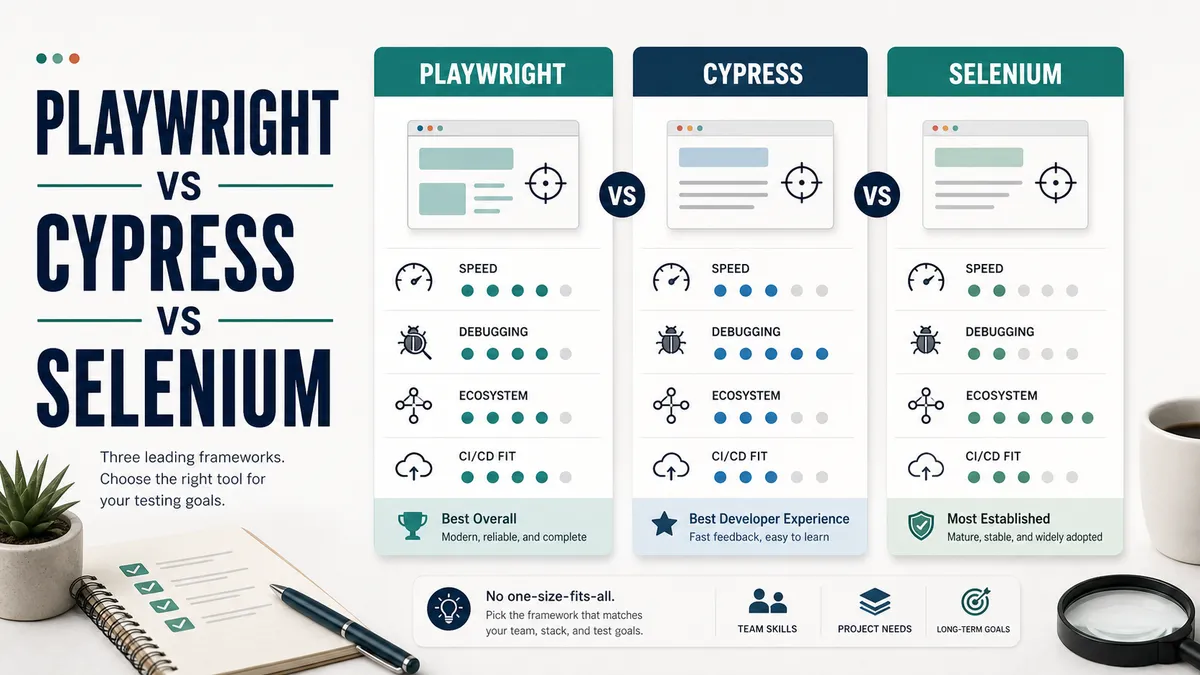
All three drive a real browser, and all three can do excellent work in the right hands, but in 2026 they are no longer evenly matched. For something new on a JavaScript or TypeScript codebase, Playwright is the one I reach for first. Cypress is still a lovely fit for frontend teams who live on Chromium and care most about developer experience. Selenium is still the right call for large teams working across many languages, where you need the widest browser support you can get.
Why the same choice keeps coming out that way is the interesting part, and you can see it the moment you put the same test side by side in all three.
The same test, three ways
Nothing shows the difference between these tools faster than the same test written in each of them. Here is a simple login test, three times over.
Playwright:
import { test, expect } from '@playwright/test'

test('verify that a registered user can log in', async ({ page }) => {
  await page.goto('https://the-internet.herokuapp.com/login')
  await page.getByLabel('Username').fill('tomsmith')
  await page.getByLabel('Password').fill('SuperSecretPassword!')
  await page.getByRole('button', { name: 'Login' }).click()

  await expect(page.getByText('You logged into a secure area')).toBeVisible()
})
Cypress:
describe('Login', () => {
  it('verify that a registered user can log in', () => {
    cy.visit('https://the-internet.herokuapp.com/login')
    cy.get('#username').type('tomsmith')
    cy.get('#password').type('SuperSecretPassword!')
    cy.get('button[type="submit"]').click()

    cy.contains('You logged into a secure area').should('be.visible')
  })
})
Selenium (JavaScript with WebDriver):
const { Builder, By, until } = require('selenium-webdriver')

async function verifyUserCanLogIn() {
  const driver = await new Builder().forBrowser('chrome').build()
  try {
    await driver.get('https://the-internet.herokuapp.com/login')
    await driver.findElement(By.id('username')).sendKeys('tomsmith')
    await driver.findElement(By.id('password')).sendKeys('SuperSecretPassword!')
    await driver.findElement(By.css('button[type="submit"]')).click()

    const flash = await driver.wait(
      until.elementLocated(By.css('#flash')),
      5000
    )
    const text = await flash.getText()
    if (!text.includes('You logged into a secure area')) {
      throw new Error('Login message not found')
    }
  } finally {
    await driver.quit()
  }
}
Even at a glance you can see it. Playwright and Cypress both come with a test runner, assertions, and automatic waiting already included, so the test reads almost like a description of what a user does. Selenium gives you the browser driver and leaves the runner, the assertions, and the waiting strategy for you to assemble yourself. That openness is part of why large teams reach for it, and it is also why it takes more effort to get going.
The waiting is the difference that cost me the most. In the Playwright and Cypress versions there is no sleep and no explicit wait before the assertion, because each one waits for the element to be ready on its own. In Selenium you write that wait yourself, and the forgotten wait is exactly the overnight flake I opened this article with. It was the most common cause of flaky Selenium tests I ever had to debug.
A note on locators
How you find elements matters just as much as the tool you pick, because good locators are what keep a suite from breaking every time the design changes. Notice that the Playwright test reaches for getByLabel and getByRole. Those find elements the way a real user, or a screen reader, would, by their visible label or their role on the page. It is the approach all three projects now recommend, and it carries into whichever tool you choose. For a quick reference to the patterns that hold up, I put together a locator cheat sheet you can keep open while you write.
A few habits keep tests stable no matter which one you land on:
- User-facing locators first: role, then label, then visible text.
- Add stable hooks in your own app, like
data-test="login-submit", rather than leaning on CSS classes, which designers will happily change out from under you. - Skip long, brittle chains such as
div > div:nth-child(3) > button. The moment the markup shifts, they break. - One clear assertion per behaviour, so that when a test fails it tells you exactly what broke.
How they actually work
Most of the differences between these tools trace back to how each one talks to the browser. Once that part clicks, the rest of the comparison stops feeling like trivia and starts making sense.
Selenium uses the W3C WebDriver protocol. Your test sends HTTP requests to a browser driver, which translates them into real browser actions. It is the most standardised and most portable of the three, which is why Selenium runs in almost every language and every browser and powers huge Selenium Grid setups. The cost is overhead and timing. Every command is a separate round trip, and the protocol has no idea when the page is actually ready, so the waiting is left to you. That is the gap my old Java tests kept falling into.
Cypress takes the opposite approach and runs inside the browser, in the same run loop as your application. That is where its developer experience comes from: the time-travel debugger, the automatic waiting, and the ability to reach straight into your app. It is also its biggest limitation. Because it lives inside the browser, it has long been tied to Chromium. Its Firefox and WebKit support has come a long way, but testing across very different browser engines is still not where Cypress is at its best.
Playwright sits between the two. It talks to the browser over the DevTools protocol on a single WebSocket connection, with no HTTP round trip in the middle, which gives it close to Cypress’s speed alongside close to Selenium’s flexibility. It drives real Chromium, Firefox, and WebKit, it isolates tests using lightweight browser contexts instead of restarting the whole browser, and its waiting and locator engine are the best of the bunch. In day-to-day use I find it both faster than Selenium and less flaky than Cypress, and that combination is most of the reason it has taken over.
Where the numbers stand in 2026
The architecture explains why Playwright is good. The adoption numbers show how decisively the industry has agreed. On npm trends, Playwright now pulls roughly 30 million downloads a week, around five times Cypress’s 6.5 million and more than ten times selenium-webdriver’s 2 million. Only five years ago it was under a million a week, one of the steepest adoption curves the registry has ever seen.
The rest of the signals tell the same story:
- In the official State of JS 2024 survey, Playwright edged past Cypress in usage for the first time.
- It also sat right at the top of that survey’s satisfaction and retention rankings.
- On GitHub it has climbed to around 90k stars against Cypress’s 50k.
None of this means Cypress or Selenium is finished. Cypress has a large and happy user base, and Selenium still runs an enormous amount of the world’s enterprise automation. But if you are picking a tool to live with for the next five years, the direction of travel matters, and it is all pointing one way.
How they compare across the board
A login test looks almost identical in all three tools, so on a small project any of them will serve you well. The real differences show up on a large, long-lived codebase, where you start to care about catching visual regressions, debugging failures in continuous integration (CI), testing your API alongside the UI, and running thousands of tests without losing an afternoon to it. Here is how the three land on the features that tend to decide it:
| Capability | Playwright | Cypress | Selenium |
|---|---|---|---|
| Real cross-browser (Chromium, Firefox, WebKit) | ✓ | ~ | ✓ |
| Auto-waiting for elements | ✓ | ✓ | ✗ |
| Visual regression built in | ✓ | ✗ | ✗ |
| Trace and time-travel debugging | ✓ | ✓ | ✗ |
| API testing built in | ✓ | ~ | ✗ |
| Network interception | ✓ | ✓ | ~ |
| Parallel runs and sharding, free | ✓ | ✗ | ~ |
| Component testing | ~ | ✓ | ✗ |
| Languages beyond JavaScript | ✓ | ✗ | ✓ |
| Low setup effort | ✓ | ✓ | ✗ |
✓ built in or strong ~ partial, paid, or via a plugin ✗ not really
A few of those rows deserve a closer look, because they are the ones that save real time once a suite grows up. These are the differences I feel most in day-to-day work:
- Visual regression. Playwright ships screenshot comparison out of the box. A single
toHaveScreenshot()call tracks pixel changes between runs and catches the layout breaks that functional assertions will always miss. With Cypress or Selenium you reach for a paid service like Percy or Applitools to get the same thing. - The trace viewer. When a Playwright test fails in CI, its trace hands you a recorded timeline you can replay on your own machine, with a snapshot of the page at every step, the network calls, and the console logs all in one place. Debugging a flaky pipeline failure turns from guessing into watching exactly what happened. Cypress gives you something similar live in its runner, while Selenium leaves you piecing it together from logs.
- API testing in the same suite. Playwright can call your API directly to set up data or check a response without ever opening the UI, which makes your tests both faster and steadier.
- Parallelism for free. Playwright runs tests in parallel and shards them across CI machines with nothing extra to buy. Cypress can parallelise too, but orchestrating it well usually means paying for Cypress Cloud.
- Component testing. This is the one place Cypress clearly leads. Its component testing is mature and genuinely pleasant for exercising a React or Vue component on its own, while Playwright’s is still labelled experimental.
For a small suite, none of this may matter yet. For a product you expect to support for years, it is most of the decision.
The honest pros and cons
Playwright is fast, truly cross-browser, and has the best waiting and locators of the three. Most of that traces back to its single connection: no HTTP round trip to slow it down, and full DevTools access to power the auto-waiting and tracing. It speaks JavaScript, TypeScript, Python, .NET, and Java, it ships with parallelism, tracing, visual comparisons, and API testing already included, and Microsoft keeps it on a quick release cadence. The downsides are real but small. It is the newest, so there is less old Stack Overflow history to lean on, and it has enough surface area that a beginner can feel a little lost at first.
Cypress still has the nicest experience of the three for writing and debugging tests, and the best component testing story by some distance. Watching a test replay step by step, with the DOM exactly as it was at each point, is genuinely pleasant, and it makes people want to write tests. The trade-offs all flow from the in-browser architecture: weaker cross-engine testing, JavaScript and TypeScript only, paid parallel orchestration, and some long-standing awkwardness around multiple tabs and certain iframe scenarios.
Selenium wins on sheer reach, and that reach comes straight from the WebDriver protocol. Because it is standard HTTP through a driver, it has the broadest language support, the broadest browser support, an enormous ecosystem, the de facto standard for grid-based cross-browser testing at scale, and decades of hard-won knowledge behind it. The same protocol is the cost: every command is a round trip, you assemble your own runner and assertion stack, and because the driver has no idea when the page is ready, it is the easiest of the three to fill with flaky tests if your team is not disciplined about waits. I have the scar tissue to prove that last one.
What I would actually pick
For a new project on a JavaScript or TypeScript stack, with a team that can code and wants modern speed alongside true cross-browser coverage, I pick Playwright. It quietly handles the things that used to eat days of debugging, and the ecosystem around it has well and truly caught up.
For a frontend-heavy team that lives on Chromium, cares about developer experience above all else, and writes plenty of component tests close to their React or Vue code, Cypress is still a great choice. Your developers will enjoy using it, and that matters far more than people like to admit, because the tests people enjoy writing are the tests that actually get written.
For a large organisation with teams spread across Java, C#, Ruby, Python, and JavaScript, needing the widest browser matrix and serious grid infrastructure, Selenium is the safe, proven answer, especially anywhere it is already in place.
There is one more tool I want to mention, even though it is not part of the headline three, because I spent real years in it. WebdriverIO sits in an interesting middle: it is built on the WebDriver standard but can also drive browsers over the DevTools protocol, it has a large plugin ecosystem, and it handles both web and native mobile through Appium in a single framework. If your team has to test both web and mobile, WebdriverIO can do both, and it is the tool I have written about most on this blog if you want to go deeper.
So here is where I would start, depending on your situation:
| If you are | Start with |
|---|---|
| Starting a new JavaScript or TypeScript project | Playwright |
| A frontend team on Chromium that values developer experience and component tests | Cypress |
| A large team working across many languages, needing the widest browser support | Selenium |
| Testing web and native mobile together | WebdriverIO |
Where to start
The tool you pick will not save you from careless work. A well-structured suite with sensible waits and a clean page object structure will serve you better than the trendiest tool used carelessly, and all three can turn into a flaky mess without discipline. My own worst flakes were never the tool’s fault; they were a wait I forgot to write. So choose deliberately instead of by star count. Start from the quick answer above, prove it with a small proof of concept in your top two before you commit, then put your energy into tests that are maintainable, atomic, and well located. The tool sets the terms your tests work under. The discipline is still yours.
If you are starting from scratch and just want a sensible default, run
npm init playwright@latest, write five tests, and see how it feels. That hour will teach you more than any comparison table.

Written by
Julia Pottinger
Hi, I'm Julia. I've been in QA for over a decade. I spend my days testing software and my own time building apps and games, and I write here to share what I learn, the practical, honest lessons you can actually use.

Comments 0
Share your thoughts, ask questions, or add to the conversation.