
This is Part 5, the capstone of the locator strategies series, after Part 2 on id, name, and class, Part 3 on CSS selectors, and Part 4 on XPath. One advanced installment follows it: Part 6, the hard cases.
Back in 2020, in the introduction to this series, I gave a priority order for choosing a locator. It was reasonable advice for the pages we were testing then. It is not the first thing I would tell you today, and the reasons it changed are worth understanding, because they are the reasons the modern order works.
You can find the same element a dozen ways. By the time you have read the rest of this series, you can target it by id, by name, by class, by a CSS attribute, and by XPath. Knowing the options is the easy part. The harder, more useful skill is knowing which one to reach for first, and being able to say why. Get that ordering right and a suite stays stable as the product underneath it changes for years.
What I told you in 2020, and what changed
In the original post I suggested this order: a unique id, then a unique class, then unique attributes. If you were writing tests in 2020 against server-rendered pages, that held up well. Three things have changed since then.
- Component frameworks made generated values the norm. React, Vue, and the styling tools around them now hand out ids like
ember742and classes likecss-1a2b3ceverywhere. “Use the id” stopped being safe blanket advice once half the ids on a page were machine-generated and rebuilt on every deploy. - Test tools learned to locate like a person. Playwright and Testing Library added queries that find elements by their role and their visible name, the same things a user and a screen reader perceive, rather than by their place in the markup.
- Accessibility moved from nice-to-have to baseline. Once you are locating by role and accessible name anyway, your tests double as a quiet accessibility check, and that turns out to matter more than any single selector trick.
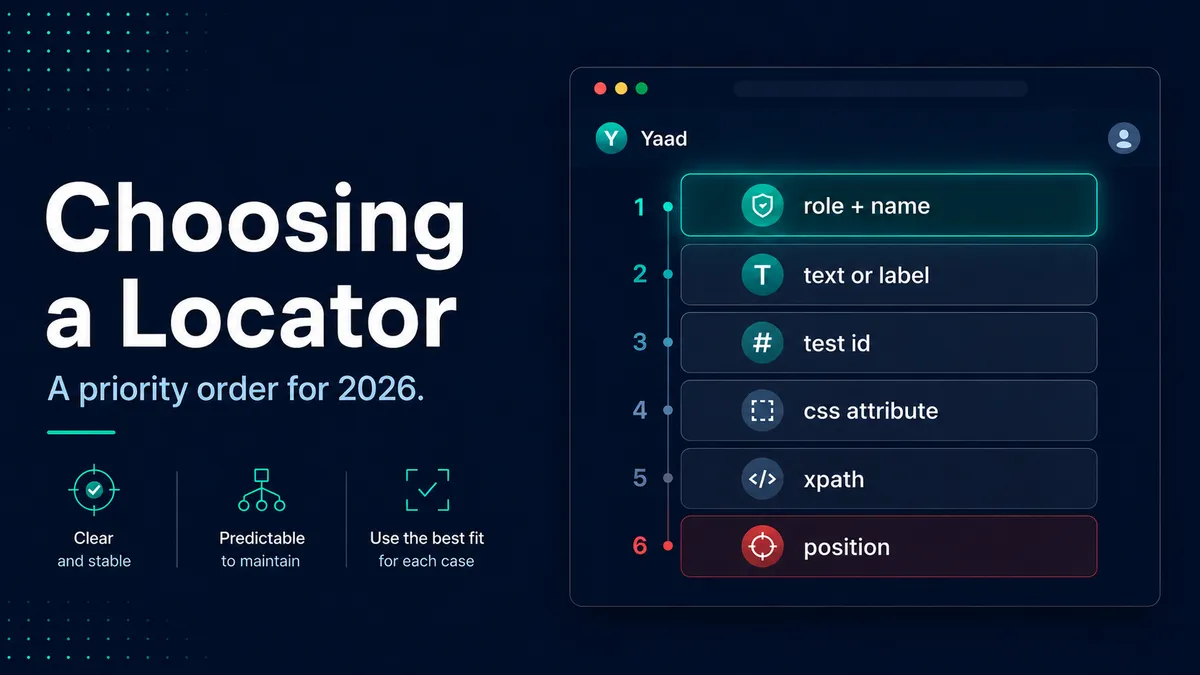
So the order flipped. In 2020 the most stable thing on the page was usually a hand-written id. In 2026 the most stable thing is the element’s meaning, its role and its name, because meaning is the one thing a refactor is least likely to change.
The order I reach for now
Here is the priority order I actually use. Start at the top, and only move down when the level above genuinely does not exist and cannot be added.
The examples above are written in Playwright’s syntax because its locators map onto this order most directly, but the order itself is not tied to one tool. Every modern framework can express the top of the ladder; they just spell it differently:
| Reach for | Playwright | WebdriverIO | Cypress |
|---|---|---|---|
| Role and name | getByRole('button', { name: 'Place order' }) | $('aria/Place order') | cy.findByRole('button', { name: 'Place order' }) |
| A label | getByLabel('Email address') | $('aria/Email address') | cy.findByLabelText('Email address') |
| A test id | getByTestId('checkout-cta') | $('[data-testid="checkout-cta"]') | cy.get('[data-testid="checkout-cta"]') |
The Cypress role and label queries come from Testing Library’s Cypress add-on, which is worth installing precisely so you can write tests at the top of this ladder.
Locating like a user is testing like a user
There is a payoff to the modern order that goes well beyond stable selectors, and it is the part I care about most.
When you locate an element by its role and its accessible name, you are finding it the same way a person using a screen reader would. So if your test cannot find the “Place order” button by its role and name, that is not just a test problem. It usually means the button is a <div> with a click handler instead of a real <button>, or an icon with no label, and a screen reader cannot find it either. Your locator just surfaced a genuine accessibility gap, for free, as a side effect of being written well.
That is why I push teams toward role-first locators even when a data-testid would also work. A suite written this way puts a quiet, constant pressure on the application to use real semantic markup, because the tests only stay easy to write if the markup stays accessible. You get stability and accessibility from the same habit, and you find the accessibility problems early, while they are cheap to fix, instead of after a complaint. This is one of those places where good testing and good product are the same work.
A short conversation with your developers
The single highest-leverage thing you can do for your locators happens before you write any of them, and QA cannot do it alone. It starts with a five-minute conversation with the people building the front end:
- Use real semantic elements. A
<button>is a button, a<nav>is navigation, a heading is an<h2>. Each one comes with a role for free. - Give form fields proper labels, connected with
forandid. That makes the field findable by label, and usable by everyone. - Add a
data-testidto the handful of elements that matter most: the primary action on each screen, the fields in the critical flows, the rows in the important tables.
None of this is expensive, and all of it pays the developers back too, because semantic, labelled, testable markup is also more accessible and easier to maintain. Framing it that way, as a shared win rather than a favour to QA, is usually all it takes to get a yes.
Locators in the age of AI coding agents
By 2026, a lot of the locators in your suite are not written by you. You ask an AI coding agent to add a test, and it writes the selectors. Left to its own judgment, it tends to write the brittle kind, for two reasons. Its training data is full of absolute XPath copied from dev tools and :nth-child chains, because that is what fills the internet. And a brittle selector and a resilient one produce the same green check, so nothing in “it passed” tells the agent it chose badly.
The fix is the same one you would use with a new engineer on your team: give it the standard up front instead of correcting it forever. Put your locator priority order in the file the agent actually reads, the project’s CLAUDE.md or AGENTS.md, and it will generate selectors that follow it.
## Locator standards (for tests)

Find elements in this priority order. Do not drop to a lower option when a
higher one exists or can be added.

1. Role + accessible name    getByRole('button', { name: 'Place order' })
2. Label, placeholder, text  getByLabel(...), getByText(...)
3. Test id                   getByTestId(...) / [data-testid="..."]  (ask for one if missing)
4. A stable attribute        [name="email"], a purpose-named class
5. Relative XPath            only when nothing above fits; anchor to text or an attribute

Never use:
- Position: :nth-child, :nth-of-type, //div[2], [last()]
- Auto-generated values: #ember742, .css-1a2b3c, React's :r1a:
- Absolute XPath copied from dev tools: /html/body/div[2]/...
- Visible copy that marketing can change, for anything translated

If an element cannot be found by role or name, stop and flag it. The markup may
be inaccessible, which is a bug to raise, not a selector to work around.
The block above is a starting point. For a complete, framework-specific version you can download and drop straight into a repo, there is a full AI test automation standards file for Playwright, Cypress, and WebdriverIO, with the locator order built in alongside the rest of the conventions an agent needs.
With that in place, your job changes. You spend less time hand-writing selectors and more time reviewing the ones the agent wrote. When it opens a pull request, read its locators the way you read everything else it produces: check they are resilient and accessible, not just that the run is green. That review is where QA sits in an AI-assisted team.
Where to start
If you take one habit from this whole series, make it this: find the element the way a user would. Reach for its role and its name first, drop to a data-testid when meaning alone cannot identify it, use a stable attribute or relative XPath for the awkward cases, and never, ever count position or lean on a generated value. That single ordering will do more for the stability of your suite than any framework you could switch to.
Keep the locator cheat sheet open while you write, and use the practice playground on it to write real selectors against a sample app and watch how each one is graded for resilience. And once your locators are solid, the tool you wrap them in matters less than people think, though it is still worth choosing well; if you are weighing that decision, my honest comparison of Playwright, Cypress, and Selenium is the place to start.
And if a selector is correct but still finds nothing, you have probably hit one of the hard cases: an element in a shadow DOM, inside an iframe, or simply not rendered yet. The advanced part on the hard cases covers the move for each.
The best locator is not the cleverest one. It is the one that still points at the right element after a redesign you did not see coming. Find the element the way a person does, and most of the time, it will.

Written by
Julia Pottinger
Hi, I'm Julia. I've been in QA for over a decade. I spend my days testing software and my own time building apps and games, and I write here to share what I learn, the practical, honest lessons you can actually use.


Comments 0
Share your thoughts, ask questions, or add to the conversation.