
This is Part 6, the advanced installment of the locator strategies series. It assumes you already have Part 5, the priority order.
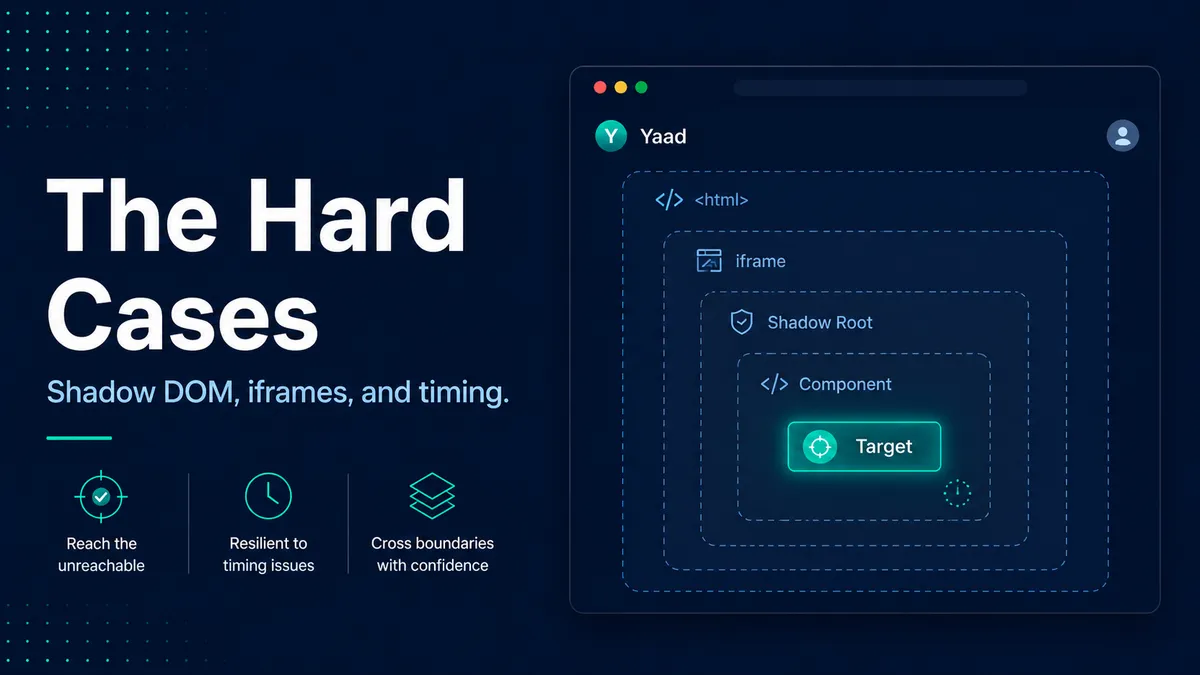
Sometimes a selector is exactly right and still finds nothing. You can see the field on the screen, the label matches, the selector is correct, and the run reports nothing at all. A common reason is that the field sits inside a payment iframe or a shadow root, a separate little document your selector cannot see from the outside. The selector was never the problem. It was pointed at the right thing, across a boundary it could not cross.
When a good selector finds nothing, the move is to stop blaming the selector and start asking where the element actually is, and whether it is even on the page yet. Most of the time the answer is one of four things, and each one has a specific move that ends the hunt fast.
The skill is reading the symptom. A correct selector that finds nothing is telling you something, and what it is telling you depends on exactly how it fails. Two of the four cases are the same problem wearing different clothes: your selector cannot cross a boundary it does not know is there.
The element is in a shadow DOM
Web components, design-system widgets, and some native elements like <video> hide their internals inside a shadow root. A shadow root is a deliberate boundary. It keeps a component’s markup encapsulated so the outside page cannot accidentally style or grab it. Good for the component, inconvenient for you, because a normal selector stops at that boundary. XPath cannot cross it at all, and CSS cannot cross a closed one.
The move is to use a tool that pierces it for you.
- Playwright and WebdriverIO reach into open shadow roots on their own, so you locate as normal and it just works.
- Cypress needs you to ask for it.
Playwright and WebdriverIO handle the first case. Cypress is the second.
// Playwright crosses open shadow roots automatically
await page.getByRole('button', { name: 'Add to cart' }).click()cy.get('add-to-cart-widget', { includeShadowDom: true })
.find('button')
.click()A closed shadow root is a different story. Nobody can reach into it, not even the tools, by design. When I hit one, I treat it as a conversation with the developers rather than a puzzle to solve from the test side. Either the component exposes a proper handle, or the root is opened up for testing. Fighting it from your test code is time you will not get back.
The element is inside an iframe
This is the one that cost me the afternoon. An iframe is a whole separate document embedded in your page, and a selector only ever sees its own document. Payment widgets, embedded checkouts, and third-party tools are almost always iframes, which is why “my selector is perfect and matches nothing” so often turns out to be a card field inside a payment frame.
The move is to switch into the frame first, then locate inside it.
const frame = page.frameLocator('#checkout-iframe')
await frame.getByLabel('Card number').fill('4111 1111 1111 1111')
The other tools do the same thing with different words.
- WebdriverIO: call
switchToFrame()before locating andswitchToParentFrame()after. - Cypress: reach for the iframe plugin.
The principle holds across all three. Your selector is fine. It is just pointed at the wrong document until you step inside.
The element is not there yet
This is the most common version of “my selector is right but finds nothing,” and it is pure timing. The element renders after a network request comes back, after a route change, after a lazy-loaded section scrolls into view, or after an animation finishes. Your selector ran a beat too early and looked at a page where the element genuinely did not exist yet.
The move is to wait for a condition, never for a fixed number of seconds. A hard-coded sleep is a guess: too short and it still flakes, too long and your suite crawls. Modern tools have web-first assertions that wait for the element on their own, so you assert on the thing you are waiting for instead of sleeping before it.
// No sleep. The assertion waits for the alert to appear, up to the timeout.
await expect(page.getByRole('alert')).toHaveText('Order placed')
In WebdriverIO the same idea is await elem.waitForDisplayed(). The rule across every tool is the same: wait for the state you actually care about, not for the clock.
This is also where most flaky tests are born. Once a red run might just mean the test is unstable, people stop trusting the suite, and a suite nobody trusts has already stopped doing its job. If you are chasing that kind of instability, I wrote a full playbook for fixing a suite you stopped trusting.
The element is one of many
Sometimes the selector is too successful. You ask for a Delete button and match ten of them, one per table row. The fix here is scope, not a more exotic selector. Find the container that makes the element unique first, then locate inside it. That is the scoping idea from Part 3 on CSS selectors applied to a real list.
await page.getByRole('row', { name: /Louise Bennett/ })
  .getByRole('button', { name: 'Delete' })
  .click()
The same goes for elements that only exist in a certain state, like a tab that is enabled after an action or a toast that appears and then vanishes. Target the state itself, an [aria-selected="true"] or a role="alert", and wait for it rather than racing it.
When a correct selector still fails
When your selector is sound and the element still will not come, run down this short list before you touch the selector at all.
| What you see | The likely cause | The move |
|---|---|---|
| Nothing matches, on a custom widget or design-system component | The element is in a shadow root | Use a tool that pierces it. Playwright and WebdriverIO reach open roots on their own; Cypress needs { includeShadowDom: true } |
| Nothing matches, inside an embedded or third-party section | The element is in an iframe, a separate document | Switch in first with frameLocator(), switchToFrame(), or the Cypress iframe plugin |
| Nothing on the first run, then it works on a retry | The element was not rendered yet | Wait for a condition with a web-first assertion. Never a fixed sleep |
| Too many matches at once | No scoping | Find the unique container first, then locate inside it |
Where this leaves you
You can do everything right at the selector level and still hit a wall, and now you know the four walls and the door through each one.
- Behind a shadow boundary, so you pierce it.
- In another document, so you switch in.
- Not rendered yet, so you wait for it properly.
- One of many, so you scope.
The shift in thinking is the part worth keeping. When a good selector finds nothing, your first question stops being “what is wrong with my selector” and becomes “where is this element, and is it even here yet?”
For a quick reminder of these situations while you work, the locator cheat sheet has a tricky-cases section that lists each one and what every framework does about it. With that, you have the whole picture: the strategies, the order to reach for them, and the awkward cases that break the rules.
A selector that finds nothing is often right. It is pointing at an element that is in another document, behind a shadow boundary, or simply not on the page yet. Read the failure before you rewrite the selector.

Written by
Julia Pottinger
Hi, I'm Julia. I've been in QA for over a decade. I spend my days testing software and my own time building apps and games, and I write here to share what I learn, the practical, honest lessons you can actually use.

Comments 0
Share your thoughts, ask questions, or add to the conversation.