
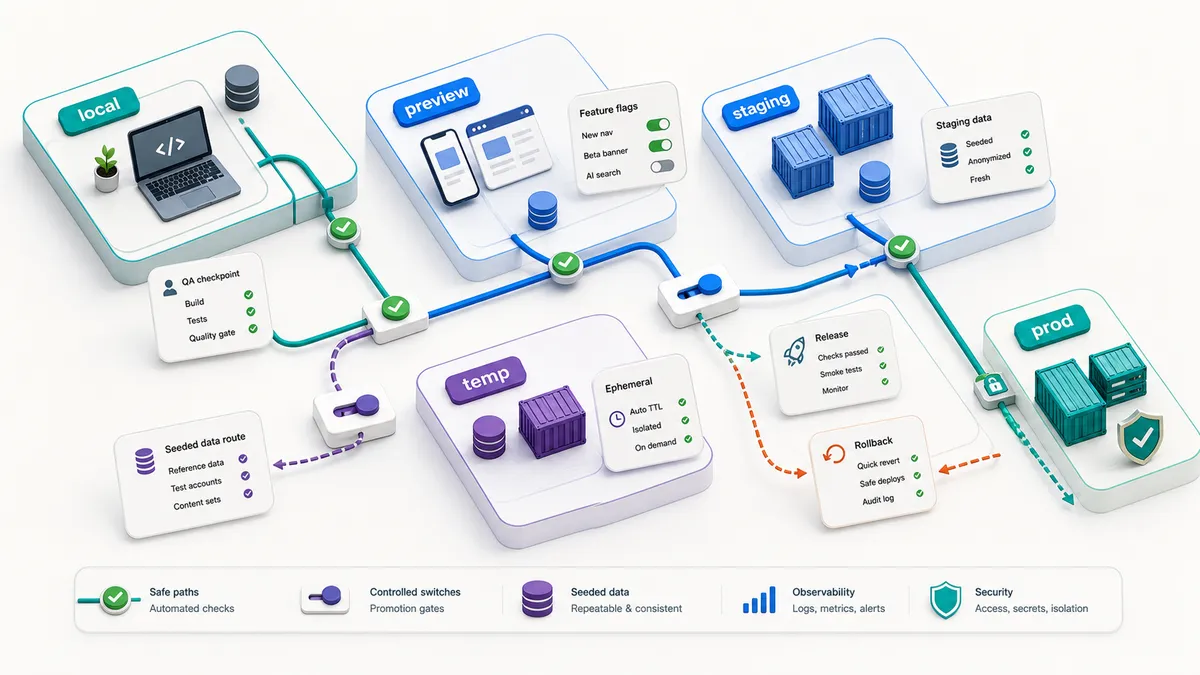
When a checkout bug reaches production, the first sentence in the room is usually “QA missed it.” Sometimes that is fair. More often the flow was tested, it passed, and it passed somewhere that could never have shown the bug. It ran locally, against a fake payment provider and a database with three tidy rows in it. Production has a real payment provider, a shared inventory service, and a customer whose account carries five years of messy history. There was nothing wrong with the test. The problem sat in the gap between where it ran and where it shipped.
Each environment tells you a different kind of truth, and the bug that bites is usually the one that only shows up in a truth you skipped. Local tells you whether the change works close to the code. A preview environment tells you whether the branch can run as a real app. Staging tells you whether the release candidate behaves with shared services and production-like settings. A temporary seeded environment tells you whether one change can be tested deeply without poisoning everyone else’s data.
So before you accept “QA missed it,” audit where the flow was tested before you audit what was tested. Mix those up and QA takes the blame for slow or sloppy testing when the real problem is environment strategy.
The environment should match the question
Before choosing where to test, ask: what am I trying to prove?
| Question | Better environment |
|---|---|
| Does this component or API change work at all? | Local or CI with service containers |
| Does this branch render and route correctly as a deployed app? | Preview deployment |
| Does this workflow work with realistic integrations and release config? | Staging or QA |
| Can I test a risky feature without blocking everyone else? | Temporary seeded environment |
| Can we safely release this build? | Staging plus targeted production-safe checks |
| Is production healthy after release? | Production monitoring, smoke checks, and rollback evidence |
One environment cannot answer every question well.
The environment menu
Use this as a starting point. The answer changes by product, but the categories are useful.
| Environment | Best for | Watch out for |
|---|---|---|
| Local | Fast feedback, unit/component checks, debugging | May hide config, auth, network, and deployment issues |
| CI test stack | Repeatable automation, integration tests, service containers | Needs clear seed and teardown, or it becomes flaky |
| Preview deployment | Reviewing branch changes at a real URL | May not include full backend or production-like data |
| Shared QA | Exploratory testing and cross-feature review | Data collisions, stale builds, unclear ownership |
| Staging | Release candidate validation | Can become a junk drawer if every team mutates it |
| Temporary seeded environment | Deep testing for a feature, PR, tenant, or risky flow | Needs lifecycle rules so it does not live forever |
| Production | Real user behavior and post-release confidence | Test safely. Do not mutate real customer data unless the system has approved test paths |
The mistake is treating staging as the only grown-up environment. Sometimes a short-lived environment with seeded data is the cleanest way to test.
Preview environments are not magic, but they are useful
Platforms such as Vercel and Netlify support preview deployments so a branch or pull request can run at its own URL. That gives QA, developers, designers, and product people something real to open before merge.
Preview environments are especially good for:
- Visual review.
- Routing changes.
- Copy and content checks.
- UI state checks.
- Feature flag review.
- Smoke tests against the branch URL.
- Product signoff before merge.
They are not automatically enough for:
- Full payment workflows.
- Shared backend state.
- Migration safety.
- Long-running jobs.
- Production-like data permissions.
- End-to-end release confidence.
A preview URL is the beginning of the conversation, not the whole strategy.
What an ephemeral environment should include
An ephemeral environment is a temporary environment created for a branch, pull request, feature, or test run. The value is not just the URL. The value is isolation.
A useful temporary environment should answer:
- App version. Deploy the branch or build under test.
- Data. Seed a named scenario set, not random leftovers.
- Services. Use real dependencies where the risk lives, safe fakes where external side effects are risky.
- Secrets. Use environment-specific test secrets, never production secrets.
- Identity. Provide known users and roles.
- Observability. Expose logs, request IDs, and build metadata.
- Lifecycle. Auto-delete after merge, close, or a fixed time.
- Cost. Keep it small enough that teams will actually use it.
The best temporary environment is quick to create, safe to use, and easy to delete.
A seeded environment example
Here is a real one. On a promotions service for a large retail platform, the risk that kept me up was never the single discount. It was the combinations: a Buy More Save More tier, a gift with purchase, and a few non-eligible items, all in one cart. None of that shows up on a clean account with one item in the bag. So we did not test on clean accounts. We seeded carts on purpose, sat them right on each tier boundary, mixed eligible and non-eligible items, and ran the real service against a real database with only the outside dependencies faked.
That seeding is what surfaced the bug I remember best. A tier discount could push a line below the spend threshold that made its gift free, and the gift quietly stopped applying. A happy-path account with one item never would have shown it, because those two promotions never met in the same cart. The environment did not catch the bug. The data we chose to put in it did.
The lesson stuck: seed the environment with the data that carries the risk. Here is how I lay that kind of environment out. Imagine a checkout change on Vendly, a made-up app I use for examples, that touches promo codes, delivery windows, and payment authorization.
For a real QA pass, I would want a temporary environment seeded with a named set of users, each one carrying a reason it exists:
standard_customerfor the happy path checkout.new_customer_no_addressfor the address and onboarding edge.member_with_discountfor the promo and membership logic.expired_card_customerfor the payment failure path.low_inventory_skufor inventory reservation and error handling.delivery_window_fullfor the scheduling boundary.admin_userfor back-office order review.support_userfor permission-limited order lookup.
Then I would tag every created order with the environment ID or run ID:
env: pr-482-checkout
seed: checkout-v3
run_id: qa-2026-12-08-01
That tiny bit of metadata makes cleanup and evidence much easier. How you generate, seed, and tear down that data without tests colliding is its own skill, and I cover it in test data management for QA (coming soon); this article is about the place you run it.
Service containers are a practical middle ground
You do not always need a full environment for every test. GitHub Actions service containers can run databases and other services beside CI jobs. Docker Compose can define a multi-container app stack for local or CI use. Testcontainers can spin up throwaway real dependencies for tests.
Use these when you need more truth than mocks but less ceremony than a full deployed environment.
Here is the shape of one I have actually used. Testing that promotions cache meant testing it on a clustered cache, not a single in-memory fake, because clustering changes how keys are distributed and expired, and that is exactly where cache bugs hide. So locally and in CI I stand up a small throwaway Valkey cluster with Docker Compose, then point the suite at it:
# docker-compose.yml: a throwaway 3-node cache cluster for tests
services:
  cache-1:
    image: valkey/valkey:8.0
    command: valkey-server --port 7001 --cluster-enabled yes
      --cluster-node-timeout 5000 --appendonly no
    ports: ["7001:7001"]
  cache-2:
    image: valkey/valkey:8.0
    command: valkey-server --port 7002 --cluster-enabled yes
      --cluster-node-timeout 5000 --appendonly no
    ports: ["7002:7002"]
  cache-3:
    image: valkey/valkey:8.0
    command: valkey-server --port 7003 --cluster-enabled yes
      --cluster-node-timeout 5000 --appendonly no
    ports: ["7003:7003"]
  # one-shot init that joins the three nodes into a cluster, then exits
  cache-init:
    image: valkey/valkey:8.0
    depends_on: [cache-1, cache-2, cache-3]
    entrypoint: >
      sh -c "sleep 3 && valkey-cli --cluster create
      host.docker.internal:7001 host.docker.internal:7002
      host.docker.internal:7003 --cluster-yes"
docker compose up gives me a real cluster in seconds, the cache tests run against it, and docker compose down -v leaves nothing behind. No shared staging cache to pollute, no waiting on a provisioned environment.
| Tooling pattern | Good for |
|---|---|
| Service container in CI | API tests that need Postgres, Redis, or another dependency |
| Docker Compose | Local multi-service workflow and repeatable developer setup |
| Testcontainers | Integration tests that create and destroy dependencies programmatically |
| Preview deploy | Branch-level UI and smoke testing |
| Full temp environment | Deep QA for risky flows with seeded users and services |
The choice should follow the risk.
Mocks, fakes, and real services
Do not turn this into a religion. Use the level that matches the question.
| Dependency | Use real when | Use fake or test mode when |
|---|---|---|
| Database | Testing constraints, migrations, queries, reports | Unit tests only need logic |
| Payment | You need provider contract and state transitions | You must avoid real charges |
| Email or SMS | You need delivery integration confidence | You only need to inspect message content |
| Third-party API | Contract, auth, or retry behavior is the risk | The third party is slow, costly, unstable, or unsafe |
| Feature flags | Release behavior depends on flag state | You are only testing local component logic |
| Analytics | Event shape and timing matter | You only need to assert an event would be sent |
The danger is using a mock and then claiming full confidence.
Environment readiness checklist
Before QA starts a release pass, I want these answered:
- What build or commit is deployed?
- What branch or release does this environment represent?
- Which feature flags are on or off?
- What seed data version is installed?
- Which test users and roles are available?
- Are external services real, mocked, or in provider test mode?
- Is email, SMS, payment, push, or webhook behavior safe?
- Can QA see logs, request IDs, and error traces?
- What cleanup runs after tests?
- Who can reset the environment?
- What changed since the last test pass?
- Is this environment shared or isolated?
- When will it be deleted or refreshed?
If those answers are unclear, your test result will be unclear too.
A weekly environment rhythm
For teams that feel chaotic, I like a simple operating rhythm:
| When | Action |
|---|---|
| Every PR | Preview deploy and run smoke checks against the preview URL |
| Every main merge | CI integration tests with service containers |
| Daily | Refresh shared QA data or clean stale test records |
| Before release | Deploy release candidate to staging with known seed version |
| For risky feature | Create temporary seeded environment for deep QA |
| After release | Run production-safe smoke and watch key signals |
This gives QA places to test without making every team fight over one shared staging box.
What QA should push for
If your current environment strategy is messy, ask for these first:
- A build/version visible in the app.
- A documented seed data script.
- A known set of test users and roles.
- A cleanup job for automated test data.
- Preview URLs on pull requests.
- One command or button to reset QA data.
- Safe test modes for payment, email, SMS, and push.
- Logs or request IDs available to QA.
- Clear rules for what staging is allowed to contain.
This is practical quality work. It makes everyone faster. To keep it from being a wish list nobody owns, hang an owner and a finish line on the first three:
- Owner: Dev. Surface the build or commit in the running app. Done when: QA can read the deployed version from the footer, debug menu, or an endpoint, without asking anyone.
- Owner: QA. Write and check in the seed data script and the test-user list. Done when: a named set of users and roles seeds with one command and is documented in the repo.
- Owner: EM. Decide what staging is allowed to contain and who can reset it. Done when: the rule is written down and there is one command or button to reset QA data.
Where AI helps
AI can draft seed data, generate environment checklists, inspect CI config, compare environment variables, and turn a failed test run into a clearer bug report when it has access to the repo, build logs, and deployment URL.
It should not decide which environment is “good enough” for release. That is a risk decision.
Related resources
- Use the QA Release Summary Template to record the environment, build, seed data, and release decision.
- Use the Test Automation Strategy Builder when you need to choose automation gates.
- Read Continuous Testing in CI/CD for the pipeline side of this.
Where to start
You do not need to stand up all of this at once. Pick the environment closest to where your last escaped bug got through, and close that one gap first. If it slipped because local was too clean, stand up a temporary seeded environment for that flow. If it slipped because staging was a junk drawer, write down what staging is allowed to contain and add a reset command.
Do not ask one shared staging box to carry every kind of truth. Use local, CI, preview, staging, temporary seeded environments, and production-safe checks for the questions they answer best, then make the build, data, dependencies, and evidence visible. Do that and the next “QA missed it” turns into “we never tested it in a place that could have shown it,” which is a problem you can actually fix.

Written by
Julia Pottinger
Hi, I'm Julia. I've been in QA for over a decade. I spend my days testing software and my own time building apps and games, and I write here to share what I learn, the practical, honest lessons you can actually use.

Comments 0
Share your thoughts, ask questions, or add to the conversation.