
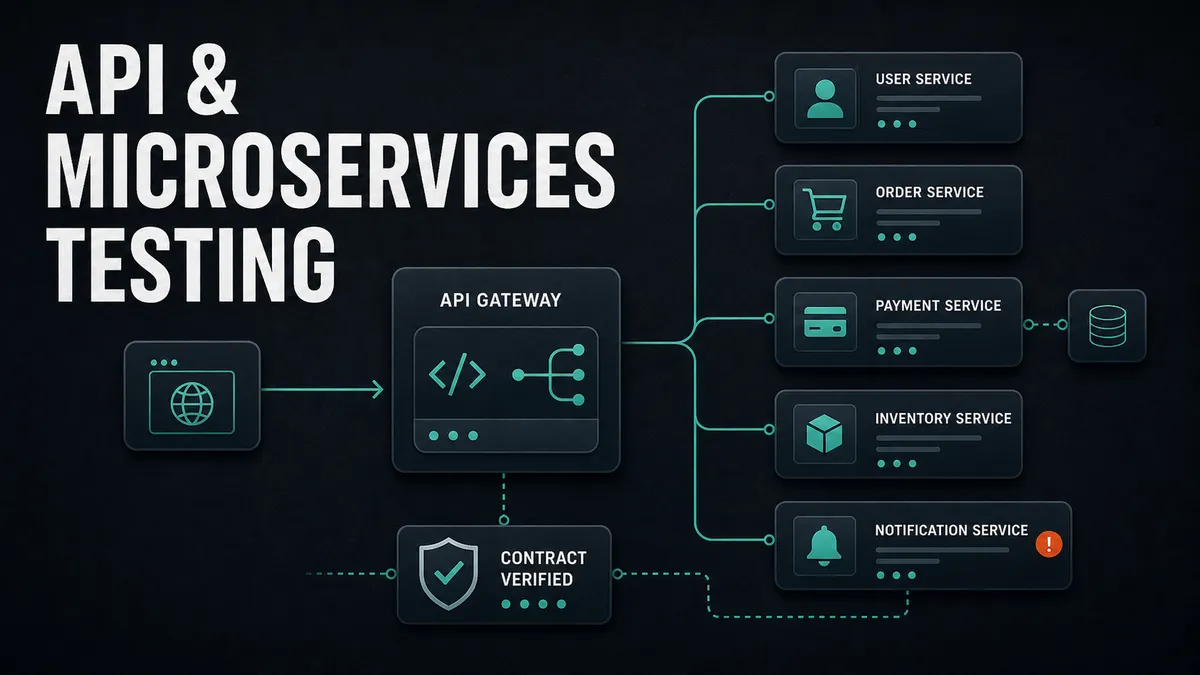
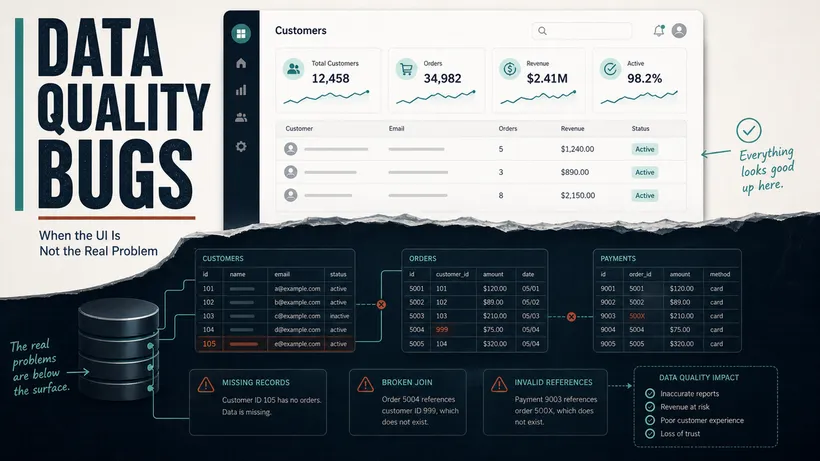
On a promotions engine, the risk I watched most closely was the cart math at the discount-tier boundaries, the spot where a total tips from one discount rate into the next. One day a backend change started sending one of those money fields back as a string instead of a number. The user interface (UI) coerced it, rendered the right total, and every browser test stayed green. The record underneath was wrong, and nothing in the UI layer was ever going to tell me.
It is a pattern I keep meeting: a green UI test sitting happily on top of wrong data. A browser test exercises the slowest, most fragile layer of the system, and along the way it quietly coerces away the money-math breaks that actually cost you. The shape of a response is the contract between your services. Check that shape directly and the string-where-a-number-should-be stops sliding through.
This is the gap API testing fills, and it is the cheapest, fastest, most stable testing you will ever write. Below is how I approach it in practice, with examples you can copy and run today. This is part one, on testing a single service well. When you are ready for the harder problem of many services in production, part two picks it up: Testing Microservices at Scale.
Get the proportions right before you write a line
Before any code, decide where your tests should live. The test automation pyramid puts a lot of fast unit tests at the bottom, a healthy layer of API and integration tests in the middle, and a thin layer of UI tests at the top. The middle layer is where most teams are weakest, and it is the one that pays back the most.
The reason to push tests down to the application programming interface (API) level is simple. An API test runs in milliseconds, does not care about a CSS change, does not flake because an animation was still running, and tells you exactly which endpoint broke. A UI test that checks the same rule takes seconds, breaks when a button moves, and tells you only that “something on the page was wrong.” When you can verify a rule at the API level, verify it there. Save the browser tests for the things that genuinely need a browser.
Your first API test in plain JavaScript
You do not need a heavy framework to start. If your team already writes JavaScript, Supertest with Jest is a quick way to test a Node API, and Playwright’s request fixture is just as good if you already use Playwright for your UI tests. Here is a basic test against JSONPlaceholder, a free public API, so you can run it without setting up anything of your own.
const request = require('supertest')

const api = request('https://jsonplaceholder.typicode.com')

describe('Users API', () => {
  it('verify that a single user is returned with the expected fields', async () => {
    const response = await api.get('/users/2')

    expect(response.status).toBe(200)
    expect(response.body).toHaveProperty('id', 2)
    expect(response.body).toHaveProperty('email')
    expect(response.body.email).toContain('@')
  })

  it('verify that a missing user returns 404', async () => {
    const response = await api.get('/users/23')
    expect(response.status).toBe(404)
  })
})
Notice what I am checking. The status code, that the right fields exist, and that the email at least looks like an email. I am not asserting on the exact name of the user, because that is data, and data changes. Verify the rules, not the specific values, unless the specific value is the rule.
That distinction is the one that would have caught my promotions bug. The rule was “this field is a number.” The value was whatever the cart happened to total. Test the rule and a string sliding into a number field fails loudly. Test the value and you are just chasing today’s data around.
If you already live in Playwright, the same test looks like this and needs no extra HTTP library:
import { test, expect } from '@playwright/test'

test('verify that a single user is returned with the expected fields', async ({ request }) => {
  const response = await request.get('https://jsonplaceholder.typicode.com/users/2')

  expect(response.status()).toBe(200)
  const body = await response.json()
  expect(body.id).toBe(2)
  expect(body.email).toContain('@')
})
I reach for the Playwright version on most projects now, simply because I usually have Playwright installed anyway, and it keeps the API and UI tests in one runner with one report. If you are weighing up runners, I went deep on that in Playwright vs Cypress vs Selenium.
Validate the shape, not just a few fields
Checking three fields by hand is fine for one endpoint. It does not scale, and it lets real problems through. What actually breaks the teams consuming your API is the shape of the response changing, so validate the whole shape with a schema.
Playwright does not ship schema validation, so I pair it with Ajv for JSON Schema, or with Zod when I want the schema and the TypeScript types to come from the same place. Here is the Ajv approach.
import { test, expect } from '@playwright/test'
import Ajv from 'ajv'
import addFormats from 'ajv-formats'

const ajv = new Ajv()
addFormats(ajv)

const userSchema = {
  type: 'object',
  required: ['id', 'name', 'username', 'email'],
  properties: {
    id: { type: 'integer' },
    name: { type: 'string' },
    username: { type: 'string' },
    email: { type: 'string', format: 'email' },
    website: { type: 'string' },
  },
}

test('verify that the user response matches the agreed schema', async ({ request }) => {
  const response = await request.get('https://jsonplaceholder.typicode.com/users/2')
  const body = await response.json()

  const valid = ajv.validate(userSchema, body)
  expect(valid, JSON.stringify(ajv.errors)).toBe(true)
})
The payoff is that if a developer renames email to emailAddress, or starts sending id as a string, this test fails immediately and tells you the exact field. This is precisely the kind of break that sails past a UI test and lands in someone else’s integration weeks later.
The promotions money field from the top of this article is exactly this test earning its keep. The change looked harmless in a pull request. The UI coerced it and looked fine, so nobody clicking around would have noticed. The contract test coerced nothing. It failed on the next run and told me precisely where:
[
  {
    "instancePath": "/discountTotal",
    "schemaPath": "#/properties/discountTotal/type",
    "keyword": "type",
    "params": { "type": "number" },
    "message": "must be number"
  }
]
One short array, the exact field, the exact rule it broke. No reproduction steps, no bisecting a UI failure three services downstream weeks later. A schema check pays for itself the first time it does that.
Test the things that go wrong, not just the happy path
A green happy-path test gives a false sense of safety. Real systems get sent bad input, missing tokens, and strange timing, and that is where the security holes and the 3am pages live. Cover the unhappy paths on purpose. For any endpoint that matters, make sure you have tests for:
- The happy path with valid input.
- Missing or malformed required fields. Assert on the error message and status, not just that it failed.
- Authentication and authorization. Call it with no token, an expired token, and a token belonging to a user who should not have access. A surprising number of APIs happily hand data to the wrong person.
- Boundary values. Empty strings, very long strings, zero, negative numbers, and the classic off-by-one on pagination.
- The wrong HTTP method on a valid route, which should return a clean
405and often does not.
The authorization checks earn special attention. Calling an endpoint with no token, an expired token, and a token belonging to the wrong user protects against one of the most damaging bugs there is: the broken access control that quietly hands one customer’s data to another. They cost almost nothing and I never skip them. Rather than re-show the id-swap and the 401/403 tests here, I go deep on running and automating them in security and authentication testing QA can actually own, which is the article that owns access control.
Combine API and UI in one test to cut flakiness
This is the technique that changed how I write end-to-end tests, and surprisingly few teams use it. Instead of clicking through the login form on every single test, log in through the API, then drive the browser as that already-authenticated user. You skip the slowest, flakiest part of the flow and go straight to the behavior you actually want to verify.
import { test, expect } from '@playwright/test'

test('verify that a logged in user sees their dashboard', async ({ request, page }) => {
  // Authenticate through the API instead of the login form
  const login = await request.post('https://api.vendly.example/login', {
    data: { email: 'qa.user@vendly.example', password: 'Sup3rSecret!' },
  })
  const { token } = await login.json()

  // Hand the token to the browser before the page loads
  await page.addInitScript(value => {
    window.localStorage.setItem('auth_token', value)
  }, token)

  await page.goto('https://app.vendly.example/dashboard')
  await expect(page.getByRole('heading', { name: 'Your Dashboard' })).toBeVisible()
})
You can run the same trick in reverse to verify side effects. Drive a purchase through the UI, then call the inventory endpoint directly and assert the stock count went down by one. The UI tells you the user can do the thing. The API confirms the thing actually happened in the data. This is the same lesson as the promotions bug from another angle: the screen and the record can disagree, so check both.
Where to start
If you take one thing from this, move your testing down the pyramid. Most of what teams test slowly and flakily through the browser can be tested faster, more reliably, and closer to the bug at the API layer. Start with a single endpoint, add the unhappy paths, then validate the whole response shape with a schema. If you want a checklist to work through endpoint by endpoint, I keep one here: the API testing checklist. The schema check alone will catch more real regressions than another dozen UI tests ever would.
That covers testing one service well. Real systems are rarely one service. They are dozens of them, passing large payloads to each other, caching for speed, and breaking each other’s assumptions in production, and that is where the expensive bugs actually live. I cover it in part two: Testing Microservices at Scale, which gets into real payloads pulled from logs, caches that lie, money that has to add up, contract testing between teams, and two real bugs that a green 200 was happily hiding.
Want a sandbox to practise on? JSONPlaceholder is great for HTTP tests with no signup, and DummyJSON gives you products and carts to assert against.

Written by
Julia Pottinger
Hi, I'm Julia. I've been in QA for over a decade. I spend my days testing software and my own time building apps and games, and I write here to share what I learn, the practical, honest lessons you can actually use.

Comments 0
Share your thoughts, ask questions, or add to the conversation.